Best Portable SSDs & Drives for PlayStation Game Storage
As an Amazon Associate, I earn from qualifying purchases. This article may contain affiliate links, which means we may receive a commission at no extra cost to you.
As an Amazon Associate, I earn from qualifying purchases. This article may contain affiliate links, which means we may receive a commission at no extra cost to you.
If your PlayStation library keeps expanding and your internal SSD is bursting at the seams, a portable drive is one of the most practical upgrades you can make. Whether you want lightning-fast transfers when installing large titles, a weather-resistant SSD to toss in your backpack, or a cost-effective high-capacity HDD to archive older games, there are clear choices depending on how you play. This guide breaks down five strong options—from compact NVMe-style portable SSDs to officially licensed PlayStation hard drives—so you can pick the right balance of speed, capacity, and price.
Below you’ll find a buyer-focused overview, realistic usage scenarios, pros and cons for each product, and buying tips to avoid common pitfalls. I researched product specs, firmware notes, and verified customer feedback to highlight practical observations like heat behavior under sustained transfers, cable and connector reliability, and how each drive fits into PS4/PS5 workflows.
Buying Guide
Why a dedicated external drive makes sense for PlayStation owners
The PlayStation 4 and PlayStation 5 let you expand storage using USB-connected drives, but not all drives deliver the same experience. For most people, an external drive is used to: store large PS4 titles, archive PS5 games you aren’t actively playing, speed up transfers between consoles, and hold game media and captures. Before you buy, consider three main tradeoffs: speed, capacity, and price.
Speed: SSD vs HDD
Solid-state drives (SSDs) offer dramatically faster transfer speeds than spinning hard drives (HDDs). That means quicker installs, shorter copy times when moving PS5 games between internal and external storage, and a snappier experience when loading saved files or transferring captures. SSDs in this guide advertise sustained throughput in the hundreds to thousands of MB/s. HDDs trade speed for lower cost per terabyte and are ideal if you want to archive large numbers of games cheaply.
Compatibility and PlayStation behavior
PlayStation requires external drives to be USB 3.0 (or better) for extended storage. You can store PS5 games on USB drives but you cannot play PS5-native titles directly from most USB-connected drives — they must be moved back to the console’s internal SSD or an M.2 expansion slot to run. PS4 titles can generally be played directly from an external drive. Check your console’s storage settings and format the drive with the PlayStation to avoid permission or formatting issues.
Connections and cable quality
Look for USB-C or USB-A cables rated for high-speed modes. Some high-throughput portable SSDs use USB 3.2 Gen 2×2 or Gen 2; if your PlayStation or PC doesn’t support those modes you’ll still get decent performance but not peak speeds. Durable connectors and included good-quality cables reduce headaches.
Durability, warranties, and real-world considerations
IP-rated drives resist dust and water and are a smart pick if you travel or commute with your drive. Ruggedized and drop-rated SSDs protect against accidental knocks. Also check manufacturer firmware update availability and included software—some drives offer encryption or backup tools useful for PC owners. Finally, pay attention to heat management: thin metal SSD enclosures can get warm during long transfers, and many users note throttle behavior during heavy copy sessions. If you plan lots of bulk transfers, a drive with better thermal design or an intermittent transfer strategy helps.
Who should pick which type?
– Gamers who want the fastest transfers and minimal waiting: choose an SSD with high MB/s ratings. – Budget-conscious players with huge libraries: large-capacity HDDs provide the best value per TB. – Travelers or content creators: an IP-rated, rugged SSD balances speed and durability. – Owners of PS5 who want to store but not play PS5 games from USB: any external drive will help free internal space for currently played titles.
Keep these points in mind as you read the individual product breakdowns below. Each section highlights realistic use cases and compares to standard alternatives so you can match a drive to your PlayStation routine.
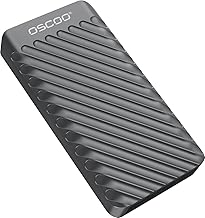
1TB External Hard Drive, Up to 2100MB/s, USB 3.2 Gen 2 Portable SSD, External Solid State Drive for Mac, Windows PC, Laptops, Gaming, iPhone — Ideal for File Backup, Content Creators & Videographers
Best For:
PS5/PS4 owners who want a portable, high-speed 1TB SSD for quick transfers, creators moving large capture files, and players who rotate a small-to-moderate library frequently.
This 1TB portable SSD promises NVMe-class portability with claimed peak speeds up to 2100MB/s over USB 3.2. In practice, that kind of throughput reduces large-game install and transfer times significantly compared with a traditional external HDD and matches what many gamers want when juggling a growing PlayStation library.
Main benefits and who it’s for
If you’re a PS5 owner who frequently swaps titles between your console’s internal SSD and external storage, this 1TB unit gives you a fast staging ground for PS5 backups and PS4 libraries alike. It’s also a good fit for content creators or anyone who needs a compact, fast drive to carry captures, clips, and game assets between a console and a PC. Compared to standard spinning drives, the difference in copy times for 50–100GB game installs is obvious—what used to take many minutes on an HDD is often reduced to a small fraction of that time on a high-bandwidth SSD.
Real-life usage scenarios
– Store hundreds of gigabytes of PS4 games for direct play without eating up internal space. – Keep PS5 titles archived on the drive when you’re rotating your active games collection—copy them back to the internal SSD when you want to play. – Transfer large capture files to a laptop for editing: the high sustained speed makes video workflows less frustrating. Reviews and user reports commonly praise these drives for quick PC-to-drive transfers and noticeable speed-ups in installs, though sustained heavy transfers may cause thermal throttling on very long copy sessions.
Practical features and considerations
The key advantages are light weight, compact footprint, and strong advertised speeds. Check that the cable and your console/PC ports support the necessary USB mode; without USB 3.2 Gen 2 the drive will operate at reduced speeds but still outperform many HDDs. Also consider that the console will often reformat the drive when you set it up for extended storage—back up any preexisting files first. Firmware updates from the manufacturer can improve compatibility and performance; look for an easy update path if you’re buying for a critical workflow.
How it compares to alternatives
Compared with budget HDDs this SSD is markedly faster and more portable. Compared to top-tier portable NVMe drives from major brands, it may offer similar peak throughput but watch for differences in cooling and long-transfer performance. For many users the 1TB capacity is a sweet spot—large enough to hold several modern titles but small enough to remain affordable.
Who should buy it and who may not need it
Buy this if you value fast transfers, portability, and a compact drive to carry between console and PC. Skip it if you need multi-terabyte archival storage on a strict budget—an HDD will give you much more capacity per dollar.
Check the latest price on Amazon.
Pros
- Very fast advertised transfer speeds (up to 2100MB/s) for quick installs and copies
- Compact and lightweight for portability
- Great for editing and transferring large media files between PC and console
Cons
- 1TB fills up quickly if you have many modern AAA titles
- Potential for thermal throttling during very long transfers
Want faster install and transfer times for your PlayStation library? Check the latest price on Amazon.
SANDISK 4TB Extreme PRO Portable SSD – Up to 2000MB/s – USB-C, USB 3.2 Gen 2×2, IP65 Water and Dust Resistance, Updated Firmware – External Solid State Drive – SDSSDE81-4T00-G25,Black

Best For:
Enthusiast gamers, content creators, and power users who need large-capacity, high-speed portable storage with dust and splash resistance.
SanDisk’s Extreme PRO 4TB portable SSD blends very high capacity with professional-level performance and an IP65-rated enclosure. With up to 2000MB/s advertised transfer speeds and USB 3.2 Gen 2×2 connectivity, it’s aimed at creators, power users, and gamers who want large capacity without sacrificing speed.
Main benefits and who it’s for
If you maintain a substantial PlayStation library—or you mix console gaming with heavy PC content work—this drive removes the classic tradeoff between capacity and speed. Four terabytes of solid-state storage gives you enough room to archive dozens of modern titles without frequent juggling. The IP65 rating also protects against dust and low-pressure water jets, which is a practical advantage if you take your drive to LAN parties, events, or outdoor shoots.
Real-life usage scenarios
– A streamer transporting captures and highlight reels between a PS5 and a portable editing workstation. – A family console where multiple players want fast access to a rotating collection of games. – Backing up large media projects without the long wait you’d experience on a spinning drive. Customers who buy this model commonly note the convenience of high capacity and strong raw throughput for both transfers and backups, though a few highlight that full Gen 2×2 performance requires compatible host hardware.
Practical features and considerations
The Extreme PRO is physically robust and comes with firmware improvements that enhance reliability and compatibility. Look for a good USB-C to USB-C or USB-C to USB-A cable depending on your host ports. While it’s a premium choice, its durability and warranty support make it a solid long-term investment. Also consider thermal behavior: very long sustained writes can warm the enclosure; the firmware includes throttling behaviors to protect the drive which is normal for high-speed portable SSDs.
How it compares to alternatives
Compared with consumer-class HDDs, this SanDisk drive is far faster and more durable. Compared with cheaper SSDs, it offers massive capacity and faster peak throughput, but at a premium price. For gamers who want both speed and the convenience of terabytes of storage, it’s a standout option.
Who should buy it and who may not need it
Choose this if you need large, fast portable storage and value ruggedness and high throughput for professional or enthusiast workflows. If you only need to store a handful of titles and are on a tight budget, a smaller SSD or high-capacity HDD may be a better value.
Check the latest price on Amazon.
Pros
- Very large 4TB capacity for extensive game libraries
- High sustained speeds up to 2000MB/s
- IP65-rated for dust and water resistance
Cons
- Premium price compared to HDDs or smaller SSDs
- To fully utilize Gen 2×2 speeds, compatible host hardware is required
Need high-capacity, fast, and rugged storage for your gaming and content workflow? Check the latest price on Amazon.
Seagate Game Drive for PlayStation® Consoles 5 TB External Hard Drive – USB 3.2 Gen 1, Officially-License (STLV5000100)

Best For:
PlayStation owners who want maximum storage for a lower cost and an officially licensed accessory that integrates smoothly with their console.
Seagate’s officially licensed Game Drive is tailored specifically for PlayStation users who prioritize capacity and convenience. At 5TB it’s ideal for anyone who wants a simple, plug-and-play approach to expanding console storage without the higher cost of SSDs.
Main benefits and who it’s for
This drive is built around the core need of many console owners: hold a large library affordably. As an officially licensed PlayStation accessory, it matches the console’s aesthetic and setup process, and it’s broadly targeted toward players who want to store many PS4 and PS5 titles (note that PS5 games stored on external USB drives must be moved back to the internal SSD to play). The advantage here is sheer storage volume—5TB is enough to keep dozens of modern AAA titles backed up and ready to be moved to internal storage as needed.
Real-life usage scenarios
– A household with several players who want to keep different games installed without constantly deleting and redownloading. – A completionist who likes to archive older games but keep the library intact. – Gamers who primarily play PS4 titles from external storage and need a hassle-free solution. Users commonly report quick setup, reliable operation for day-to-day needs, and the convenience of not having to manage cloud backups for every title.
Practical features and considerations
As an HDD, this Game Drive won’t match SSD speeds for installs or file transfers, but it’s significantly cheaper per terabyte. It uses USB 3.2 Gen 1 (compatible with USB 3.0 ports) and is bus-powered, keeping installation neat without external power bricks. When evaluating this model, consider placement—HDDs are bulkier and slightly noisier than SSDs, and they are more sensitive to drops. However, for stationary setups where capacity is king, the tradeoff is usually acceptable.
How it compares to alternatives
Compared to portable SSDs, the Seagate Game Drive offers much more capacity at a lower price but slower transfer rates. Compared with generic external HDDs, its PlayStation licensing, branded finishes, and firmware testing for console compatibility are meaningful differentiators for many buyers.
Who should buy it and who may not need it
Buy this if you want the simplest, most affordable way to store a huge number of games and prefer a product designed and labeled specifically for PlayStation. Skip it if you need the fastest installs and transfers—an SSD will be noticeably snappier.
Check the latest price on Amazon.
Pros
- Huge 5TB capacity at a lower cost per TB
- Official PlayStation license and plug-and-play setup
- No external power required
Cons
- Slower transfer speeds compared to SSDs
- Bulkier and more sensitive to physical shocks than solid-state options
Need a big, affordable PlayStation-ready drive to hold your library? Check the latest price on Amazon.
Seagate Portable 2TB External Hard Drive HDD — USB 3.0 for PC, Mac, PlayStation, & Xbox -1-Year Rescue Service (STGX2000400)

Best For:
Budget-minded PlayStation owners who want reliable 2TB storage for games, media, and backups without the premium price of SSDs.
The Seagate Portable 2TB HDD is a straightforward, budget-friendly choice for gamers who need more space without splurging on SSD performance. It’s widely compatible across platforms and comes with Seagate’s reputation for reliability and a year of rescue data recovery service, which is a useful perk for anyone storing irreplaceable captures or saved data.
Main benefits and who it’s for
This drive is aimed at casual and budget-conscious players who want a no-frills expansion. It’s ideal for PS4 owners who play directly from external drives, and for PS5 owners who need to archive PS5 games or keep a large number of PS4 titles ready to play. At 2TB you can comfortably store many medium-sized titles or a mix of smaller indie games and a couple of AAA titles.
Real-life usage scenarios
– A gamer who wants to offload older games to make room for new downloads without relying on cloud storage. – Someone who records gameplay occasionally and needs a cheap place to store raw capture files before editing. – Owners of multiple consoles who want a cross-platform drive for storing media and backups. Buyers frequently comment that setup is simple and that the drive works reliably for extended storage, though transfer speeds are of course limited by the mechanical nature of the HDD.
Practical features and considerations
The Seagate Portable is bus-powered via USB 3.0, so it keeps your setup tidy. It’s compact for an HDD but larger and heavier than SSD rivals. If you plan to transport it frequently, consider its vulnerability to drops and bumps. For long transfer jobs expect slower times than SSD options and occasional noise during disk activity—but the tradeoff is strong affordability per terabyte and a familiar, dependable storage method.
How it compares to alternatives
Compared with SSDs, this drive sacrifices speed but saves significantly on cost. Compared to the Seagate 5TB Game Drive, it offers less capacity but is cheaper and more compact—suitable for gamers who want a modest expansion without the larger footprint.
Who should buy it and who may not need it
Choose the Seagate 2TB Portable drive if you want reliable, budget-friendly storage for PS4 libraries, archived PS5 titles, or general media backups. Skip it if you need the fastest possible transfers or plan to use the drive as a primary media editing volume.
Check the latest price on Amazon.
Pros
- Affordable and widely compatible across consoles and PCs
- Compact form factor for an HDD and bus-powered via USB
- Includes 1-year rescue service for data recovery
Cons
- Slower transfer speeds inherent to HDDs
- More vulnerable to drops and physical shocks than SSDs
Want reliable, budget-friendly storage for your games and captures? Check the latest price on Amazon.
SANDISK 2TB Extreme Portable SSD, Officially Licensed for PlayStation 5 Console and PC – up to 1000MB/s, USB-C, USB 3.2 Gen 2, Drop Protection – External Solid State Drive – SDSSDE62P-2T00-G25

Best For:
Players who want a mid-size, fast, and durable external SSD that’s officially licensed for PlayStation 5 and balances performance with portability.
SanDisk’s 2TB Extreme Portable SSD is officially licensed for PlayStation 5 and marketed toward players who want a balance of speed, capacity, and ruggedness. With up to roughly 1000MB/s sequential read speeds over USB 3.2 Gen 2, it offers a noticeable improvement over HDDs and is excellent for quick file transfers and archiving.
Main benefits and who it’s for
This drive sits in the sweet spot for many console owners: large enough to store multiple AAA titles while still being fast and compact. The official PlayStation licensing signals tested compatibility with the console’s storage workflow, which reduces setup friction for many buyers. It’s particularly well suited for players who move games back and forth between internal and external storage frequently and for creators who want a rugged drive for on-the-go editing.
Real-life usage scenarios
– A PS5 user rotating a few current titles between internal and external storage to manage the limited internal space. – A content creator who records on console and needs to transport large clips to a workstation for editing. – A traveler who wants a tough drive for LAN events or commuting with game backups. Owners often praise the drive for its balanced performance: significantly faster than an HDD, quiet in operation, and resilient to everyday knocks and drops thanks to its reinforced housing.
Practical features and considerations
The drive’s drop protection and compact enclosure make it a comfortable carry option. To extract full performance, match it with a USB 3.2 Gen 2 port; otherwise, you’ll still benefit from faster transfers than with spinning disks. The 2TB capacity is a practical middle ground: more flexible than 1TB for larger libraries, but less expensive than the top-tier 4TB options. As with other high-speed SSDs, check for firmware updates and be mindful of heat buildup during large bulk transfers.
How it compares to alternatives
Versus bulk HDDs, the SanDisk Extreme Portable is faster, smaller, and more durable. Versus ultra-high-end Gen 2×2 SSDs, it offers lower peak speeds but at a more accessible price point while keeping strong real-world performance for game storage and media transfers.
Who should buy it and who may not need it
Buy this if you want a well-rounded 2TB drive that balances speed, size, and ruggedness—ideal for PS5 owners who juggle multiple large titles. Skip it if you need the absolute fastest Gen 2×2 speeds or massive 4TB+ capacity—those niches are better served by premium or higher-capacity solutions.
Check the latest price on Amazon.
Pros
- Official PlayStation licensing and solid compatibility
- Good real-world speeds (~1000MB/s) that beat HDDs
- Rugged build with drop protection for travel
Cons
- Not as fast as Gen 2×2 premium NVMe portable SSDs
- 2TB could still be limiting for very large libraries
Looking for a balanced, rugged SSD for your PlayStation? Check the latest price on Amazon.
Final Verdict
Choosing the right external drive for your PlayStation comes down to how you play and how you intend to use the drive. If you prioritize the absolute fastest transfers and travel often with your drive, a compact NVMe-style SSD (like the 1TB unit listed first) delivers excellent portability and dramatic reductions in install and transfer times. If you need massive capacity and prefer the simplest, most affordable route to store dozens of titles, the Seagate 5TB Game Drive is a practical pick with official PlayStation branding and easy setup. The Seagate 2TB portable HDD remains the budget-friendly workhorse for players who want straightforward expansion without the premium of SSDs. For creators and heavy users who want both speed and space, the SanDisk Extreme PRO 4TB blends high throughput with a rugged, IP-rated enclosure. Finally, the SanDisk 2TB Extreme Portable balances price, performance, and durability while providing official PlayStation compatibility and a sensible middle-ground capacity.
Remember: PS5 games stored on an external USB drive generally must be moved back to a console internal SSD to be played, while PS4 titles can be run directly from most external drives. Check console storage settings when you first attach a new drive and back up any existing files before formatting. Consider how often you move games, whether you care about transfer times, and how much capacity you realistically need.
Overall, for most modern PlayStation users I recommend the 2TB SanDisk Extreme as the best balance for everyday use—speed, size, and rugged build—while the 4TB SanDisk Extreme PRO is ideal if you want to minimize juggling titles and can afford the higher upfront cost. If your priorities are budget and capacity, the Seagate Game Drive 5TB is the clear value pick.
Check the latest price on Amazon.
Conclusion
These Portable SSD for PlayStation game storage picks are trending now and offer great value and variety. Check the links above for latest prices and reviews.
As an Amazon Associate, I earn from qualifying purchases.
Tags:
portable ssd, playstation storage, external ssd, ps5 external drive, seagate game drive, sandisk extreme, game storage
