Best Gaming Desk Accessories to Upgrade Setup Aesthetics
As an Amazon Associate, I earn from qualifying purchases. This article may contain affiliate links, which means we may receive a commission at no extra cost to you.
If you care about how your gaming space looks and performs, small accessories can make a surprisingly big difference. From ambient lighting that creates mood to thoughtful ergonomics that keep you comfortable through long sessions, the right pieces pull a setup together. As an Amazon Associate, I earn from qualifying purchases. This article may contain affiliate links, which means we may receive a commission at no extra cost to you.
In the guide below you’ll find five carefully selected accessories that improve both the aesthetics and day-to-day comfort of a PC or console desk. I researched product specs, common customer feedback, and practical desk setups to highlight what each item actually does for your rig. Whether you’re decorating a minimalist streaming backdrop, reducing cable clutter under the desk, or adding soft lighting to reduce eye strain, these picks strike a balance between form and function.
Buying Guide
How to choose gaming desk accessories that actually improve aesthetics and usability
Define what "aesthetics" means for you. Are you aiming for a warm wooden look, a sleek minimalist white setup, or a neon RGB battlestation? Color, material, and finish matter: walnut wood stands offer a different vibe from matte black metal or glossy plastic. Match accessory finishes to your desk and peripherals for a cohesive look.
Prioritize ergonomics alongside looks. Accessories like wrist rests and footrests aren’t just decorative—they solve real problems. Wrist supports reduce strain during long typing or gaming sessions, while an under-desk footrest can improve circulation and posture if you sit for extended periods. Pick materials that balance comfort and durability: memory foam covered in PU leather is common because it’s easy to clean and feels supportive.
Think about scale and desk footprint. Decorative items should not overcrowd your workspace. A compact headset stand with an integrated controller slot cleans up clutter and displays gear neatly, while slim light bars provide mood without eating desk surface.
Lighting choices drive mood. RGBIC light bars offer per-zone color control, letting you craft gradients and dynamic effects that wallpaper or a single-color strip can’t produce. Check for app control, music sync, and smart-home compatibility (Alexa/Google) if you want hands-free adjustments. Also consider bias lighting placed behind monitors to reduce eye strain and create a cinematic feel.
Cable management is the unsung visual hero. Reusable hook-and-loop ties and adhesive cable clips keep cables grouped and out of sight. For under-desk routing, adhesive-backed clips and straps secure power strips and prevent dangling cords that ruin a clean aesthetic.
Finally, durability and maintenance: removable washable covers and easy-to-clean materials extend product life and keep your setup looking fresh. Buying considerations include desk size, weight limits (for stands), and whether you need Wi-Fi or app connectivity for smart lights.
Use this guide to pair the products below to your style and practical needs—mix a few well-chosen pieces rather than crowding the desk with trends.
Foot Rest for Under Desk at Work, Ergonomic Under Desk Footrest with Washable Cover for Office, Home & Gaming Leg Elevation Pillow Black

Best For:
Gamers and remote workers who want comfortable under-desk leg support with a soft, washable cover—ideal for long sessions and cozy setups.
A comfortable under-desk footrest is one of those subtle upgrades that improves both how your setup looks and how you feel after hours at the keyboard. This ergonomic under-desk footrest is a soft elevation pillow with a washable cover designed to support your feet and lower legs during long gaming or office sessions. Unlike a rigid plastic footrest, the pillow approach offers cushioning and gentle elevation that can reduce pressure on your lower back and improve circulation.
Practical benefits include a sculpted shape that encourages a natural foot position, breathable fabric on the outside, and a removable cover you can wash to keep the surface fresh after long use. Players who frequently shift positions will appreciate that the soft surface conforms to different foot placements—heels down, heels up, or cross-legged at times—while still providing enough support to feel purposeful. For setups that prioritize a cozy, lived-in look, a fabric footrest integrates better visually than a hard plastic wedge.
Use-case scenarios: a streamer who sits through multiple matches can use the footrest to minimize numbness and reduce fatigue between games; a remote worker who alternates between typing and gaming can place the pillow under their feet for posture improvements during focused work; anyone using a low chair or shorter desk can place the footrest to raise the knees subtly and avoid slouching. It also pairs well with standing desk users who occasionally sit—use the pillow to find a more ergonomic seated posture during breaks from standing.
Compared with standard adjustable plastic footrests, this pillow trades fine-tuned angle adjustment for comfort and a softer aesthetic. If you want micro-adjustments in angle and height, a mechanical footrest is still preferable. But for those prioritizing comfort, warmth, and a fabric finish that matches cushions or desk mats, this pillow-style option is a smart, affordable add-on. It’s particularly good for players and home-office users who want an approachable ergonomic solution rather than a chunky, industrial-looking device.
Who it’s best for: gamers and remote workers who experience lower-leg fatigue, anyone seeking a cozy, fabric-based footrest that blends into a home setup.
Who may not need it: users who prefer rigid, height-adjustable footrests or gamers who require precise foot positioning for pedal-based controls.
Check the latest price on Amazon.
Pros
- Soft memory-style cushioning for comfort during long sessions
- Removable, washable cover keeps the product fresh
- Conforms to a variety of foot positions for flexible support
Cons
- Not height-adjustable like rigid footrest models
- May shift on smooth floors without a non-slip base
Check the latest price on Amazon.
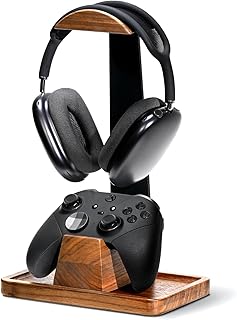
UPERGO Headset Stand with Gaming Controller Holder, Walnut Wood Headphone Stand with Storage Base, Gaming Equipment Accessories for Desk
Best For:
Streamers, console gamers, and desktop owners who want a stylish wooden display and storage solution for headsets and controllers.
A headset stand is a small investment that pays off visually and practically: it displays your gear, clears desktop clutter, and projects a more intentional setup. This UPERGO walnut wood headset stand marries form and function—crafted wood grain gives a warm, premium look that pairs nicely with wooden desks, shelves, and monitor risers. The integrated controller holder and storage base add utility, collecting the small items that otherwise live loose on your surface.
Real-life benefits are immediately visible. For streamers, a wooden stand in the background reads very well on camera—it’s an understated prop that keeps a headset accessible without looking like a tangled mess. Console gamers who rotate multiple controllers will appreciate the dedicated holder which reduces shelf clutter and protects controllers from being stacked on top of each other. The base also serves as a tidy tray for dongles, dongles and USB thumb drives, or a cable wrap zone for short charging cables.
Compared to cheap plastic or metal stands, a walnut wood stand feels heavier and more deliberate. That extra heft often translates to greater stability and a higher-end aesthetic that complements desks with natural finishes. While metal stands can look modern and minimal, they can also appear cold—this wooden option offers a warmer tone that works well with casual and professional setups alike.
Use cases: someone building a cozy streaming backdrop that looks studio-ready; a console owner who wants a dedicated home for headsets and controllers; an office worker who wants to keep a headset handy without draping it over a chair. It’s also a good gift for teammates and friends who appreciate thoughtful desktop organization.
Who it’s best for: users wanting a stylish, stable display for headphones and controllers—especially if your desk or room leans into wood tones or a blended aesthetic.
Who may not need it: minimalists with tiny desks who prefer wall-mounted racks or people who want a fully metal, ultra-modern look.
Check the latest price on Amazon.
Pros
- Warm walnut finish elevates desk aesthetics
- Integrated controller holder and storage base reduce clutter
- Heavier feel and stable presence compared to lightweight plastic stands
Cons
- Takes some desk real estate compared with wall mounts
- Wood grain and color can vary between units
Check the latest price on Amazon.
Govee RGBIC Gaming Light Bars H6047 with Smart Controller, Wi-Fi Smart LED Gaming Lights with Music Modes and 60+ Scene Modes Built, Works with Alexa & Google Assistant, Game Room Lights Decor

Best For:
Streamers, PC gamers, and console owners seeking immersive, color-rich ambient lighting with smart controls and music sync.
Lighting transforms a gaming area faster than almost any other accessory. Govee’s RGBIC gaming light bars provide per-zone color control (RGBIC), a smart controller, Wi‑Fi connectivity, and music-sync modes—everything you need to add dynamic backlighting and colorful accents that respond to your games and music. These light bars are slimmer and more directional than typical LED strips, so they create a clean, modern light source that works especially well behind monitors, under shelves, or flanking a TV.
The practical benefits go beyond looks. Bias lighting—light placed behind a monitor—can reduce eye strain and improve perceived contrast on-screen. With Govee’s scene modes and more than 60 built-in presets, you can save lighting setups for different game genres, moods, or streaming overlays. The music mode reacts to audio in real time, which is great for parties or rhythm-heavy games. Smart-home integration with Alexa and Google Assistant lets you change colors and brightness without leaving a game.
Compared to one-color LED strips, RGBIC light bars let you blend multiple colors at once, producing gradients and richer visual effects. Compared to large LED panels, these bars are less intrusive and fit into a tighter aesthetic. There is a small setup and app learning curve—don’t expect plug-and-play perfection if you want advanced synchronization with PC games. Some users employ third-party apps or Govee’s desktop integrations for more advanced sync, but the out-of-the-box experience covers most typical users.
Use cases: place a pair behind a widescreen monitor to reduce glare and add cinematic mood for single-player games; mount under a shelf above a desk to highlight collectibles; run a set vertically along a TV’s sides for immersive console lighting. Streamers will appreciate saving scenes that match branding or overlay colors.
Who it’s best for: gamers and streamers who want vibrant, controllable ambient lighting with smart-home features and music sync.
Who may not need it: those who prefer purely passive, non-electronic decor or users without stable Wi‑Fi connectivity.
Check the latest price on Amazon.
Pros
- RGBIC per-zone color control for rich gradients
- Smart Wi‑Fi controller and voice assistant compatibility
- Music modes and 60+ scene presets for quick customization
Cons
- Requires Wi‑Fi and app setup for full functionality
- Advanced game synchronization may need extra configuration
Check the latest price on Amazon.
Sushret Cloud Wrist Rest Keyboard, Cloud Keyboard Wrist Pad Set with PU Leather Memory Foam, Cute Arm Rest for Palm Support, PC/Gaming Desk Accessories/Office Setup/Computer Hand Cushion – Black

Best For:
Typists, long-session gamers, and streamers who want a comfortable, easy-to-clean memory-foam wrist rest with a tidy aesthetic.
A wrist rest is one of the simplest upgrades that improves comfort and desk presentation. The Sushret Cloud Wrist Rest is a memory-foam pad covered in PU leather with a soft, rounded silhouette aimed at supporting your palms while typing or gaming. Its "cloud" shape adds a playful, friendly aesthetic to the desk without looking childish—especially in a neutral black finish that blends with most peripherals.
Functionally, memory foam contours to the natural curve of your wrists and hands, evening pressure distribution and reducing hotspots during long gaming sessions. The PU leather surface is easy to wipe clean and resists sweat, making it suitable for warm environments or intense play. Unlike gel-filled alternatives that can get sticky over time, this memory foam option retains shape while still offering cushioned support.
Aesthetically, the wrist rest brings a finished look to your keyboard area, bridging the visual gap between keyboard and desk mat. It’s slim enough to sit flush with many tenkeyless and full-size keyboards without obstructing keyboard tilt. The non-slip bottom helps keep it in place during fast typing or gaming movements, preventing annoying shifts that break immersion.
Use-case scenarios: competitive players who spend hours at the desk and need consistent wrist support to avoid soreness; office workers who alternate between typing and short gaming breaks; content creators who want a neat foreground element while recording or streaming. It’s also useful in minimalist setups where a single, well-designed accessory can add both comfort and visual polish.
Who it’s best for: typists and gamers seeking soft, shape-conforming wrist support in a compact, easy-to-clean package.
Who may not need it: people who prefer a firmer, angled wrist support or those whose keyboard already includes an integrated wrist rest.
Check the latest price on Amazon.
Pros
- Memory foam contours for even wrist support
- PU leather surface is easy to wipe clean
- Compact, unobtrusive shape fits most keyboards
Cons
- Softer feel may not suit users who prefer firmer wrist support
- Not machine-washable—surface must be wiped clean
Check the latest price on Amazon.
Abnii 50 PCS Hook and Loop Cable Ties, Under Desk Cable Management, Self Adhesive Cable Clips Straps, Sticky-Back Cord Organizer, Wire Organizer for TV PC Laptop Ethernet Desktop, White

Best For:
Gamers, streamers, and home-office users who need flexible, reusable cable management to keep desks tidy and camera backdrops clean.
Clean cable management is often the difference between a busy, chaotic desk and a visually pleasing setup. This Abnii kit of 50 hook-and-loop cable ties and adhesive-backed clips is designed for under-desk routing, bundling, and securing cables. The large quantity makes it practical to tame multiple power bricks, monitor cables, ethernet runs, and peripheral chargers at once.
Hook-and-loop ties are reusable and adjustable, which is a major advantage over single-use zip ties. You can open them to add or remove a cable without cutting anything. The included sticky-backed clips are useful for anchoring cables to the underside of desks, the back of monitors, or along walls where you need a low-profile route. The white finish blends into light-colored desks and walls, though it’s worth noting that white can show dust and yellowing over time in certain environments.
Practical use-case examples: route your monitor power and HDMI cables neatly along the back edge of a desk so they don’t drape down; secure a power strip under the tabletop to hide it from view; bundle headset, microphone, and RGB light cables so they follow one tidy path to your PC. For streamers or content creators, tidy cable runs reduce background distraction on camera and make setup changes faster between sessions.
Compared to built-in raceways or expensive under-desk trays, this solution is low-cost and highly flexible. Adhesive clips work well on smooth, clean surfaces but can struggle on textured or freshly painted surfaces—surface prep is important for long-lasting adhesion. These ties are a good complement to other under-desk management options like Velcro cable channels and mounting brackets.
Who it’s best for: anyone building a neat desk layout on a budget—ideal for multi-cable setups and people who frequently change gear.
Who may not need it: those with factory-built desk cable channels or users who prefer a permanent, fully concealed under-desk tray installation.
Check the latest price on Amazon.
Pros
- Reusable hook-and-loop ties for flexible cable management
- Large 50-piece kit covers multiple cables and runs
- Adhesive clips anchor cables under desks and behind monitors
Cons
- Adhesive may not stick well to textured or dirty surfaces
- White color can show dust or yellowing over time
Check the latest price on Amazon.
Final Verdict
Upgrading your gaming desk’s aesthetics doesn’t require a complete overhaul—selecting a few targeted accessories can dramatically tidy, comfort, and stylize your space. The five items above cover the main touchpoints: ergonomics (footrest, wrist rest), display and storage (headset stand), atmosphere (RGBIC light bars), and the behind-the-scenes organization that keeps everything looking intentional (hook-and-loop cable ties).
Combine a bias-lighting kit with a matching headset stand and cable management to create a setup that looks polished on camera and feels comfortable at the desk. Choose materials and colors that match your desk and peripherals: walnut or wood accents warm up a space, black leather or PU leather reads professional, and RGBIC lights allow you to change the mood on the fly.
If you’re picking only one item to start with, think about the problem you experience most: wrist or hand soreness? Start with the wrist rest. Persistent clutter and messy cables? The cable tie kit will produce the biggest visual improvement per dollar. Want a faster cinematic vibe? The Govee light bars will change the room’s atmosphere immediately.
Overall, these accessories are practical, affordable, and thoughtfully designed to blend style with everyday utility. They don’t replace major gear upgrades, but they make your battlestation more comfortable, organized, and camera-ready.
Check the latest price on Amazon.
Conclusion
These Gaming desk accessories for improving setup aesthetics picks are trending now and offer great value and variety. Check the links above for latest prices and reviews.
As an Amazon Associate, I earn from qualifying purchases.
Tags:
gaming desk accessories, desk aesthetics, RGB gaming lights, ergonomic wrist rest, headset stand, cable management, gaming setup
