Best Portable Monitors for Editing on the Go
As an Amazon Associate, I earn from qualifying purchases. This article may contain affiliate links, which means we may receive a commission at no extra cost to you.
Traveling while keeping your editing workflow smooth is a common challenge for content creators, editors, and digital nomads. A lightweight, reliable portable monitor turns a cramped laptop screen into a flexible dual-display setup, so you can cut footage, color-grade photos, or manage timelines without hunting for a desktop. This guide looks at five 15.6-inch FHD portable monitors that balance image quality, connection options, and travel-ready features like protective covers and built-in speakers.
Before we dive into the product picks, a quick note on the links used: As an Amazon Associate, I earn from qualifying purchases. This article may contain affiliate links, which means we may receive a commission at no extra cost to you. The recommendations that follow are based on product specifications, feature sets, and common user feedback from multiple sources to help you choose the best monitor for your travel editing needs.
Buying Guide
Why carry a portable monitor? For many creators the single biggest productivity boost on the road is screen real estate. A second display makes timeline scrubbing, preview windows, color palettes, and reference images visible simultaneously—reducing context switching and speeding up edits.
Key specs to prioritize
– Size and resolution: 15.6-inch FHD (1920×1080) hits a sweet spot between portability and usable workspace. For everyday editing, FHD gives enough pixel density for timeline precision without adding bulk.
– Panel type and color: IPS panels provide wider viewing angles and better color consistency across the screen—important when you’re judging exposure and color. If accurate color is critical, look for advertised color gamut coverage (sRGB/Adobe RGB) or whether the panel can be hardware-calibrated.
– Connectivity and power: USB-C with DisplayPort Alt Mode is the most convenient option—one cable for video and, in many cases, power delivery. Monitors that include an HDMI port expand compatibility to phones with adapters, gaming consoles, and travel docks. Some monitors can be powered by a single USB-C from a laptop, while others need two connections or a separate power source.
– Stand and case: A well-designed smart cover or adjustable kickstand changes the monitor from a screen to a stable workstation. Magnetic folding covers, 90° adjustable stands, and 360° kickstands offer different levels of tilt and orientation—look for what suits your setup (vertical text, portrait mode, or traditional landscape).
– Speakers and HDR: Built-in speakers are convenient for previewing edits; they won’t replace studio monitors but are useful for quick checks. HDR capability helps with dynamic range on supported footage but requires compatible sources and software.
– Weight and thickness: If you’re frequently moving between cafes, planes, and client sites, prioritize lower weight and a slim profile. Protective sleeves or cases that double as stands reduce worry about dings in transit.
Real-world considerations
– Laptop compatibility: Macs with Thunderbolt/USB-C typically pair seamlessly, but confirm whether the monitor supports USB-C power passthrough so you can charge your laptop while driving the display.
– Video editing workflows: For editors using Premiere Pro, DaVinci Resolve, or Final Cut, a second screen helps separate timelines, preview windows, and effects panels. For color work, a portable monitor can be a reliable reference if you can control ambient lighting and calibrate the screen.
– Battery and power management: On long flights or remote locations, a monitor that draws minimal power from your laptop—or can be powered by a portable battery pack—gives you flexibility.
– Price vs. features: Portable monitors vary from basic second screens to feature-rich options with HDR, higher refresh rates, and professional color modes. Match your needs: hobbyist vloggers may prefer a value-oriented model, while professionals should prioritize color accuracy and build quality.
Final buying tips
– Read compatibility notes for MacBooks, Chromebooks, and phones.
– Look for one-cable setups (USB-C) to reduce clutter.
– If color-critical work is required, research real-world color coverage or select models that allow calibration.
– Consider how the included case/stand will hold up in daily travel. A flimsy cover can negate the benefit of a compact monitor if it doesn’t provide stable support.
MNN Portable Monitor 15.6inch FHD 1080P USB C HDMI Gaming Ultra-Slim IPS Display w/Smart Cover & Speakers,HDR Plug&Play, External Monitor for Laptop PC Phone Mac (15.6” 1080P)

Best For:
Content creators and digital nomads who want a feature-rich, travel-ready FHD monitor with USB-C and HDMI for flexible connectivity.
The MNN 15.6-inch portable monitor aims to be a versatile travel companion for editors who want a balance of features and convenience. With a Full HD IPS panel, HDR support, built-in speakers, and both USB-C and HDMI inputs, it covers the bases most creators need when working from a hotel room, co-working space, or airport lounge. The smart cover doubles as a protective sleeve and a simple stand, which keeps carry weight low and setup fast.
Main benefits include plug-and-play simplicity and broad device compatibility. USB-C connection handles video and, depending on your laptop, can draw power or pass-through power, while HDMI lets you connect to cameras, consoles, and older laptops. The IPS panel provides wide viewing angles so collaborators can view your timeline without color shift, and HDR support is a helpful addition when previewing high-dynamic-range clips—recognize that HDR performance on portable displays is limited compared with studio monitors.
Practical use cases: a travel vlogger can mount the monitor beside a compact laptop to monitor multi-cam timelines; a photographer can display reference images while batch editing RAW files; a remote editor can use the monitor as a dedicated preview screen during client calls. The built-in speakers are sufficient for quick audio checks, though you’ll want headphones for precise sound work.
How it compares: against bare-bones portable screens, MNN’s inclusion of HDR and speakers makes it a more rounded option. Compared to pricier professional panels, color-critical users may notice narrower color gamut and lower peak brightness, but for many mobile workflows the tradeoff is acceptable.
Who should buy this model? Choose the MNN if you want an affordable, travel-friendly second screen with flexible ports and extras like a smart cover and speakers. It suits content creators who need reliable picture quality on the go without the bulk of a full reference monitor. If you require strict color accuracy or a pro-level calibrated display, consider a model with explicit color gamut specs or calibration support.
Check the latest price on Amazon.
Pros
- FHD IPS panel with wide viewing angles
- USB-C and HDMI inputs for broad compatibility
- Smart cover acts as a protective sleeve and stand
Cons
- Color gamut and brightness not at professional reference level
- Built-in speakers are basic; not ideal for critical audio work
If you’re looking for a dependable travel monitor with useful extras, check the latest price on Amazon.
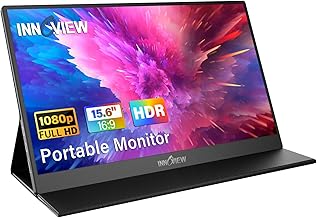
InnoView Portable Monitor, 15.6 Inch FHD 1080P HDMI USB C Second External Monitor for Laptop, Desktop, MacBook, Phones, Tablet, PS5/4, Xbox, Switch, Built-in Speaker with Protective Case
Best For:
Freelance editors, social media creators, and gamers who want a portable, durable monitor with simple setup and an included protective case.
InnoView’s 15.6-inch portable monitor is a popular choice among travelers because it blends a slim design with practical accessories. The Full HD IPS display and included protective case make it a straightforward option for anyone who needs a reliable second screen for editing, screen previews, or multi-app workflows. The dual-input design (USB-C and HDMI) simplifies switching between a laptop and game consoles, and the built-in speaker lets you preview edits without extra peripherals.
What sets this model apart is the protective case and the typically robust build quality reported by users. The case generally folds into a stand with a few stable viewing angles—handy when you don’t want to carry additional hardware. The panel provides accurate enough color for social media edits and client previews; however, photographers and colorists seeking exacting color-space coverage might need to calibrate externally or choose a higher-end display.
Use-case scenarios: freelance editors working from client sites can attach the monitor to a laptop to separate timeline and preview panels; streamers and gamers can use the HDMI port to connect consoles during breaks in work; a photographer can use the monitor as a tethered viewing display when shooting in a small studio or on location. The combination of low weight and a protective sleeve reduces the friction of tossing it in a backpack for a day of location edits.
Compared to other portable displays, InnoView emphasizes practical travel features and consistent performance. It doesn’t aim to be a color-critical pro monitor, but for many mobile editors its balance of price, portability, and accessories makes it a reliable daily driver.
Who should buy this model? Choose the InnoView if you prioritize a travel-ready package with a sturdier case and simple plug-and-play performance. If your work demands strict color grading accuracy or very high brightness, you may prefer a higher-tier monitor with calibration tools.
Check the latest price on Amazon.
Pros
- Protective case included that doubles as a stand
- USB-C and HDMI inputs for flexible device connections
- Slim and travel-friendly design
Cons
- Not aimed at professional color grading
- Speakers are useful but limited for audio-critical work
For a travel-ready monitor with a handy protective case, check the latest price on Amazon.
ASUS ZenScreen 15.6” Portable Monitor for Laptop (MB169CK) – Dual USB-C, Mini-HDMI, Plug & Play External Screen for Travel Dual Setup, Full HD, IPS, Anti-Glare Surface, 360° Kickstand, 3yr Warranty

Best For:
Frequent travelers, consultants, and professionals who value durable build, anti-glare ergonomics, and brand-backed warranty.
The ASUS ZenScreen MB169CK is designed specifically with travel professionals in mind. Its Full HD IPS panel, anti-glare surface, and dual USB-C ports allow for a clean one-cable connection for many laptops, while a mini-HDMI input increases compatibility with cameras, phones (with adapters), and streaming devices. ASUS includes a 360° kickstand that lets you position the screen at various angles—useful for client presentations or when working in tight spaces.
ASUS’s advantage is its combination of brand reliability and thoughtful ergonomics. The anti-glare coating reduces reflections under overhead lights or in cafés, which helps when you’re trying to evaluate footage or color under less-than-ideal lighting. The dual USB-C option allows more flexible routing of power and video between devices. Additionally, a three-year warranty adds peace of mind if you travel frequently and depend on the monitor for client work.
Real-life usage: consultants who run demos and need a portable second screen will appreciate the adjustable kickstand and anti-glare surface. Photographers and video editors doing client previews at shoots can use mini-HDMI to connect cameras directly for instant playback. The ASUS’s thinner profile and slightly premium build quality make it feel more durable in transit compared with generic models.
How it stacks up: compared to budget options, the ZenScreen focuses on ergonomics and longevity rather than packing every extra feature. It’s not the brightest or widest-gamut display in the portable class, but its practical touches—anti-glare, 360° stand, and extended warranty—are meaningful for professionals who rely on consistent performance.
Who should buy this model? Professionals who travel often and need a durable, reliable second screen for presentations, client reviews, and on-location editing will find the ASUS ZenScreen appealing. If you need extreme color accuracy or HDR performance, you may want to pair it with a calibrated reference monitor back at your studio.
Check the latest price on Amazon.
Pros
- Anti-glare Full HD IPS panel ideal for varied lighting
- Dual USB-C plus mini-HDMI for flexible connectivity
- 360° kickstand and solid build with a 3-year warranty
Cons
- Not the top choice for color-critical grading
- Higher cost compared to basic portable displays
For a travel-ready professional display with thoughtful ergonomics, check the latest price on Amazon.
InnoView Portable Monitor 15.6" 1080P for Laptop with Protective Sleeve, Built-in 90° Adjustable Stand USB C HDMI Ultra-Slim Portable Laptop Monitor for MacBook Phone PS Xbox Switch

Best For:
Editors and photographers who need a slim monitor with a stable built-in stand for consistent viewing angles during travel.
This second InnoView entry focuses on an ultra-slim design and a built-in 90° adjustable stand that gives you more control over viewing angles. The 15.6-inch FHD IPS panel provides crisp detail for timeline work, and the protective sleeve is designed for daily travel. With USB-C and HDMI inputs, it’s straightforward to connect to laptops, phones, consoles, and even camera outputs—making it a flexible tool for creators who switch between devices.
The adjustable 90° stand differentiates this model from simpler folding covers because it locks into place for a more stable setup on uneven surfaces like café tables or airplane trays. Users who frequently edit on trains or in co-working spaces report that the stand helps maintain a comfortable eye level, which reduces neck strain over long sessions.
Real-life scenarios: a documentary editor editing rushes on the road can place the monitor beside a laptop to separate source and program windows; a photographer tethering to a laptop can use the screen for client previews right on location; a streamer or gamer taking a break between tasks can route a console to the monitor for a quick test. The InnoView is a balanced option for those who want more stable physical support without adding bulk.
Compared with the other models in this list, this InnoView emphasizes ergonomic stability and portability. If you value a foldable but rigid stand and an ultra-slim profile, this is a sensible choice. If you require wider color coverage or professional calibration, consider higher-end displays tailored for color-critical tasks.
Who should buy this model? Creators and remote workers who prioritize a stable, adjustable stand and a slim profile for frequent transport. Avoid this model if you need a portable monitor with professional-level color calibration tools.
Check the latest price on Amazon.
Pros
- Ultra-slim profile and protective sleeve for travel
- Built-in 90° adjustable stand for stable positioning
- USB-C and HDMI compatibility
Cons
- Color accuracy may not meet pro post-production standards
- Speakers remain basic for critical listening
If a slim monitor with a sturdy stand fits your mobile workflow, check the latest price on Amazon.
Dopesplay Portable Monitor, 15.6" FHD 1080P IPS Travel Monitor for Laptop, Foldable Magnetic Stand & Carry Case Included, USB-C Screen Extender for Laptop Mac PC Phone Xbox PS4/5 Switch

Best For:
Lightweight travelers and freelance editors who want the most packable solution with an easy-to-deploy stand and protective case.
Dopesplay’s 15.6-inch portable monitor focuses on convenience and minimalism with a foldable magnetic stand and an included carry case. The FHD IPS panel delivers solid image clarity for editing timelines, client reviews, and on-the-go previews. USB-C support for video makes it easy to pair with modern laptops and phones, while HDMI compatibility keeps consoles and cameras in play.
A few practical strengths stand out: the magnetic stand is quick to deploy and often holds well on flat surfaces, which is perfect for editors who need a rapid setup between locations. The included carry case protects the screen during transport and reduces the need to buy accessories separately. Like the others in this roundup, it’s not a professional reference monitor, but it provides adequate color and contrast for many real-world editing tasks.
Use cases: freelance video editors who jump between client offices can use the monitor for side-by-side timelines; travel photographers can review raw images and basic color adjustments without lugging a larger display; casual gamers or console testers can use HDMI for quick checks. The lightweight nature makes it suited to backpack travel where every ounce counts.
How it compares: against more expensive or pro-focused models the Dopesplay is a sensible, value-driven option with user-friendly accessories. If you need advanced features like hardware calibration or extended color gamuts, you’ll need to look at pro-level portable displays or a full-sized reference monitor at your primary workstation.
Who should buy this model? Choose Dopesplay if you’re seeking the lightest, most packable option with a fast-setup magnetic stand and a protective carry case. Skip it if you need precision color grading or the brightest HDR performance.
Check the latest price on Amazon.
Pros
- Foldable magnetic stand for quick setup
- Carry case included for safe transport
- Lightweight and travel-friendly
Cons
- Not suitable for professional color-critical work
- Stand may be less stable on very uneven surfaces
For a lightweight, no-fuss travel monitor, check the latest price on Amazon.
Final Verdict
Choosing the right portable monitor for editing while traveling comes down to your priorities: portability, connection simplicity, and how much color accuracy you need. For a balanced pick with travel-friendly features, MNN offers an attractive mix of USB-C/HDMI connectivity, HDR support, and a smart cover. If you value a protective case and consistent daily performance, the InnoView models provide dependable options with thoughtful accessories. Professionals who travel often and need a durable, anti-glare solution may prefer the ASUS ZenScreen for its ergonomic design and extended warranty. For the lightest, most packable setups, Dopesplay’s foldable magnetic stand and slim profile are compelling.
No portable monitor will replace a calibrated studio reference display, but any of these options will significantly improve your productivity on the road—separating timelines, expanding workspace, and enabling better previews during client meetings. Consider how you’ll use the screen (client presentations, tethered shooting, timeline extension), what connections your devices require, and whether you need extras like power passthrough or HDR previews.
If you’re still unsure, prioritize USB-C one-cable setups and a reliable protective case or stand. These two factors are the biggest usability wins for mobile editing. Whichever model you choose, make sure it matches your editing software, laptop ports, and travel habits.
Check the latest price on Amazon.
Conclusion
These Portable monitor for editing content while traveling picks are trending now and offer great value and variety. Check the links above for latest prices and reviews.
As an Amazon Associate, I earn from qualifying purchases.
Tags:
portable monitor, travel monitor, USB-C monitor, portable FHD display, monitor for editors, external monitor laptop, portable monitor for MacBook
