Best Wireless Chargers for Desks – Top Picks 2026
As an Amazon Associate, I earn from qualifying purchases. This article may contain affiliate links, which means we may receive a commission at no extra cost to you.
As an Amazon Associate, I earn from qualifying purchases. This article may contain affiliate links, which means we may receive a commission at no extra cost to you.
A clutter-free desk and a reliably charged phone are two of the simplest upgrades that make daily work less frustrating. Wireless chargers designed for desks combine convenience, safety, and tidy cable management — but not every charger is right for every setup. In this guide I summarize the best wireless chargers for desks, focusing on versatile stands, multi-device stations, slim pads, and fast 15W options. The picks below are chosen for real-world usefulness: they solve common problems like awkward charging angles, multiple-device charging, poor visibility during night-time charging, and the need for fast top-ups between meetings.
This buyer-focused roundup blends product specs, typical user experiences, and practical use-cases so you can quickly identify which desk charger suits your routine without wading through technical manuals. Each product section includes who it’s best for, realistic usage scenarios, and pros and cons based on customer feedback and manufacturer specs. Whether you want a compact pad, a viewing stand, or an all-in-one station for phone, earbuds and watch, you’ll find an option here. Check the individual sections for quick CTAs and Amazon links at the end of each product write-up.
Buying Guide
Why pick a wireless desk charger?
A wireless desk charger reduces cable clutter, protects charging ports from wear, and makes it easy to pick up or glance at your phone without unplugging. For desks, you’ll prioritize stable placement (so the phone doesn’t slide), ergonomics (a stand that holds the phone at a readable angle), and compatibility (Qi certification, MagSafe considerations, or multi-device support). Below are practical buying considerations to match the charger to your workflow.
Key factors to weigh
1) Form factor: pad vs stand vs multi-station
– Pad: Slim, space-saving and good for occasional top-ups. Best if you mostly use your phone flat on the desk.
– Stand: Keeps the screen visible for video calls, notifications and navigation while charging. Ideal for desk workers who glance at notifications often.
– Multi-station: Designed to charge phone, earbuds and smartwatch simultaneously. Perfect for compact nightstands or desks where you want an all-in-one hub.
2) Power and speed
– Standard Qi chargers offer 5–10W for most phones; 15W fast wireless charging is common for recent Androids and some iPhones when negotiated with the right adapter. Remember: advertised wattage is peak under ideal conditions; actual speeds depend on cable, adapter and phone model.
3) Adapter and cable considerations
– Some chargers include AC adapters or cables; many don’t. If a product says “no AC adapter,” budget for a compatible fast charger (usually 18W+ USB-C PD) to get advertised speeds.
4) Compatibility and cases
– Qi-certified units work with most cases up to a few millimeters thick. Metal plates, magnetic wallets, or very thick cases may block charging or require repositioning.
5) Build, stability and heat management
– Heavier bases and rubber pads prevent slide-offs. Good ventilation and smart temperature control reduce throttling during long charging sessions.
6) Extra features to consider
– Night-friendly LEDs, adjustable angles, cable management channels, or anti-slip surfaces are small details that improve daily use.
Who should prioritize which features?
– Desk workers who take video calls: choose a stand-style charger for hands-free viewing.
– Multi-device owners: pick a 2–3 device station with dedicated spots for earbuds and watch.
– Minimalists: a low-profile pad gives the cleanest look.
– Speed seekers: ensure the charger supports higher wattage and pair it with an appropriate adapter.
With those points in mind, the product sections that follow describe five recommended chargers suited to a variety of desk setups, with realistic use-cases and buying considerations.
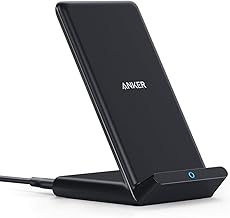
Anker 313 Wireless Charger (Stand), Qi-Certified for iPhone 17/17/17 Pro/17 Pro Max/15/14/13, 10W Fast-Charging Galaxy S23 S22 S21(No AC Adapter)
Best For:
People who want a simple, stable charging stand for a desk or nightstand and who value screen visibility while charging.
If you want a dependable, no-nonsense charging stand for your desk, the Anker 313 Wireless Charger (Stand) is a practical choice. Its upright design holds a phone at an easy viewing angle, which is useful for video calls, desktop notifications, or following a recipe while cooking. As a Qi-certified charger offering up to 10W fast charging for compatible devices, it handles everyday top-ups reliably — though it ships without an AC adapter, so pairing it with a quality USB-C PD wall charger is necessary to reach peak performance.
What users like most is its simplicity: a compact footprint that fits tight workspaces, a subtle rubberized base that stops accidental slips, and a design that keeps the phone visible while charging. Compared with low-profile pads, this stand keeps the screen in view so you don’t have to pick the phone up to check messages or join a quick video call. It’s not MagSafe, so phones with magnetic mounts or specialized magnetic cases won’t get the added alignment benefits of a magnetized charger, but its broad charging coil is forgiving when you set the device down.
Common use-cases include a remote-worker setup where you need to monitor chat notifications, a bedside charging station for quick overnight top-ups, or a kitchen counter where you want the display visible. Because it’s not a multi-device station, those who need to charge an Apple Watch or AirPods simultaneously will prefer a three-in-one dock instead.
Buying considerations: buy a reliable 18W+ USB-C PD adapter if you want consistent 10W performance. If you need MagSafe alignment or integrated adapters, consider a different model. For users who want a straightforward stand that keeps the phone visible and charged without fuss, the Anker 313 Stand is a solid value.
Check the latest price on Amazon.
Pros
- Compact stand keeps phone at a usable viewing angle
- Qi-certified and supports up to 10W fast charging
- Stable base with anti-slip surface
Cons
- No AC adapter included
- Not MagSafe — no magnetic alignment
Check the latest price on Amazon.
Acer Gadget 7-in-1 Wireless Charging Station Charger Stand for Multiple Devices for Apple – iPhone 17 16 15 14 13 12 Pro Max Apple Watch Airpods, Wireless iPhone Charger Station with Bluetooth TimeSyn

Best For:
Owners of multiple Apple devices (iPhone, Apple Watch, AirPods) or anyone who wants a single, tidy charging hub for a desk or nightstand.
The Acer Gadget 7-in-1 Wireless Charging Station aims to be the one-stop hub for desks and nightstands that need to charge multiple Apple devices simultaneously. With dedicated spots for iPhone, Apple Watch, and AirPods — plus extra USB ports — it’s designed for households or professionals who don’t want several chargers scattered around. The title also references a Bluetooth TimeSyn function, which suggests added connectivity or clock synchronization features; customers who value consolidated device management will appreciate the ambition behind the feature set.
This station’s real advantage is convenience: users can dock an iPhone upright for viewing while charging, lay earbuds flat for a reliable charge, and rest a watch on its padded charger. Compared with single-device pads or stands, a multi-device station saves space and eliminates cable juggling at your desk. It’s especially convenient for small offices or shared desks where multiple devices need daily top-ups before meetings.
Practical scenarios include a creative desk where phone, watch, and AirPods are used throughout the day; a compact bedroom setup for a couple who share the same nightstand; or a business traveler’s home office that doubles as a charging command center. Expect that simultaneous charging across multiple devices can draw more power overall—verify the bundled adapter wattage or ensure you use a powerful USB-C PD supply to keep all bays performing well.
Considerations: multi-device stations often require precise placement for each device, and bulky phone cases or watch accessories can affect fit. Heat management matters here — if you frequently charge multiple devices at once, look for a station with smart temperature control or automatic power negotiation to reduce throttling.
For users who want an all-in-one desk solution and own multiple Apple devices, this Acer 7-in-1 station is worth considering. For those who only need to charge one phone quickly, a single-device fast charger may be a simpler and more affordable option.
Check the latest price on Amazon.
Pros
- All-in-one design reduces cable clutter
- Dedicated spots for phone, watch, and earbuds
- Good for shared nightstands or multi-device desks
Cons
- May require a high-wattage adapter for best performance
- Larger footprint than a single pad or stand
Check the latest price on Amazon.
Anlmz 3 in 1 Charging Station for iPhone, Wireless Charger for iPhone 17 16e 16 15 14 13 12 11 X Pro Max & Apple Watch – Wireless Charging Station for AirPods 4 3 Pro

Best For:
Apple ecosystem users who want one neat dock for iPhone, Apple Watch and AirPods to keep a desk or nightstand organized.
The Anlmz 3-in-1 Charging Station focuses on delivering a compact, clutter-free experience for Apple ecosystem users. Rather than several separate chargers, this dock places your iPhone upright for easy viewing, includes a charging puck for Apple Watch, and provides a flat pad sized for AirPods (including Pro models). It’s tailored for desks where space is at a premium but a neat, overnight charging routine is required.
Buyers who own an iPhone, AirPods and Apple Watch appreciate the convenience of setting all three devices down in one place. The upright phone position works well for quick glances at notifications, managing calls during the workday or following a checklist while you work. Compared to single-function chargers, the Anlmz station avoids the need for three separate cables and adapters. Users report that alignment is usually forgiving, but that thick or non-standard cases may require a quick adjustment to ensure the phone seats correctly.
Common desk scenarios include a home office where earbuds and watch are used throughout the day, a bedside setup for charging overnight, or a small studio where surface area is limited. It’s especially helpful for people who value the simplicity of a dedicated spot for each device so they always know where to put them when they’re done.
Considerations: multi-device chargers sometimes prioritize convenience over raw speed. If you frequently rely on the fastest possible wireless top-ups, check the station’s maximum wattage per bay and pair it with an appropriate power adapter. Also verify that your particular watch model is supported by the included watch puck geometry.
For iPhone and Apple accessory owners seeking an organized desk or nightstand, the Anlmz 3-in-1 is a practical, space-saving choice. If you don’t own multiple devices, a single high-speed pad or stand may be more cost-effective.
Check the latest price on Amazon.
Pros
- Compact all-in-one dock for three Apple devices
- Upright phone holder keeps the screen usable while charging
- Saves space and reduces cable clutter
Cons
- May not deliver maximum wireless speeds across all bays simultaneously
- Thicker phone cases can require repositioning
Check the latest price on Amazon.
INIU Wireless Charger, 15W Fast Wireless Charging Station with Sleep-Friendly Adaptive Light Compatible with iPhone 17 16 15 14 13 12 Pro Max Samsung Galaxy S25 S24 S23 Note 20 Google etc

Best For:
Users who want faster 15W wireless top-ups on a desk or nightstand and prefer a charger with a dimmable, sleep-friendly LED.
For users who prioritize fast wireless charging on the desk or nightstand, the INIU 15W Wireless Charging Station is notable. Rated for up to 15W, it supports higher-wattage handsets (Android models and newer iPhones under the right conditions) and is a good fit when you need quicker top-ups between meetings. A standout touch is the sleep-friendly adaptive light: instead of a bright LED that disturbs the night, this charger adjusts output so it’s easier to sleep beside.
Real-world benefits include noticeably faster wireless charging compared with standard 5–10W pads, provided you pair the charger with a capable adapter and your phone supports the faster profile. The unit’s design aims for stable placement and includes anti-slip surfaces to keep devices steady during charging. Because wireless charging speed depends on alignment, this station generally performs best when phones sit directly centered on the pad or stand area.
Use cases where the INIU makes sense: a desk that needs faster midday top-ups between conference calls, a bedside table where you want quick morning boosts, or a shared family charging spot where different Android and iPhone models rotate through. The adaptive lighting is especially useful for light sleepers who otherwise find charging LEDs distracting.
Buying considerations: to achieve the advertised 15W speed, use a high-wattage adapter and the proper USB-C cable. Also expect heat management to play a role in charging efficiency; if you frequently charge stacked devices or use the phone heavily while charging, the unit may reduce output to manage temperature.
Overall, the INIU 15W charger is a good pick for anyone who wants faster wireless charging on a desk without sacrificing a low-light-friendly nightstand mode.
Check the latest price on Amazon.
Pros
- Supports up to 15W fast wireless charging
- Sleep-friendly adaptive light reduces nighttime disturbance
- Stable design with anti-slip surfaces
Cons
- Requires a high-wattage adapter and cable for peak performance
- Performance may throttle if the unit or phone gets hot
Check the latest price on Amazon.
Anker 313 Wireless Charger (Pad), Qi-Certified, 10W Max Fast Charging for Samsung, Compatible with iPhone 16 Plus/15 Plus/14 Plus/12, AirPods (No AC Adapter, Not MagSafe Magnetic Charging Compatible)

Best For:
Minimalists and travelers who want a low-profile, reliable wireless pad for phones and AirPods without the bulk of a stand or dock.
The Anker 313 Wireless Charger (Pad) is a classic, low-profile charger ideal for minimalist desks where a small footprint matters. Qi-certified and able to deliver up to 10W for compatible phones, this pad handles everyday charging with minimal fuss. Its slim profile makes it easy to slide into a bag if you travel, and the rubberized rim helps keep phones from sliding off in a busy workspace.
This pad is a straightforward alternative to stands and multi-device docks. Compared with a stand, the pad is less obtrusive and offers a clean aesthetic — great for desks where you don’t need the screen upright. Compared with multi-device stations, the pad is smaller, simpler, and usually more affordable. It’s a solid choice for someone who already has a smartwatch charger and just wants a reliable spot for their phone or AirPods case for overnight charging.
Typical use-cases include a clutter-free home office where the phone rests face up, a travel companion for quick wireless top-ups in hotel rooms, or a secondary charging spot in a living room or kitchen. Users should remember that the pad does not include an AC adapter, so pairing with a compatible adapter improves charge times. Also, it is not MagSafe; magnetic alignment features for newer iPhones won’t apply here.
Buying considerations: check case thickness and wireless compatibility; thick or metal-lined cases can interfere with charging. If you want hands-free video calls, choose a stand instead. For a simple, reliable charging surface that blends into a tidy desk setup, the Anker 313 pad is a dependable option.
Check the latest price on Amazon.
Pros
- Slim, space-saving design
- Qi-certified and supports up to 10W
- Portable and travel-friendly
Cons
- No AC adapter included
- Not MagSafe — lacks magnetic alignment
Check the latest price on Amazon.
Final Verdict
Choosing the right wireless charger for your desk comes down to how you use your devices. If you prioritize screen visibility during work, a stand-style charger like the Anker 313 Stand keeps the display usable while charging. If you own multiple Apple devices and want a tidy single spot for them, the Acer 7-in-1 or the Anlmz 3-in-1 station simplifies your routine. For faster wireless top-ups, the INIU 15W option gives better speeds if paired with the right adapter. If you prefer a minimalist look or travel frequently, the Anker 313 Pad delivers reliable performance with a tiny footprint.
Practical final tips: always pair chargers that do not include adapters with a recommended high-quality USB-C PD adapter (18W or higher for faster charging). Check case thickness and remove metal accessories that might obstruct charging. Think about placement — stands are best where you need to see the screen; pads work for low-profile setups; multi-device docks are ideal for consolidating multiple nightly charges.
With these considerations, you can pick a charger that reduces clutter, speeds up top-ups, and keeps your desk looking organized. Each product above targets a specific need, so match the model to the way you work and live.
Check the latest price on Amazon.
Conclusion
These Best Wireless Chargers for Desks picks are trending now and offer great value and variety. Check the links above for latest prices and reviews.
As an Amazon Associate, I earn from qualifying purchases.
Tags:
wireless charger, desk charger, Qi wireless, Anker wireless, multi-device charging, 15W wireless charger, wireless charging station
