Best Wireless Keyboard & Mouse Combos for Office Work
As an Amazon Associate, I earn from qualifying purchases. This article may contain affiliate links, which means we may receive a commission at no extra cost to you.
Finding the right wireless keyboard and mouse combo can make long hours at a desk markedly more comfortable and productive. Whether you’re typing up reports, hopping between virtual meetings, or managing spreadsheets, the right combo reduces noise, clutter, and wrist strain. This guide focuses on five popular options—from budget-friendly full-size sets and rechargeable ultra-slim combos to trusted Logitech bundles known for reliability. I’ll walk through what each kit offers, realistic use scenarios, who should consider it, and what to watch for before you buy. As an Amazon Associate, I earn from qualifying purchases. This article may contain affiliate links.
In the sections that follow you’ll find a practical buying guide and detailed descriptions for each recommended product, with honest pros and cons and real-life use cases based on product specs and user feedback trends. If your priority is quiet typing, extended battery life, or a built-in palm rest for comfort, there’s an option here that will fit your needs.
Buying Guide
Key factors to consider when choosing a wireless keyboard and mouse combo for office use:
1) Layout and Size: Full-size keyboards include a number pad which is essential for spreadsheet work and finance tasks. If your desk is tight or you travel often, a compact keyboard reduces footprint but sacrifices the numeric pad.
2) Typing Feel and Noise: "Quiet" or low-profile keys minimize audible click sounds in shared workplaces or during calls. Look for "quiet" keywords in descriptions or customer notes about key travel and tactile feedback.
3) Connectivity: Most combos use a single 2.4GHz USB receiver for plug-and-play simplicity. Bluetooth models reduce USB dongle use but may require device pairing. Verify compatibility with your OS (Windows, macOS, Linux) and note special function keys.
4) Battery and Power: Rechargeable sets reduce ongoing battery costs; others use AA/AAA with multi-month lifespans. Consider whether the keyboard or mouse supports auto-sleep to extend runtime.
5) Ergonomics: A built-in palm rest or contoured mouse can reduce strain during long sessions. If you have wrist pain or heavy daily typing, prioritize ergonomics.
6) Build and Materials: Metal-reinforced or sturdy plastic frames improve longevity for heavy office use. Spill-resistant membranes are a plus for coffee-prone desks.
7) Extra Features: Multimedia keys, programmable shortcuts, and adjustable DPI on mice enhance productivity. If you use multiple devices, look for easy device switching or multiple connectivity modes.
How to choose: If you need a quiet, compact, and budget-friendly setup for basic office tasks, the smaller, low-profile combos will work well. For heavy spreadsheet work or number entry, prioritize full-size keyboards with number pads. For shared or hybrid workspaces, quiet keys and long battery life are invaluable. Below are five combos selected to cover a range of office workflows and budgets.
Wireless Keyboard and Mouse, Vssoplor Rechargeable Quiet Full-Size Keyboard and Mouse Combo Set Ultra Slim Design for Laptop, PC, Notebook, Desktop-Dark Gray

Best For:
Quiet full-size typing with rechargeable convenience—good for writers, accountants, and hybrid workers who prefer a slim, battery-free setup.
The Vssoplor Rechargeable Quiet Full-Size Keyboard and Mouse Combo aims to reduce desk clutter with a modern ultra-slim keyboard and a rechargeable mouse. This set targets office users who prioritize low noise, a full number pad, and the convenience of rechargeable power. The keyboard’s low-profile scissor-style keys offer quieter keystrokes compared with traditional mechanical or high-travel membrane keys, and the full-size layout keeps the numeric keypad for spreadsheet or accounting tasks.
A standout feature is the rechargeable battery system: both keyboard and mouse recharge via included cables, which removes the ongoing cost and waste of disposable batteries. For users who prefer a cleaner desk, this is a practical advantage. The mouse has a simple optical sensor suitable for standard office surfaces and adjustable DPI for sensitivity tuning; it’s not a gaming-grade sensor, but it’s plenty responsive for navigation, document editing, and light image work.
Real-life use cases include accounting professionals inputting numbers into spreadsheets, writers who appreciate the quieter key action during long composition sessions, and hybrid workers who pack a laptop and want a light, easy-to-stow full-sized peripheral set. The slim profile helps when sliding a keyboard into a laptop bag or using it on a small desk.
Compared to ultra-budget combos that rely on disposable batteries, the rechargeable nature here reduces long-term costs and environmental impact. Compared with Logitech’s higher-end ergonomic models, the Vssoplor is more budget-conscious, trading some polish in materials and extra features for a clean, functional experience.
Considerations: The ultra-slim chassis means less wrist cushioning; if you need a built-in palm rest, this set may not be ideal. Also, while charging is convenient, you’ll need to remember to plug them in occasionally — there’s no hot-swap battery option.
Who should buy: Office workers who want a quiet, full-size keyboard with a rechargeable mouse and a slim footprint. Who may not need it: Users wanting advanced ergonomic support or professional-grade mice with high-end sensors.
Check the latest price on Amazon.
Pros
- Rechargeable keyboard and mouse reduce ongoing battery costs
- Quiet, low-profile keys suitable for shared offices
- Full-size layout with numeric keypad for spreadsheets
Cons
- Minimal wrist support due to ultra-slim design
- Mouse is basic—not suitable for precision design or gaming
Check the latest price on Amazon.
Wireless Keyboard and Mouse Combo, Full-Sized 2.4GHz Wireless Keyboard with Comfortable Palm Rest and Optical Wireless Mouse for Windows, Mac OS PC/Desktops/Computer/Laptops (Black)

Best For:
Users who want built-in wrist support and a dependable 2.4GHz connection—great for long typing sessions and standard office workflows.
This full-sized 2.4GHz combo targets everyday office users who value comfort above all. The defining feature is the integrated palm rest on the keyboard—a soft-touch area designed to reduce wrist strain during long typing sessions. The included optical mouse has a comfortable, ambidextrous shape and responsive tracking for general productivity tasks.
Connectivity is handled by a single 2.4GHz USB receiver that provides plug-and-play simplicity. That means minimal setup for users who need a straightforward, dependable connection across Windows and many macOS setups. The key layout follows a standard full-size design with dedicated multimedia controls for quick access to volume and media playback—handy during conference calls or while playing background audio.
Practical use cases are plentiful: remote workers who type entire documents and want wrist support; office administrators who alternate between typing and mouse-based navigation; and students who need a reliable, comfortable set for study sessions. The palm rest is a practical difference compared to slim combos—users with mild wrist discomfort often report it makes multi-hour typing sessions more tolerable.
Compared with compact or ultra-slim keyboards, this combo prioritizes ergonomics and comfort over portability. If you frequently travel, a slimmer set might be better. Compared to premium ergonomic brands with sculpted keys or tenting, this model offers a simpler, cost-effective way to reduce strain but lacks advanced ergonomic adjustments.
Considerations: Palm rests are helpful for many but can add to the desk footprint; if you have limited space, measure first. Battery life will depend on whether the keyboard or mouse uses disposables or internal rechargeable cells—verify the power type if long battery endurance or rechargeable convenience matters to you.
Who should buy: Users seeking affordable wrist support and straightforward, dependable connectivity for office tasks. Who may not need it: Minimalists or frequent travelers who prioritize compactness.
Check the latest price on Amazon.
Pros
- Integrated palm rest for improved comfort during long typing sessions
- Plug-and-play 2.4GHz receiver for simple setup
- Full-size layout with multimedia keys
Cons
- Larger footprint may not suit small desks
- Battery type varies—check if you prefer rechargeable or replaceable batteries
Check the latest price on Amazon.
Logitech MK270 Wireless Keyboard and Mouse Combo for Windows, 2.4 GHz Wireless, Compact Mouse, 8 Multimedia and Shortcut Keys, 2-Year Battery Life, for PC, Laptop – Black

Best For:
Users who prioritize long battery life and dependable wireless connections—ideal for shared workstations and low-maintenance office setups.
The Logitech MK270 is a popular entry-level combo that balances reliability, battery life, and simple functionality—making it a favorite in many small business and home office setups. Logitech’s reputation for stable wireless performance is a key selling point: the 2.4GHz Unifying receiver provides a consistent connection without the fussiness found in some cheaper dongle implementations.
One of the MK270’s biggest practical advantages is its long battery life—Logitech advertises up to two years on keyboard batteries, which aligns with many user reports of long-term, maintenance-free use. The compact mouse is small but comfortable for most right- or left-handed users, and the keyboard includes eight multimedia and shortcut keys that speed up routine tasks (volume control, play/pause, etc.). The layout is streamlined but retains the essentials, though it is not full-sized—so if a numeric keypad is important, you may need a different model.
This combo fits a wide range of use cases: front-desk computers where reliability and minimal upkeep matter, home offices for writers and administrators, or classrooms where multiple machines need sturdy, long-lived peripherals. Compared with bulkier ergonomic models, the MK270 focuses on compact convenience. Compared to ultra-cheap knockoffs, Logitech tends to offer better longevity and consistent wireless connectivity.
Considerations: If heavy numeric data entry is part of your daily workflow, the compact layout could be limiting. The mouse is basic—not designed for high-precision graphics work or gaming. Also, the keys are not the quietest, so shared office environments might prefer quieter low-profile designs.
Who should buy: Anyone seeking a reliable, low-maintenance combo with excellent battery life and proven wireless performance. Who may not need it: Users who require full-size keyboards with number pads or premium ergonomic support.
Check the latest price on Amazon.
Pros
- Excellent battery longevity (up to 2 years on keyboard)
- Reliable 2.4GHz wireless connection from a trusted brand
- Compact, space-saving design with handy multimedia keys
Cons
- Not full-size—no numeric keypad
- Mouse is basic and not optimized for precision tasks
Check the latest price on Amazon.
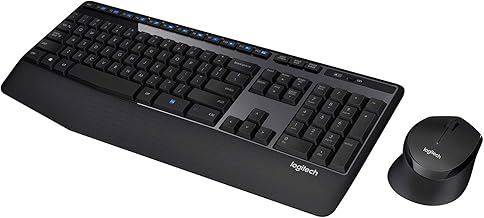
Logitech MK345 Wireless Keyboard and Mouse Combo with Palm Rest, 2.4 GHz USB Receiver, Compatible with PC, Laptop, Black
Best For:
Full-time typists and spreadsheet users who value a full keyboard and built-in palm rest for comfort.
The Logitech MK345 combines a roomy full-size keyboard with an integrated palm rest and a contoured mouse that emphasizes comfort for full-day office use. Logitech’s build quality and wireless stability make this combo a go-to for users who want comfort without sacrificing reliability. The palm rest is subtle but useful for reducing wrist angle, and the keyboard keeps a familiar full layout with a number pad for heavy data entry.
For professionals who spend hours typing or handling spreadsheets, the MK345 is designed to feel familiar while reducing fatigue. The mouse is shaped for right-handed users with textured grips to prevent slipping and a DPI suitable for office tasks. The 2.4GHz USB receiver offers plug-and-play simplicity and a connection that stays responsive even in busy wireless environments.
Real-world applications include financial analysts who need the numeric keypad, educators who use classroom PCs for lessons and grading, and remote employees who want a comfortable home desk setup. Compared with ultra-compact combos, the MK345 prioritizes comfort and usability. Against premium ergonomic chairs or keyboards, it lacks advanced sculpting or tenting but provides a tangible improvement over flat, slim designs.
Considerations: The keyboard and mouse are larger, so they take more desk space. The palm rest is fixed rather than detachable or adjustable, so those wanting customization may look elsewhere. Also, while battery life is strong, the combo typically uses replaceable batteries rather than internal rechargeable cells—factor this into long-term cost and convenience preferences.
Who should buy: Users who need a full-size layout with a palm rest and reliable Logitech wireless performance—great for accountants, students, and heavy typists. Who may not need it: Minimalists, left-handed users who need an ambidextrous mouse, or travelers looking for portability.
Check the latest price on Amazon.
Pros
- Full-size keyboard with numeric keypad
- Integrated palm rest reduces wrist strain
- Logitech’s reliable 2.4GHz wireless performance
Cons
- Larger footprint requires more desk space
- Right-handed mouse design may not suit left-handed users
Check the latest price on Amazon.
Logitech MK335 Quiet Wireless Keyboard and Mouse Combo – Black/Silver Keyboard and Mouse Combo Wireless, Ambidextrous

Best For:
Open-office workers and shared-space users who need quieter keys and an ambidextrous mouse.
The Logitech MK335 Quiet combo is designed with shared workspaces in mind: quieter keys, a low-profile design, and an ambidextrous mouse make it a versatile pick for open offices and home setups. The quiet keys aim to reduce clacking sounds without fully sacrificing tactile feedback, which makes it a good middle ground between high-travel tactile keyboards and ultra-flat membrane types.
The set includes an easy-to-use USB receiver and a spill-resistant design on the keyboard—useful if you have a habit of working near drinks. Logitech emphasizes comfortable typing and straightforward reliability rather than advanced features. The mouse is ambidextrous, making it suitable for both left- and right-handed users, and the keyboard includes media keys for quick control of volume and playback.
This combo is well-suited for open-floor office environments where key noise can be distracting, libraries, or shared home workspaces. It’s also a pragmatic choice for teachers, students, and remote workers who want a dependable, quiet setup without paying extra for premium ergonomic adjustments. Compared to high-end ergonomic keyboards, the MK335 won’t replace a medically recommended split keyboard, but for everyday comfort, it’s a solid, cost-effective option.
Considerations: While quieter, the keys still have some travel and may not be the absolute quietest available. Battery life is good but depends on replaceable batteries—check whether you want rechargeable convenience. If you require a numeric keypad for heavy data entry, confirm the layout, as compact variants exist in the market.
Who should buy: People working in shared spaces who want quieter typing and ambidextrous mouse options. Who may not need it: Power users seeking advanced ergonomic features or specialty input devices.
Check the latest price on Amazon.
Pros
- Designed for quieter typing suitable for shared environments
- Ambidextrous mouse works for both left- and right-handed users
- Spill-resistant keyboard adds practical durability
Cons
- Not the quietest possible—some key travel remains
- Lacks advanced ergonomic adjustments for severe wrist issues
Check the latest price on Amazon.
Final Verdict
Choosing the right wireless keyboard and mouse combo for office work boils down to priorities: comfort, quietness, battery convenience, and form factor. If you want rechargeable convenience and a slim full-size layout, the Vssoplor set is a practical pick. For those prioritizing wrist comfort, the palm-rest-equipped full-sized combo and the Logitech MK345 offer tangible ergonomic benefits. If your desk needs reliability and long battery life with minimal maintenance, the Logitech MK270 delivers excellent value. And for shared or quiet spaces, the Logitech MK335 balances quiet keys with durable everyday performance.
Before buying, consider whether you need a numeric keypad, whether rechargeable batteries matter to you, and how much desk space you can afford. Each of the five options here serves a slightly different user: from the budget-conscious and travel-friendly to the comfort-seeking heavy typist. Read product Q&As and spec sheets for details like battery type, DPI ranges, and OS compatibility if you have specific needs. Ultimately, pick the combo that aligns with how you work every day—comfort and dependable connectivity often pay dividends in productivity.
As an Amazon Associate, I earn from qualifying purchases. This article may contain affiliate links, which means we may receive a commission at no extra cost to you. Check the latest price on Amazon.
Conclusion
These Wireless keyboard and mouse combo for office work picks are trending now and offer great value and variety. Check the links above for latest prices and reviews.
As an Amazon Associate, I earn from qualifying purchases.
Tags:
wireless keyboard mouse combo, office keyboard and mouse, quiet wireless keyboard, Logitech wireless combo, rechargeable keyboard mouse, ergonomic keyboard, full-size keyboard
