Best Portable Autofocus Webcams for Remote Meetings
As an Amazon Associate, I earn from qualifying purchases. This article may contain affiliate links, which means we may receive a commission at no extra cost to you.
Remote meetings have become a day-to-day reality for many of us, and a reliable, portable webcam with good autofocus can make the difference between a distraction-free conversation and a grainy, out-of-focus experience. Whether you jump between home, the office, and co-working spaces or you frequently present on the go from your laptop, a portable webcam that locks onto your face and adapts to changing light is one of the simplest upgrades to boost your professional presence.
As an Amazon Associate, I earn from qualifying purchases. This article may contain affiliate links. Below you’ll find a practical buyer’s guide and detailed recommendations for webcams that focus quickly, deliver sharp video, and keep setup easy. I researched product specs, manufacturer information, and common user feedback to highlight what matters most: image quality, autofocus reliability, microphone performance, low-light behavior, and portability.
If you’re pressed for time, jump to the product list below. If you’d like to understand which features matter for different workstyles, keep reading the buying guide before diving into the detailed reviews.
Buying Guide
Why autofocus matters
Autofocus keeps your face sharp even if you move, stand up, or lean in to show a document. For remote meetings, reliable autofocus reduces the need to fumble with manual focus or restart a call to regain clarity. It’s especially helpful for teachers, salespeople, or creators who move while speaking.
Key features to compare
– Resolution and frame rate: 1080p at 30fps is the baseline for clear video; 2K options provide extra detail for presentations or when cropping. Higher frame rates matter more for streaming or fast motion.
– Autofocus system: Look for continuous autofocus or face-tracking autofocus for the smoothest results. Some webcams offer fixed-focus lenses that are fine for a stationary setup but less flexible for portable use.
– Low-light correction: Many modern cameras use software HDR or low-light enhancement; this improves visibility in dim rooms without adding harsh shadows.
– Microphone quality: Built-in mics are convenient, and dual or stereo mics with noise cancellation are better for smaller rooms. For noisy environments, consider pairing the camera with a dedicated headset or lapel mic.
– Privacy and portability: A built-in privacy shutter or cover gives peace of mind when the camera is not in use. Look for compact mounting options and plug-and-play USB connectivity for easy portable setup.
Who should prioritize which features
– Frequent travelers: Choose a compact webcam with reliable autofocus and plug-and-play USB that won’t demand software installs every time.
– Presenters and teachers: Higher resolution and consistent autofocus help keep the subject and whiteboard text legible.
– Streamers and creators: Adjustable field of view and higher frame rates are beneficial.
Practical buying considerations
– Compatibility: Confirm the camera works with your conferencing apps (Zoom, Teams, Google Meet) and operating system. Many webcams are cross-platform, but check driver requirements for older systems.
– Mounting: A flexible clip or tripod thread expands placement options.
– Power and connection: USB-A is common, but if you use USB-C-only laptops, you may need an adapter. Avoid cameras that require constant external power.
– Reviews and updates: Look at recent user feedback for reliability and software updates—manufacturers sometimes tweak autofocus performance through firmware.
This guide focuses on portable webcams with dependable autofocus so you can stay sharp on camera without fuss. The product sections below take a closer look at real-world strengths, common trade-offs, and who each model suits best.
Logitech Brio 101 Full HD 1080p Webcam for Meetings, Streaming, Desktop, Laptop, PC – Built-in Mic, Shutter, Works with Zoom, Microsoft Teams, Nintendo Switch 2’s new GameChat Mode, USB-A,-Black

Best For:
Remote professionals who need an easy-to-use, portable webcam with reliable autofocus and a privacy shutter.
The Logitech Brio 101 aims to deliver crisp 1080p video with a straightforward, business-friendly feature set designed for people who switch workspaces often. It balances image clarity with easy portability: the compact form clips securely onto laptops and monitors, and the USB-A connection offers plug-and-play convenience in most office setups.
Autofocus performance is one of the Brio 101’s most notable traits. In everyday use—virtual meetings, client calls, and short presentations—the camera quickly locks onto faces and maintains focus through small movements. Users who move around their desks or stand up briefly will find the autofocus less likely to hunt or overshoot compared with older fixed-focus webcams. Low-light correction helps in home offices with soft lamps, producing a more natural image than many budget cameras that tend to overexpose.
Sound is handled by a built-in microphone that’s suitable for one-on-one calls and small meeting rooms. It won’t replace a dedicated headset for noisy environments, but it does a credible job capturing voice clearly for standard meetings. A privacy shutter is included for peace of mind when the camera isn’t in use—handy for commuters and shared workspaces.
Compared with standard laptop cameras, the Brio 101 offers much better framing and exposure control. Versus higher-end 4K webcams, it focuses on a practical blend of performance and portability without requiring driver installs for common video apps. Real customer feedback often praises its straightforward setup and consistent focus; occasional notes mention that very low light still benefits from additional room lighting.
If you want a no-fuss webcam that emphasizes dependable autofocus for hybrid work and frequent travel between meeting locations, the Brio 101 is a solid choice. Check the latest price on Amazon.
Pros
- Consistent continuous autofocus for small movements
- Compact, easy-to-mount design with privacy shutter
- Good low-light correction for everyday home office use
Cons
- Built-in mic is adequate but not ideal in noisy spaces
- USB-A connector may require an adapter for some ultrabooks
Check the latest price on Amazon.
Logitech C920x HD Pro PC Webcam, Full HD 1080p/30fps Video, Clear Audio, HD Light Correction, Works with Microsoft Teams, Google Meet, Zoom, Nintendo Switch 2’s new GameChat Mode, Mac/Tablet- Black

Best For:
Budget-conscious professionals and part-time streamers who want reliable 1080p autofocus and clear audio.
The Logitech C920x is a long-standing favorite for professionals and content creators who want dependable 1080p video and solid autofocus without breaking the bank. Its continuous autofocus system does a reliable job of keeping faces sharp during ordinary motion—leaning forward to emphasize a point, standing briefly, or adjusting position—making it a workhorse for recurring remote meetings.
Image processing emphasizes natural skin tones and balanced exposure. The camera’s HD light correction smooths out harsh backlighting or dim room conditions better than most built-in laptop cameras, so you won’t be constantly crouching toward a desk lamp. Its dual stereo microphones pick up clear audio for one-person presentations and small rooms; customers often report noticeably better voice pickup than typical laptop mics.
Mounting is flexible: the C920x secures to screens with a reliable clip and also has a tripod thread for more permanent desk setups. That portability, combined with plug-and-play USB compatibility, makes it easy to carry between home and office or swap between multiple devices.
Compared to newer 2K models, the C920x focuses on delivering solid Full HD performance with wide compatibility and fewer frills—no huge software suite required to get great video. Real-world buyers often praise its longevity and consistent output; occasional critiques mention that autofocus can hunt if you move quickly across a cluttered background, so a tidy backdrop helps.
If you need an all-around webcam that balances price, portability, and autofocus reliability for daily remote meetings and occasional recording, the C920x remains one of the most sensible choices. Check the latest price on Amazon.
Pros
- Proven continuous autofocus performance
- Dual mics for clearer voice pickup than laptop webcams
- Sturdy clip and tripod compatibility for flexible mounting
Cons
- Autofocus can struggle with fast motion or very busy backgrounds
- Limited to 1080p/30fps (no 2K/4K options)
Check the latest price on Amazon.
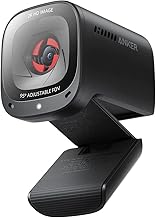
Anker PowerConf C200 2K Webcam for PC/Laptop/Mac, Computer Camera, Low-Light Correction, AI-Noise Canceling Mics, Adjustable Field of View, Built-in Privacy Cover, Stereo Mics, for Meeting
Best For:
Professionals and presenters who want higher-resolution video, AI noise reduction, and flexible framing for remote meetings.
The Anker PowerConf C200 brings a step up in resolution and software features for users who want sharper video and smarter audio handling. With 2K capture (a higher resolution than typical 1080p webcams), it produces extra detail that’s useful when you present slides, show product demos, or crop the feed for framing. The adjustable field of view is a practical feature: widen it for group calls or tighten it for a head-and-shoulders frame.
Autofocus on the C200 is speedy and stable. It benefits from Anker’s image processing to keep faces in focus during modest motion, and it especially shines when the lighting is mixed—backlight compensation and low-light correction reduce washed-out faces in challenging setups. Stereo mics with AI noise cancellation help cut down background sounds like keyboard clatter or distant traffic, which is useful for remote workers who don’t have access to a quiet home office.
The camera includes a built-in privacy cover and mounts securely on laptop lids and monitors. Its compact footprint makes it easy to pack and move between workstations. The Anker software gives extra controls (white balance, exposure, and field-of-view tweaks) for those who like to fine-tune their appearance, but plug-and-play functionality works fine for most users.
Compared to the standard 1080p webcams, the C200 gives a noticeable upgrade in image detail and noise management. Buyers with high-quality displays and clients who scrutinize video quality will appreciate the 2K advantage. Some users note that while the autofocus is strong, environments with many reflective surfaces or very low light still benefit from an auxiliary lamp for best results.
If you want sharper video, intelligent audio filtering, and an adjustable field of view in a portable package, the PowerConf C200 is a robust pick. Check the latest price on Amazon.
Pros
- 2K resolution for clearer detail and cropping
- AI noise-canceling mics and adjustable field of view
- Fast autofocus with solid low-light handling
Cons
- Additional software offers value but may be unnecessary for casual users
- Slightly larger than ultra-compact webcams
Check the latest price on Amazon.
EMEET 1080P Webcam with Microphone, C960 Web Camera, 2 Mics Streaming Webcam, 90°FOV Computer Camera, Plug and Play USB Web Cam for Online Calling/Conferencing, Zoom/Teams/Facetime/YouTube, Laptop/PC

Best For:
Budget-minded remote workers, teachers, and small business owners who want dependable 1080p autofocus and decent audio.
The EMEET C960 positions itself as a value-friendly webcam that still covers the essentials: 1080p video, a reasonable wide-angle field of view, and dual microphones for better voice pickup than standard built-in laptop mics. It’s a practical choice for users who need portability and fuss-free setup for frequent remote calls across multiple locations.
Autofocus on the C960 is designed for everyday scenarios—it keeps the subject sharp during typical head movement and re-centers quickly after minor position changes. For teachers, telehealth practitioners, or remote workers who alternate between sitting and standing, the camera delivers dependable focus without manual adjustment. Low-light performance is respectable for a mainstream webcam, though very dim environments still benefit from an external light source.
The camera’s 90-degree field of view is wide enough for small group calls or to show some background context without distortion. Dual mics improve clarity for meeting participants and reduce the need for a separate microphone in quiet environments. Users frequently note the plug-and-play convenience and the secure clip that fits most laptops and monitors.
Compared to premium or higher-resolution models, the EMEET C960 targets buyers who want solid video and audio at a lower cost. It lacks some of the advanced image processing and AI features of pricier units, but its consistent focus, decent audio pickup, and compact size make it a sensible pick for portable use.
If you want a straightforward, affordable webcam with reliable autofocus for everyday remote work, the EMEET C960 is worth considering. Check the latest price on Amazon.
Pros
- Affordable 1080p with dependable autofocus
- 90° field of view suits small group calls
- Dual microphones for clearer voice pickup
Cons
- Low-light performance is limited compared with higher-end models
- Fewer advanced tuning options or AI features
Check the latest price on Amazon.
Final Verdict
Choosing the right portable autofocus webcam depends on your priorities: portability and privacy, raw image detail, or a balance of price and performance. If you want a straightforward, business-focused webcam that’s easy to carry and offers a privacy shutter, the Logitech Brio 101 is a solid choice. The Logitech C920x is a trusted, budget-friendly workhorse with proven autofocus and reliable audio. For professionals who want sharper image detail and smarter audio handling, the Anker PowerConf C200 steps up with 2K capture and AI noise cancellation. If you’re focused on affordability and dependable everyday performance, the EMEET C960 covers the essentials with a wide field of view and clear microphones.
When deciding, consider whether you need extra resolution for presentations (choose the C200), an established all-rounder with long-term reliability (C920x), or the convenience of a privacy shutter with consistent focus (Brio 101). For buyers on a budget who still need solid, portable performance, the EMEET C960 offers good value. Whatever you choose, pairing a capable webcam with decent room lighting and a modest microphone upgrade (if needed) will dramatically improve how you come across in remote meetings.
Check the latest price on Amazon.
Conclusion
These Portable webcam with autofocus for remote meetings picks are trending now and offer great value and variety. Check the links above for latest prices and reviews.
As an Amazon Associate, I earn from qualifying purchases.
Tags:
portable webcam, autofocus webcam, webcam for remote meetings, Logitech webcam, Anker webcam, EMEET webcam, best webcams 2026
