Best Laptop Stands for Airflow & Cooling
As an Amazon Associate, I earn from qualifying purchases. This article may contain affiliate links, which means we may receive a commission at no extra cost to you.
Overheating laptops are more than a nuisance; they throttle performance, shorten battery life, and make lap computing uncomfortable. Whether you’re editing video, gaming, or running long development builds, improving airflow and keeping your laptop cool can make a measurable difference in responsiveness and longevity. This guide focuses on stands designed to improve airflow and cooling—both passive stands that raise the laptop for better convective cooling and active solutions that add fans. Below you’ll find a curated list of reliable options that cover portability, desk ergonomics, and heavy-duty cooling.
Before we get into the picks, a quick note: the recommendations below are based on product specifications, feature comparisons, and user reports available publicly. I have not claimed personal hands-on testing. The goal is to present realistic use cases, common benefits, and honest trade-offs so you can choose the right stand for your setup.
Buying Guide
How to choose a laptop stand for better airflow and cooling
1) Passive vs active cooling
– Passive stands lift the laptop to improve natural airflow and often use metal surfaces to dissipate heat. They’re silent, portable, and great for everyday productivity. Active cooling pads include fans to force air under the chassis—useful for thermally demanding workloads or gaming sessions.
2) Material and heat dissipation
– Aluminum and other metals conduct heat away from the chassis better than plastic. If cooling is a priority, look for aluminum surfaces or metal feet that make contact with the laptop base.
3) Ventilation pattern and clearance
– Open frames and ventilated surfaces reduce trapped heat. Check the height and the airflow channel design—higher clearance improves convective flow but may cost portability.
4) Adjustability and ergonomics
– Angled stands relieve neck strain and improve typing posture. Adjustable risers let you balance cooling vs keyboard comfort. If you use an external keyboard and mouse, a higher monitor position is ideal.
5) Stability and grip
– A stand must hold your laptop steady during typing. Look for rubber pads, anti-slip silicone, and good weight capacity—especially for heavier 15–17” laptops.
6) Portability and assembly
– Foldable stands and compact wedges are great if you move between home and office. Consider whether the stand is tool-free to set up and how it fits in your bag.
7) Noise and power (for active pads)
– Fans can vary dramatically in noise level. If you work in quiet spaces, prioritize low-noise fans and multiple speed settings. Note whether the pad is USB-powered and if it draws from your laptop or an external port.
8) Extra features
– Cable routing, built-in rulers or measuring marks, and additional USB hubs can be handy. For gamers, a fan controller or targeted cooling may be valuable.
Buying considerations
– Match stand size to your laptop footprint; a 16–17” gaming laptop needs a different platform than a 13–14” Ultrabook. Consider warranty and return policy if you’re unsure about ergonomics. Finally, read multiple user reports to gauge long-term durability and any common assembly quirks.
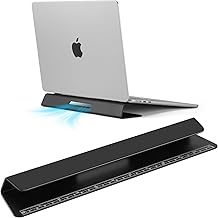
Portable Laptop Wedge Airflow Cooling Stand, Aluminium Laptops Feet Legs Improved Ergonomics, Stability, and Versatility – Compatible with MacBook and All Laptop, with Ruler
Best For:
Students, remote workers, and travelers who want a low-profile airflow boost and slightly improved typing angle without adding bulk to their bag.
The Portable Laptop Wedge is a minimal, low-profile approach to improved airflow and ergonomic typing. Instead of a full riser, this product lifts the rear edge of your laptop a few degrees using lightweight aluminum feet. That slight angle opens the underside for convective airflow, helps reduce surface contact with your desk, and improves typing comfort for users who prefer a flatter profile than a tall riser.
Why it matters: many everyday laptops rely on small intake vents at the base or near the hinge; even a modest elevation can reduce heat buildup during typical productivity tasks. The wedge design is particularly useful when you want a stable typing platform without sacrificing portability. The aluminum construction also helps disperse heat away from the laptop base more effectively than plastic feet.
Real-life use cases: students and remote workers who switch between coffee shop and home offices will appreciate how compact the aluminum feet stow away. Designers doing long spreadsheets or writers producing long-form copy will notice reduced fan whine in many thin-and-light laptops once airflow improves. It’s also a neat complement when you use an external keyboard and want a low-profile laptop angle for glanceable reference.
Practical observations: users report it’s easy to install—no tools required—and the built-in ruler can be handy for quickly checking spacing or aligning devices. It isn’t intended to replace a full monitor riser: if you need a high screen position for ergonomic viewing, pair it with a laptop stand or external monitor. Also, because it’s low-profile, its airflow benefits are most pronounced on laptops with vents along the rear or center base; machines that rely on side intakes may see more modest gains.
Who should buy this: people who want a portable, subtle upgrade in airflow and typing angle without the bulk of a full stand. It’s ideal for travelers, students, and users of ultra-thin laptops who want a lighter solution.
Who may not need it: heavy gamers or professionals running sustained heavy loads—those will benefit more from taller stands or active cooling pads with fans.
Key buying considerations: confirm compatibility with your laptop’s base dimensions, and ensure the wedge height aligns with your preferred typing angle. The aluminum finish helps with heat dissipation but may show fingerprints over time.
Pros:
– Extremely portable and unobtrusive
– Aluminum aids passive heat dissipation
– Easy, tool-free setup with anti-slip design
Cons:
– Less dramatic lift than full stands
– Limited benefit for laptops with side-only intakes
Check the latest price on Amazon.
Pros
- Compact and portable
- Aluminum construction helps dissipate heat
- Quick, tool-free setup
Cons
- Modest elevation — not for heavy thermal loads
- Less effective if laptop vents are on the sides
Check the latest price on Amazon.
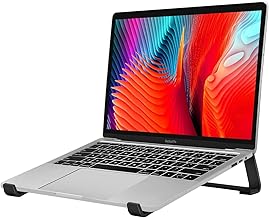
Thibault Aluminum Laptop Stand for Desk – Cooling Ergonomic Design – Fits MacBook Air Pro/DELL/HP/Lenovo/ThinkPad/Alienware – 13/14/15.6/16 -Easy Assembly- Ventilated Laptop Stand for Optimal Airflow
Best For:
Office workers, remote employees, and content creators who want an ergonomic riser that also improves passive airflow and keeps a clean desk layout.
The Thibault Aluminum Laptop Stand is a full-sized desk riser designed to deliver stable elevation and improved thermal performance. Built from a single-piece or modular aluminum frame (depending on the model), it raises your laptop to eye level for a better neck posture while leaving plenty of open space underneath for air circulation. The ventilated platform and open-frame design encourage convective airflow and reduce the hot-spot effect common with closed plastic docks.
This stand targets users who want both ergonomic benefits and passive cooling. For many MacBook and Windows laptop owners, elevating the screen and opening the chassis air pathways can noticeably reduce fan duty cycles during mixed workloads such as web development, video conferencing, and light content creation. The aluminum construction draws heat away from the laptop’s bottom and can act as a heat sink for low-to-moderate loads.
Real-world scenarios: office professionals who keep laptops docked on a monitor and occasionally close the lid will find this stand useful for freeing desk space and maintaining airflow. Remote workers who do long conference calls with screen sharing can tilt the laptop slightly to clear vents and mitigate localized heat buildup. Graphic designers and photo editors using Adobe apps on lighter laptops will appreciate the better sustained performance compared to a laptop lying flat on a desk.
Practical observations from users: assembly tends to be straightforward, and the stand’s weight and footprint provide confidence when typing directly on a laptop. Rubberized contact points prevent slippage and protect finishes. Some reviewers note that while passive cooling helps in many cases, it won’t match the airflow of active-fan coolers under heavy gaming or prolonged rendering workloads.
Who should buy this: knowledge workers and creators who want an elegant, durable riser that improves posture and lowers heat during everyday use.
Who may not need it: gamers or users running prolonged CPU/GPU-intensive tasks should consider an active cooling pad for targeted airflow.
Pros:
– Solid, stable aluminum build
– Promotes good ergonomics and passive cooling
– Wide compatibility with laptop sizes
Cons:
– Passive cooling only—no built-in fans
– Larger footprint than portable wedges
Check the latest price on Amazon.
Pros
- Sturdy aluminum construction
- Improves posture and desk organization
- Ventilated design for passive cooling
Cons
- No active fans for heavy gaming or rendering
- Takes up desk space compared to wedges
Check the latest price on Amazon.
Tonmom Laptop Stand for Desk, Adjustable Laptop Riser ABS+Silicone Foldable Portable Notebook Holder, Ventilated Cooling Notebook Mount Computer Stand for 10-15.6” Laptops,Tablets-Black

Best For:
Travelers, students, and hybrid workers who need a lightweight, adjustable stand for varied use between laptops and tablets.
The Tonmom Adjustable Laptop Stand is a budget-friendly hybrid: a foldable, portable riser crafted from ABS with silicone contact points, designed to offer adjustable viewing angles and reasonable airflow for 10–15.6” laptops. It’s especially attractive if you want an all-in-one travel stand that can prop devices at multiple angles for typing, viewing, and video calls.
Because it’s adjustable, you can fine-tune the tilt to balance cooling and ergonomics. At lower angles it serves as a comfortable typing slope with moderate ventilation; at higher angles it acts more like a monitor riser for better neck alignment when using external input devices. The silicone pads improve grip and protect your laptop’s finish while the lightweight design folds flat for easy transport.
Real-life use cases: digital nomads and hybrid workers who move between home and coworking spaces will find the Tonmom handy. Students attending online classes can flip it into a steeper angle for presentations, then flatten it for note-taking. It’s also useful for tablet users who need a steady stand for drawing or watching media.
Practical observations: compared to metal stands, ABS won’t conduct heat away from your laptop, so the cooling benefit is mostly from improved airflow rather than heat sinking. That said, many users report noticeable improvements in surface temperature and fan behavior versus laying a laptop flat on a desk. It’s light and compact but not as rigid as full-metal alternatives; for heavy mechanical typing or large 17” machines you might prefer something stiffer.
Who should buy this: travelers, students, and casual users who want a versatile, low-cost stand that balances portability and adjustability.
Who may not need it: anyone who prioritizes maximum thermal dissipation (metal stands) or who demands the strongest stability for heavy-duty laptops.
Pros:
– Foldable and highly portable
– Multiple height/angle positions
– Protective silicone pads and easy setup
Cons:
– ABS material limits heat-sinking capability
– Not as rigid as metal stands for heavy typing
Check the latest price on Amazon.
Pros
- Versatile angle adjustments
- Compact and foldable
- Good grip with silicone pads
Cons
- Plastic construction doesn’t conduct heat like metal
- Less stable for heavier laptops
Check the latest price on Amazon.
Kootek Laptop Cooling Pad, Laptop Cooler with 5 Quiet Fans for 12"-17" Computer PC Notebook Gaming Laptop Fan, Height Adjustable Laptop Cooling Stand Laptop Accessories, Blue

Best For:
Gamers and content creators who run sustained CPU/GPU workloads and need active, multi-fan cooling to reduce thermal throttling.
The Kootek Laptop Cooling Pad is an active cooling solution with five fans designed to force air underneath the laptop chassis. With multiple fan zones and adjustable height settings, it’s targeted at heavier users—gamers, video editors, and anyone running sustained CPU/GPU tasks—who need more than passive convection to control heat.
Active cooling is the difference-maker when laptop fans can’t keep up on their own. The Kootek’s array of fans distributes airflow across a wide bottom surface so hotspots receive direct air, and the height adjustment lets you balance airflow with comfortable typing angles. Included fan speed controls and an integrated USB hub on many models provide convenience for power and peripheral passthrough.
Real-life scenarios: gamers playing long sessions on 15–17” laptops often report lower chassis temperatures and fewer throttling events when using multi-fan pads. Video editors working on long exports or photographers running batch processes also benefit from more stable performance and reduced fan noise from the laptop itself because the pad shoulders some of the cooling workload.
Practical observations: as an active device, fan noise and power draw matter. The Kootek typically offers quiet or medium modes to let you choose between maximum cooling and a lower-noise environment. It’s USB-powered, so it’s easy to plug into your laptop or a powered hub, but keep in mind this draws from a USB port and may affect battery life if used unplugged.
Who should buy this: gamers, content creators, and anyone running intensive computing tasks who needs targeted airflow and adjustable fan control.
Who may not need it: light office users or those who prioritize absolute silence—passive stands may be more attractive for quiet environments.
Pros:
– Strong active cooling with five fans
– Adjustable height and fan speed options
– Wide compatibility for 12–17” laptops
Cons:
– Fans introduce noise and require USB power
– Larger and less portable than passive stands
Check the latest price on Amazon.
Pros
- Powerful, distributed airflow
- Multiple fan speed settings
- Supports large 12–17" laptops
Cons
- Fan noise and USB power draw
- Bulky compared with foldable passive stands
Check the latest price on Amazon.
Soqool Laptop Stand for Desk,Aluminum Computer Stand for Cooling,Sturdy Stable Ergonomic Laptop Riser Compatible with MacBook Pro Stand Air/Dell/HP/Lenovo 10-16.2inch Notebook,Work Home Office

Best For:
Desk-based professionals and creatives who want a durable, elegant stand that improves passive cooling and desk organization.
The Soqool Aluminum Laptop Stand is a solid, full-size riser designed to combine desk ergonomics and passive cooling. With an open-profile aluminum platform and sturdy construction, it lifts laptops to a comfortable view height and allows plenty of airflow underneath. The stand is often praised in user reports for its stable typing surface and its ability to free desk space—many owners use the cleared area beneath for storage or to stash a keyboard.
Its key advantage is the combination of metal heat conduction and an open-frame profile. Aluminum surfaces help pull heat away from the laptop base while the elevated layout reduces heat retention on the desk surface. For users who alternate between heavy meetings and bursts of creative work, this stand reduces localized heating and keeps the laptop chassis cooler during everyday use.
Real-world examples: professionals running multi-tab browser sessions with video calls, developers compiling code, and those who stream gameplay while monitoring chat can see smoother fan operation and a slightly cooler chassis when using a metal riser. For home offices that value a clean, minimalist aesthetic, the Soqool blends durability with a polished look.
Practical observations: the stand’s weight contributes to stability during typing, and rubberized feet help it stay put. It’s not a tiny travel piece—if you commute daily with your laptop, a foldable stand could be more convenient. Also note that passive aluminum stands won’t equal a multi-fan pad under extreme loads, but they perform well for sustained productivity and creative tasks.
Who should buy this: office-bound professionals and creative workers who want a long-term desk solution that improves cool-down and workstation ergonomics.
Who may not need it: those who need extremely portable options or the highest active cooling for extended gaming sessions.
Pros:
– Durable aluminum construction
– Good passive heat dissipation and stability
– Clean aesthetic that fits home/office setups
Cons:
– Not as portable as folding stands
– No active fans for extreme thermal situations
Check the latest price on Amazon.
Pros
- Solid, stable aluminum build
- Excellent desk presence and cooling
- Space-saving design with storage underneath
Cons
- Less portable than compact stands
- No active cooling for intense gaming
Check the latest price on Amazon.
Final Verdict
Choosing the right stand depends on how you use your laptop. If you mostly need a portable nudge for airflow and a better typing angle, the Portable Laptop Wedge is a lightweight, unobtrusive option. For a polished desk setup that improves posture and passive cooling, the Thibault and Soqool aluminum risers strike a good balance between stability and heat dissipation. If you require adjustable angles for travel, the Tonmom foldable riser offers flexibility without much weight. And when active cooling is necessary—gaming, long renders, or sustained heavy workloads—the Kootek multi-fan pad provides directed airflow that passive stands can’t match.
When picking, match the stand’s footprint and height to your laptop size and daily workflows. Consider whether you prefer total silence and portability (passive), a premium desk presence (aluminum riser), or maximum cooling power (active pad). Read user reports for durability notes and check return policies if you’re uncertain about ergonomics. If you pair a stand with an external keyboard and mouse, you’ll get the biggest ergonomic gains while also maintaining better thermal conditions for the laptop.
I hope this guide helps you select a stand that cuts down throttling, keeps your machine cooler, and fits the way you work. As an Amazon Associate, I earn from qualifying purchases. This article may contain affiliate links, which means we may receive a commission at no extra cost to you.
Check the latest price on Amazon.
Conclusion
These Laptop stand for improving airflow and cooling picks are trending now and offer great value and variety. Check the links above for latest prices and reviews.
As an Amazon Associate, I earn from qualifying purchases.
Tags:
laptop cooling stand, laptop stand for airflow, best laptop cooling pad, ergonomic laptop stand, portable laptop stand, aluminum laptop stand, laptop cooling solutions
