Best MagSafe Accessories for iPhone Desk Setups
As an Amazon Associate, I earn from qualifying purchases. This article may contain affiliate links, which means we may receive a commission at no extra cost to you.
Keeping an iPhone charged, visible, and easy to use while you work has become a small craft of its own. MagSafe accessories bring magnetic alignment and convenience to everyday desks, turning a cluttered workspace into a streamlined command center. This guide looks at popular MagSafe-compatible charging stands and docks that convert your phone into a video-ready display, a reliable bedside charger, or part of a multi-device charging hub.
As an Amazon Associate, I earn from qualifying purchases. This article may contain affiliate links, which means we may receive a commission at no extra cost to you.
I compared design notes, feature lists, and common customer experiences to highlight practical strengths and buying considerations: how magnets align with MagSafe, whether the stand rotates or adjusts height, how stable the base is for typing while the phone charges, and what to expect compared with standard non-magnetic stands or simple wireless pads.
Buying Guide
Why choose MagSafe for your desk: MagSafe’s magnetic alignment is the main advantage. It ensures precise positioning for faster, more reliable wireless charging and lets you dock and remove the phone with one hand. Compared with standard Qi pads or clamp-style holders, MagSafe stands reduce fumbling and often allow better viewing angles and hands-free FaceTime or video capture.
Key features to evaluate:
– Magnetic strength and alignment: Strong magnets keep your phone centered on the charger; weaker magnets can slip during light taps. If you use a thick case, confirm MagSafe compatibility.
– Adjustability: Look for height and tilt adjustments. A rotating base is helpful for switching between portrait and landscape without undocking.
– Build and stability: Metal or weighted bases resist tipping when you tap the screen; cheap plastic stands can wobble. Rubber feet and anti-slip pads matter for a tidy desk.
– Charging ecosystem: Some docks are single-purpose stands; others are 3-in-1 stations with Apple Watch and AirPods charging support. Verify whether the watch charger is included or requires the Apple-supplied puck.
– Power and cables: Many MagSafe stands don’t include a power adapter or fast-charging brick. Check recommended wattage—higher-wattage USB-C PD chargers give better MagSafe performance.
Who should prioritize MagSafe stands:
– Remote workers who use their phone for video calls, notifications, and quick reference while typing.
– Creators shooting vertical videos or livestreams who need a stable, magnetic mount.
– People who dislike fiddling with cables and want a one-tap charging experience.
Who may not need a MagSafe dock:
– Users who rarely use their phone at their desk, or those satisfied with cheap wireless pads and corded charging.
– People with non-MagSafe cases who don’t want to swap cases or add magnetic rings.
Buying considerations and practical tips:
– If you want fast charging, pair MagSafe stands with a proper USB-C PD adapter and check compatibility claims.
– Read customer feedback about magnet strength and wobble under typing; it’s a common differentiator.
– For multi-device setups, confirm whether the dock uses integrated chargers or requires separate pucks for the watch and earbuds.
With these points in mind, the following five MagSafe-compatible accessories cover different use cases—desktop convenience, portable stands, and multi-device chargers.
New 3 in 1 Charging Station for Apple Compatible with Magsafe Charger Stand for iPhone 17 16 15 14 13 12 Wireless Charging Station for AirPods Wireless Charger for iWatch Series

Best For:
Users who want a tidy, consolidated charging station for iPhone, AirPods, and Apple Watch.
If you want a single footprint on your desk that handles iPhone, AirPods, and Apple Watch, a 3-in-1 MagSafe-compatible charging station is an obvious choice. This New 3-in-1 Charging Station is built to be an all-in-one bedside or desk hub: a vertical MagSafe charging stand for your iPhone, a wireless charging pad for AirPods, and a slot for your iWatch. Based on the product design and typical user reports, it’s aimed at people who want neat cable management and a unified charging ritual.
How it helps: rather than three separate cables spilling across a nightstand, the 3-in-1 consolidates everything into one tidy dock. MagSafe alignment means your iPhone snaps to the charging surface and remains centered for more consistent charging than a generic wireless pad. The dock’s integrated layout reduces daily friction — you pick up or set down devices without hunting for cables.
Real-life use cases: this is ideal for someone who charges a work iPhone and personal AirPods every evening, or for a hybrid worker who places their watch on the stand overnight and needs their phone visible during the day. It’s also helpful in smaller apartments or shared spaces where counter space is limited.
Practical observations and comparisons: compared with separate chargers, a combo dock reduces clutter and can improve cable routing. However, multi-device docks sometimes compromise on individual performance — for instance, watch charging speed may depend on whether the station uses Apple’s official puck or a built-in alternative. Look for notes in the product listing about included cables and required power brick wattage. Some users report that the watch charging mat or AirPods cradle may sit a bit shallow for certain case profiles; if you use a very thick case, check dimensions and user images.
Who should buy this: buyers who prioritize a clean desk and like an integrated look. Who may not need it: people who already own high-speed standalone chargers for each device or who prefer modular chargers to swap independently.
Check the latest price on Amazon.
Pros
- Consolidates three chargers into one compact footprint
- MagSafe alignment improves phone charging consistency
- Reduces cable clutter and looks tidy on desks or nightstands
Cons
- Charging speeds can vary; may depend on separate power adapter
- Watch or AirPods placement may be shallow for some cases
Check the latest price on Amazon.
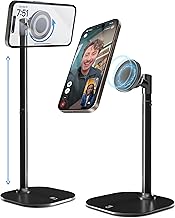
COOPER MagStand, Adjustable Magnetic iPhone Stand for Desk & Phone Holder for Video Recording, Compatible with MagSafe, Stand for iPhone 17 Pro Max, 16/15/14/13/12, Small Mag Safe Tripod (Black)
Best For:
Creators and remote workers who need portable, adjustable magnetic mounting for video and calls.
The COOPER MagStand focuses on portability and video-friendly ergonomics. This adjustable magnetic stand is built like a small tripod and is especially suited to creators, remote presenters, or anyone who often records video from their desk. The magnetic MagSafe-compatible head keeps your iPhone aligned while the adjustable legs or column let you change height and tilt for better framing.
Main benefits: for video calls or vertical content, the ability to quickly switch between portrait and landscape angles without removing the phone is invaluable. The COOPER MagStand’s compact shape makes it convenient for multi-location creators who move between home office and a secondary workspace. Compared with pancake pads or fixed-angle stands, this model gives more control over framing and distance from the mic and camera.
Real-life usage examples: imagine hosting a week-long webinar series — the stand lets you place the phone at eye level for flattering angles and keep it stable during screen-sharing or live demonstration. If you like to record TikToks or Instagram Reels at your desk, the magnetic tripod-style stand speeds setup and reduces the chance of the phone slipping mid-take.
Practical observations and buying considerations: tripod stands often trade off heavyweight stability for portability. Expect a lighter base than a substantial desktop stand; on clattering desks or when vigorously tapping the screen the setup might wobble. Also check whether the stand houses a built-in MagSafe charging puck or simply holds the phone — some versions are holders only and still require a MagSafe charger or cable to provide power.
Who should buy: content creators, frequent video callers, and anyone who needs an adjustable, portable MagSafe mount. Who may not need it: users who want a heavy-duty, ultra-stable desk base or those who prefer a full charging dock with integrated power delivery.
Check the latest price on Amazon.
Pros
- Adjustable angles for video and calls
- Compact and portable, good for multi-location use
- Works well with MagSafe alignment for quick docking
Cons
- Lighter tripod bases can wobble under heavy screen taps
- May require a separate MagSafe charger for power
Check the latest price on Amazon.
OMOTON MS05 360°Rotating Base Magnetic Phone Stand for MagSafe, [Height Adjustable] Foldable Cell Phone Stand for Desk, Office Desk Accessories for iPhone 17/16/15/14 Pro Max Air, Black
![OMOTON MS05 360°Rotating Base Magnetic Phone Stand for MagSafe, [Height Adjustable] Foldable Cell Phone Stand for Desk, Office Desk Accessories for iPhone 17/16/15/14 Pro Max Air, Black](https://m.media-amazon.com/images/I/71K4t+DVNeL._AC_UY218_.jpg)
Best For:
Users seeking a versatile, rotating MagSafe stand with height adjustment for everyday desk use.
OMOTON’s MS05 blends practical adjustability with a design built for everyday desk tasks. The stand’s 360° rotating base and height-adjustable column make it easy to shift between portrait and landscape or to find a comfortable viewing height for reading notifications, following recipes, or attending video meetings. As a MagSafe-compatible stand, the magnetic pad helps align your iPhone for cordless convenience.
Why it stands out: compared with fixed-angle plastic holders, a rotating base is simple but powerful — you can share your screen with a colleague, rotate for landscape video calls, or angle your phone for better lighting without lifting it off the stand. The height adjustment helps reduce neck strain and places the camera at a more natural angle for longer calls. The foldable design also makes it a decent option for packing into a commuter bag.
Real-world scenarios: use it at a busy desk where you need to glance at messages while editing documents. It’s also useful next to an external keyboard as a second-screen reference or facing a small group during quick collaboration sessions. For students, having a phone propped upright while studying or following lecture slides can be more ergonomic than laying the phone flat.
Practical notes and comparisons: compared with more premium aluminum stands, the OMOTON may feel slightly lighter but often comes at a significantly lower price, which appeals to budget-conscious buyers. Magnet strength and compatibility with MagSafe cases is usually reliable, though if you use bulky cases check user photos to confirm fit. Confirm whether the model includes cable routing or a USB-C input for integrated charging.
Who should buy: anyone who values adjustability and portrait-to-landscape rotation without a big price premium. Who may not need it: those who prefer a heavy, fixed-base premium metal stand or need an integrated multi-device charging station.
Check the latest price on Amazon.
Pros
- 360° rotation for easy switching between portrait and landscape
- Height adjustable and foldable for portability
- Good value compared to premium metal stands
Cons
- Lighter construction than heavy-duty desktop stands
- May require separate charger for fast MagSafe charging
Check the latest price on Amazon.
UGREEN Magnetic Phone Stand for MagSafe, Height Adjustable iPhone Stand for Desk with 360° Rotation Compatible for iPhone 17 Air 16 Pro 15 Pro Max 14 Plus 13 12 and MagSafe Case, Black

Best For:
People who want a sturdy, height-adjustable MagSafe stand with smooth rotation for daily desktop use.
UGREEN’s Magnetic Phone Stand leans into robust build quality and user-friendly adjustments. Known for producing reliable accessories, UGREEN designed this stand with a height-adjustable arm and 360° swivel so you can place the phone at eye level and spin it into landscape for videos or screen sharing. The MagSafe-compatible magnetic head keeps the phone aligned for charging and safe positioning during one-handed use.
Main benefits: the combination of sturdy construction and thoughtful movement makes this a go-to for desks where the phone is a daily companion. If you often take calls, refer to messages while working, or use the phone as a secondary display, the UGREEN stand’s stability matters. Compared with basic budget stands, it often feels more solid under finger taps and less likely to tip.
Everyday use examples: professionals who alternate between laptop and phone can prop the iPhone at a readable angle for Slack and email previews. Designers and coders who mirror screens to test mobile layouts will appreciate the quick rotation. In kitchen or workshop settings, a stable stand that resists knocks keeps recipes or how-to videos in view.
Buying considerations: UGREEN stands typically perform well right out of the box, but they may not include the MagSafe charger itself; you’ll often need to provide a USB-C PD adapter for full MagSafe power. Check whether your case supports MagSafe or if you’ll need a thin MagSafe-compatible case to preserve magnetic strength. Also confirm cable management features if you prefer concealed routing.
Who should buy: buyers who want a durable, adjustable MagSafe stand that feels more premium than low-cost alternatives. Who may not need it: travelers who want an ultra-compact tripod or users who already own a full charging dock with multiple device support.
Check the latest price on Amazon.
Pros
- Sturdy build and stable under taps
- Height adjustment and 360° rotation for flexible viewing
- Feels more premium than basic budget stands
Cons
- May not include MagSafe charger or power adapter
- Larger footprint than travel-focused tripods
Check the latest price on Amazon.
Mag.Safe Charger Stand for iPhone, Magnetic Wireless Charging Station for iPhone 17/16/15/14/13/12 Series (Onxy Black)

Best For:
Buyers who want a minimalist, upright MagSafe charging stand focused on the iPhone.
This Mag.Safe Charger Stand is a straightforward magnetic wireless charging station designed for people who want a clean, upright charging experience. The stand emphasizes minimalism: a vertical MagSafe-compatible charging surface that holds the phone at a convenient viewing angle while it powers up. It’s an attractive middle ground between flat wireless pads and heavier multi-device docks.
Key benefits: the upright position is ideal for hands-free FaceTime calls, video notifications, and using your phone as a secondary screen. Magnetic alignment reduces the fuss of centering the phone, which you typically face on Qi pads. Compared to larger 3-in-1 docks, a single-purpose MagSafe stand takes less space and usually costs less while offering better phone-first ergonomics.
Use-case scenarios: put this on a home office desk to keep your phone visible during meetings, use it on a crowded kitchen counter to follow recipes without bending over the phone, or place it on a bedside table for overnight charging with easy access to notifications in the dark. It’s especially useful for anyone who checks their phone often and wants to pick it up quickly between tasks.
Practical notes and comparisons: many single-purpose stands require a USB-C PD power adapter to deliver optimal MagSafe charging speeds; cheaper adapters will work but at reduced wattage. Because it focuses on one device, it’s not the right choice if you need to charge an Apple Watch or AirPods simultaneously. If you own a MagSafe case or a thin case, magnet strength will be optimal; thick or metal cases can interfere with magnetic coupling.
Who should buy: users who primarily want a reliable, space-saving MagSafe stand for daily phone use and charging. Who may not need it: people seeking multi-device stations or those who want a heavy-duty desk anchor with extensive cable routing.
Check the latest price on Amazon.
Pros
- Simple, space-saving design
- Great for hands-free calls and notifications
- MagSafe alignment for reliable charging
Cons
- Single-device focus — not a multi-charger
- May need a separate high-wattage adapter for top charging speeds
Check the latest price on Amazon.
Final Verdict
MagSafe accessories can dramatically simplify day-to-day phone use at a desk: they reduce cable fuss, improve charging reliability, and create better angles for calls and video. Your choice depends on whether you want an all-in-one charging station, a portable video stand, or a sturdy adjustable desk mount. For maximum convenience in a small space, a 3-in-1 dock brings everything together. For creators and travelers the compact magnetic tripod-style stand offers quick setup and framing control. For everyday desk work, a rotating or height-adjustable stand gives the best balance between ergonomics and affordability. Pair any MagSafe accessory with a compatible MagSafe case and a good USB-C PD adapter to get the best performance. If you’re ready to tidy your workspace, pick the option above that matches your routine and preferences and check the product links to learn more.
Check the latest price on Amazon.
Conclusion
These MagSafe accessories for iPhone desk setups picks are trending now and offer great value and variety. Check the links above for latest prices and reviews.
As an Amazon Associate, I earn from qualifying purchases.
Tags:
MagSafe accessories, iPhone desk stand, MagSafe charger, Magnetic phone mount, 3-in-1 charging station, adjustable phone stand, MagSafe desk setup
