Best External SSDs for 4K Editing on MacBook
As an Amazon Associate, I earn from qualifying purchases. This article may contain affiliate links, which means we may receive a commission at no extra cost to you.
As an Amazon Associate, I earn from qualifying purchases. This article may contain affiliate links, which means we may receive a commission at no extra cost to you.
If you edit 4K video on a MacBook, your internal drive can quickly become the bottleneck. External SSDs have become the go-to solution for videographers, content creators, and editors who need fast, portable, and reliable storage that keeps up with ProRes, 10-bit h.265, and multicam timelines. In this long-form guide I cover five standout external SSDs—options ranging from budget-friendly NVMe enclosures to high-capacity, rugged drives—so you can match speed, capacity, and durability to your workflow without guessing.
Below you’ll find a practical buying guide plus detailed descriptions of each recommended drive, who should buy it, real-world uses, pros and cons, and considerations for Mac compatibility and long editing sessions.
Buying Guide
Why an external SSD matters for 4K editing on a MacBook
Editing 4K footage requires sustained read/write throughput, low latency, and a stable connection. While modern MacBooks are fast, internal storage space is often limited—especially on smaller-capacity SSD configurations—so an external drive becomes essential for storing media, scratch disks, and finished exports.
Interface and real-world speed
Look for USB 3.2 Gen 2 (10Gb/s), Gen 2×2 (20Gb/s), or Thunderbolt 3/4. Advertised sequential speeds (e.g., 2,000MB/s) are maximums under ideal conditions. For most 4K editing, sustained write/read above 800–1,000MB/s yields smooth performance for single-camera 4K ProRes timelines; multi-cam or high-bitrate RAW workflows may need 1,500–2,000MB/s.
NVMe vs SATA
NVMe-based portable SSDs use faster flash and typically give higher sustained throughput and lower latency than SATA-based drives (like older T5-style units). NVMe is better for real-time 4K editing and large file transfers; SATA remains adequate for backups and lighter workflows.
Thermal throttling and endurance
High-speed NVMe chips generate heat. Drives with metal housings, heat spreaders, or built-in thermal throttling manage sustained workloads better. Also check TBW (terabytes written) or endurance rating if you plan to use the drive as a primary working volume.
Capacity and workflow
For editing a single 4K project, 1TB to 2TB is often the sweet spot. Multi-project archives, long-form footage, or RAW workflows will push you to 4TB or higher. Consider keeping an external HDD for cold storage and using the SSD for active projects.
Compatibility and file systems
Format to APFS for Mac-only workflows or exFAT for cross-platform use. For best performance with macOS video apps, use a trim-enabled driver or check the vendor’s macOS recommendations.
Cables, adapters, and ports
Use the shortest, high-quality USB-C or Thunderbolt cable you have. If your MacBook supports Thunderbolt 4, prefer TB4/3 drives for peak throughput; otherwise USB-C 3.2 Gen 2/Gen 2×2 delivers excellent performance at a lower price.
Practical buying considerations
Balance speed against price per GB and endurance. If you frequently edit on the go, prioritize a rugged, water/dust-resistant drive. For home studios, a desktop NVMe or RAID might suit better. Look for drives with a good warranty (2–5 years) and straightforward software for encryption and firmware updates.
Workflow tips
Use proxy editing when working with very high-bitrate RAW to avoid constant reliance on the drive’s top sustained speeds. Keep project files and cache on the SSD and archive completed projects to larger HDDs or cloud storage. Regularly back up—SSDs can fail and data loss is costly.
1TB External Hard Drive, Up to 2100MB/s, USB 3.2 Gen 2 Portable SSD, External Solid State Drive for Mac, Windows PC, Laptops, Gaming, iPhone — Ideal for File Backup, Content Creators & Videographers
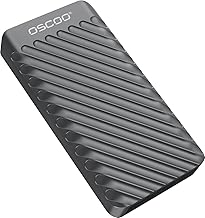
Best For:
Editors and videographers who need a portable NVMe working drive for single-project 4K timelines and fast on-location backups.
Why this drive matters for MacBook editors
This 1TB portable NVMe SSD promises speeds up to 2,100MB/s over USB 3.2 Gen 2—an attractive spec for editors who need fast transfer times and the kind of sustained throughput that holds up during multicam scrubbing and timeline playback. For MacBook users who regularly move between office, client sites, and on-location shoots, the drive offers a blend of performance and portability that fits easily in a laptop bag.
Performance and practical benefits
Advertised top speeds are useful for file transfers—offloading a full day’s worth of 4K footage becomes less of a time-sink. In day-to-day editing, sustained read speeds above 1,000MB/s reduce playback dropped frames when using ProRes or high-bitrate H.265 clips. The drive’s USB 3.2 Gen 2 interface ensures broad compatibility with modern MacBooks using USB-C/Thunderbolt ports; you won’t need special adapters for most setups.
Real-life usage scenarios
Use this SSD as your active project volume: store camera masters, scratch cache, and render cache on the drive while keeping exports on your internal SSD. It’s also excellent for rapid backups after a shoot—copying 50–100GB folders takes minutes instead of tens of minutes with older external HDDs. On location, pair it with a laptop and a card reader to ingest and verify footage quickly.
Design and thermal considerations
At these speeds, thermal management matters. Drives at this performance level either use metal enclosures or internal heat spreaders to minimize throttling during long transfers. For marathons of multicam editing, look for a unit with a robust housing and a steady performance profile rather than short peak bursts.
Who should buy this
Choose this 1TB NVMe SSD if you need a fast, portable working drive for single-project 4K timelines, quick backups on the go, and broad compatibility with MacBook USB-C ports. It’s a strong step up from SATA-based portable SSDs if you want fewer pauses and faster exports.
Who may not need it
If you only edit lower-resolution proxies, do infrequent video work, or primarily archive footage, a slower SATA SSD or a large-capacity HDD may suffice—and cost less per gigabyte.
Buying considerations
Check the warranty length and whether the vendor provides utilities for firmware updates and secure erase. Pair the drive with a quality USB-C cable (short and rated for high-speed transfers) to maximize performance. For cross-platform work, format to exFAT; for Mac-only workflows, APFS can offer advantages.
Check the latest price on Amazon.
Pros
- Very fast advertised speeds (up to 2100MB/s)
- Compact and highly portable for field use
- Good compatibility with modern MacBook USB-C ports
Cons
- Thermal throttling possible under long sustained loads without a metal housing
- 1TB may fill quickly for multi-day shoots
Check the latest price on Amazon.
Lexar D70E 1TB Dual Drive External SSD, Up to 2000MB/s Read and 1800MB/s Write, Durable Metal Housing Design, Cable-Free Portable SSD for USB Type-C/Type-A Devices, Compatible with iPhone 17

Best For:
Professional and prosumer editors who want consistent sustained write performance and a durable, cable-free portable SSD.
Why the Lexar D70E stands out for MacBook editors
The Lexar D70E is designed with speed and convenience in mind: near-NVMe performance (up to 2,000MB/s read and 1,800MB/s write) and a cable-free design that keeps things tidy when you’re working on the go. For Mac users who juggle both studio and location workflows, the D70E’s metal housing improves heat dissipation and looks flush on a desk or travel kit.
Performance that supports real editing
Sustained write performance near 1,800MB/s is notable because many drives hit high read peaks but fall back on writes—Lexar’s numbers suggest this model can handle continuous recording or export jobs without collapsing in speed. That stability is especially valuable when rendering timelines or copying long takes in a single run.
Practical usage scenarios
The D70E is ideal as an active project drive for 4K ProRes timelines or as a fast offload target for multiple camera cards. If you’re cutting multicam sequences or color-grading high-bitrate footage, the drive helps keep scrubbing smooth and renders predictable. Cable-free designs are handy when moving between machines: you won’t fumble with loose cords while switching ports or workstations.
Durability and daily handling
A metal shell does more than look premium: it acts as a heat sink during sustained transfers, which reduces thermal throttling and gives you steadier performance across long export jobs. For creators who travel frequently, the rugged feel and compact footprint make it a practical companion for airport and field work.
Who should buy this
Pick the Lexar D70E if you want near top-tier NVMe speeds in a tidy, durable package with strong sustained write performance—useful for editors who render or copy long-form 4K footage regularly.
Who may not need it
If you only create short-form content or primarily work with proxies, the extra write endurance and peak speeds may be overkill. Budget SATA SSDs or lower-capacity drives could meet your needs more affordably.
Buying considerations
Confirm whether the drive ships with both USB-C and USB-A connectors for full compatibility with older machines. Look at the included cable length and the manufacturer’s thermal management recommendation if you plan on extended editing sessions.
Check the latest price on Amazon.
Pros
- Strong sustained write and read performance
- Durable metal housing for better thermal control
- Cable-free design reduces clutter and lost cables
Cons
- 1TB capacity may be limiting for very large projects
- Higher performance models cost more per GB
Check the latest price on Amazon.
Samsung T7 Portable SSD, 1TB External Solid State Drive, Speeds Up to 1,050MB/s, USB 3.2 Gen 2, Reliable Storage for Gaming, Students, Professionals, MU-PC1T0T/AM, Gray

Best For:
Editors and content creators seeking a reliable, affordable, and compact SSD for everyday 4K editing and fast file transfers.
Why the Samsung T7 is still relevant for MacBook video work
The Samsung T7 isn’t the fastest NVMe on the market, but its combination of dependable performance (up to 1,050MB/s), compact design, and broad software support makes it a practical choice for many MacBook-based editors. Unlike higher-tier NVMe drives that trade cost for extreme speed, the T7 excels as a balanced workhorse for day-to-day 4K editing, proxy workflows, and rapid file transfers.
Real-world performance and reliability
At roughly 1,000MB/s, the T7 handles single-camera 4K ProRes timelines comfortably and performs blistering transfers compared to external HDDs. It’s particularly useful when you want predictable performance for light-to-moderate 4K workloads, fast backups, and moving project folders between machines.
Everyday use cases
Use the T7 as a scratch disk for Premiere Pro or Final Cut Pro projects, or store camera masters and LUTs while keeping an internal SSD for system and application files. For freelance editors who shuttle between client offices, the T7’s resilient build and easy-to-use Samsung utilities for encryption and firmware updates mean fewer surprises.
Comparing to higher-end NVMe drives
You’ll trade off top-end sequential speeds (1,050MB/s vs. 2,000MB/s+) and sustained write for a lower price and lower power draw. In practice, that means the T7 is not ideal for sustained 4K RAW recording or extremely heavy multi-cam timelines, but it’s often more than enough for creative professionals who primarily cut ProRes or H.264/H.265 footage.
Who should buy this
Choose the Samsung T7 if you need a compact, dependable SSD for everyday 4K editing, fast transfers, and cross-device compatibility without the higher cost of Gen 2×2 drives.
Who may not need it
If you work with high-bitrate RAW, extended 8K workflows, or require the fastest possible sustained writes, consider a higher-performance NVMe drive instead.
Buying considerations
Make sure you use the supplied cable or a certified USB-C cable to avoid speed issues. Format the drive to APFS for Mac-only editing or exFAT for cross-platform projects.
Check the latest price on Amazon.
Pros
- Dependable, consistent performance around 1,050MB/s
- Compact and well-supported with Samsung utilities
- Good value for general 4K editing and backups
Cons
- Lower peak and sustained speeds compared to newer NVMe models
- Not ideal for sustained RAW recording or extreme multi-cam loads
Check the latest price on Amazon.
SANDISK 4TB Extreme PRO Portable SSD – Up to 2000MB/s – USB-C, USB 3.2 Gen 2×2, IP65 Water and Dust Resistance, Updated Firmware – External Solid State Drive – SDSSDE81-4T00-G25,Black

Best For:
Professionals and production teams who need high capacity (4TB), ruggedness, and sustained high-speed performance for multi-day shoots and large libraries.
Why the SanDisk Extreme PRO is a top pick for heavy-duty MacBook editing
The SanDisk Extreme PRO Portable SSD targets creators who need both capacity and sustained speed. With USB 3.2 Gen 2×2 support and advertised throughput up to 2,000MB/s, it sits in the sweet spot between high-end NVMe pocket drives and larger desktop solutions. The added benefits—IP65-rated water and dust resistance and a 4TB capacity option—make it great for long shoots, multi-day projects, and field work where you need both speed and reliability.
Performance that scales to demanding workflows
A 4TB drive that can hit 2,000MB/s dramatically reduces the friction of ingesting and backing up multi-camera shoots. It also gives you room to keep multiple projects on the drive without juggling media between devices. Sustained reads/writes at high levels are valuable when exporting full-resolution timelines or working with high-bitrate codecs.
Field-ready features and durability
IP65 resistance means the drive can tolerate wet or dusty conditions better than most competition—an advantage for travel shooters, documentary filmmakers, and event production. Combined with a sturdy housing and firmware tuned for steady performance, it’s designed to be a reliable working drive outside the studio.
Use cases and workflow
This model is ideal as a long-term working drive for video producers who handle extended shoots or continually churn through large media libraries. Use it to store camera masters, run active projects, and as a primary offload station at events. The 4TB capacity removes the need to constantly archive mid-project, allowing a smoother, uninterrupted workflow.
Who should buy this
Choose the SanDisk Extreme PRO 4TB if you want a rugged, high-capacity, high-speed drive for serious 4K editing, field production, or as a central portable library for multiple projects.
Who may not need it
If you rarely exceed 1TB of active project data or mostly edit proxies, the cost and capacity may be more than you need. A smaller-capacity SSD or a desktop NAS could be more economical for archival storage.
Buying considerations
Check that your MacBook supports Gen 2×2 speeds for the full performance benefit; otherwise, Gen 2 (10Gb/s) will limit throughput. Consider a short, shielded USB-C cable and confirm the warranty terms for on-the-road coverage.
Check the latest price on Amazon.
Pros
- High capacity (4TB) for long-term project storage
- Up to 2000MB/s with Gen 2×2 support
- IP65 water and dust resistance for field reliability
Cons
- Requires Gen 2×2-capable host for maximum speed
- Larger capacity models are more expensive per unit
Check the latest price on Amazon.
Lexar ES3 1TB External SSD, USB 3.2 Gen2 Portable SSD, PSSD Up to 1050MB/s Read, 1000MB/s Write, External Solid State Drive Compatible with iPhone 16/15 Series/Mac/PS5/XBOX/Laptop/PC, Silver

Best For:
Budget-conscious editors and creators who need reliable near-NVMe speeds for everyday 4K editing and quick transfers.
Why the Lexar ES3 is a practical pick for MacBook editors on a budget
The Lexar ES3 sits in the sweet spot between cost and capability: roughly 1,050MB/s read and 1,000MB/s write puts it on par with many entry-to-mid level NVMe portable drives. For editors who want reliable 4K playback and fast transfers without paying for top-tier Gen 2×2 hardware, the ES3 offers sensible performance, straightforward compatibility, and a compact design.
Performance and everyday benefits
With sustained reads and near-1,000MB/s writes, the ES3 handles single-cam 4K timelines smoothly and provides fast copies from camera cards. It’s a sensible choice for freelance editors, vloggers, and students who need responsive storage for their active projects and can’t justify the cost of the absolute fastest drives.
Real-world editing examples
Use the ES3 as a scratch disk for Final Cut Pro or Premiere, keep proxy and project files on it to reduce strain on your MacBook’s internal SSD, or use it for fast client deliveries at coffee shops and co-working spaces. The drive’s reasonable thermal behavior and small footprint make it easy to pair with a MacBook during long editing sessions.
Comparing to other options
Compared with top-end NVMe units the ES3 trades peak throughput for affordability, but it’s faster than SATA-based portable SSDs and drastically faster than spinning HDDs. If your projects are mostly ProRes, H.264/H.265, or proxy-first workflows, the ES3 will meet the need without the premium price.
Who should buy this
Buy the Lexar ES3 if you’re a budget-conscious editor who still needs near-NVMe performance for 4K timelines and frequent file transfers.
Who may not need it
If you routinely work with RAW 4K/6K or multitasking multi-cam timelines that demand 1,500–2,000MB/s sustained, step up to a higher-performance NVMe drive with better cooling and higher endurance ratings.
Buying considerations
Check whether the kit includes a USB-C to USB-C cable and whether any software utilities are provided for firmware updates or drive maintenance. Format to APFS for macOS projects and exFAT if you share files with Windows systems.
Check the latest price on Amazon.
Pros
- Good value with near-1,000MB/s performance
- Compact and easy to carry
- Better performance than SATA SSDs and HDDs
Cons
- Not as fast as Gen 2×2 NVMe drives for extreme workloads
- Smaller capacity options can fill up quickly with large projects
Check the latest price on Amazon.
Final Verdict
Choosing the right external SSD for 4K editing on a MacBook comes down to matching speed, capacity, and durability to your actual workflow. If you need extreme sustained performance for multi-cam or RAW-heavy timelines, look for Gen 2×2 or Thunderbolt drives with strong thermal design. If you primarily edit ProRes or H.264/HEVC and value portability and cost-efficiency, a 1TB NVMe like the Samsung T7 or Lexar ES3 delivers dependable day-to-day performance. For frequent traveling professionals and teams who need both capacity and ruggedness, the SanDisk Extreme PRO 4TB brings the space and resilience to keep projects moving without constant archiving.
Remember to factor in cable quality, host port type, and file system when buying. Always keep a backup strategy—SSDs are fast but not a replacement for redundancy. Use proxies for very high-bitrate RAW to reduce strain on your external drive, and choose a drive that matches how you actually edit: lots of short clips, long-form continuous takes, or frequent client handoffs.
Taken together, the five drives above cover the typical range of needs for MacBook-based 4K editors: from budget-friendly, compact options to high-capacity, rugged workhorses. Pick the one that best aligns with the codecs you use, how long your shoots run, and whether you often edit on the go. Happy editing—and check the links below to review the latest specs and vendor details.
Check the latest price on Amazon.
Conclusion
These External SSD for editing 4K video on MacBook picks are trending now and offer great value and variety. Check the links above for latest prices and reviews.
As an Amazon Associate, I earn from qualifying purchases.
Tags:
external ssd macbook, 4k editing ssd, portable nvme ssd, best ssd for video editing, usb-c ssd for macbook, sandisk extreme pro, lexar d70e
