Best Phone Grips & Triggers for Mobile Gaming
As an Amazon Associate, I earn from qualifying purchases. This article may contain affiliate links, which means we may receive a commission at no extra cost to you.
Competitive mobile gaming is no longer just thumb swipes and luck — comfort, stability, and control make a measurable difference. If you spend hours in PUBG, Call of Duty Mobile, Free Fire or similar shooters, a dedicated phone grip accessory can reduce hand fatigue, steady your aim, and give you extra inputs for quicker reactions. This article rounds up several well-reviewed options — from multi-finger trigger setups to ergonomic grips and mini-joysticks — so you can match a solution to your phone size, play style, and budget.
Affiliate disclosure: As an Amazon Associate, I earn from qualifying purchases. This article may contain affiliate links, which means we may receive a commission at no extra cost to you.
What follows is a practical buyer’s guide and side-by-side look at five accessories frequently recommended by players and reviewers. I examined product descriptions, customer feedback, and common fit-and-use considerations so you can pick a grip that will actually improve sessions instead of creating more hassle.
Buying Guide
Why you need a phone grip for mobile gaming
Mobile shooters demand steadiness, quick reaction and comfortable hand positioning. Stock touch controls are fine for casual play, but in longer sessions or competitive matches, the little advantages matter: less wrist strain, a more secure hold during rapid movement, and an extra set of physical buttons that reduce the need to move your thumbs off-screen.
Types of grips and what they solve
– Trigger attachments: Simple to clip on, these provide shoulder-like buttons (usually two or four) that map to on-screen controls. They reduce thumb travel and speed up aiming and shooting. Best if you want extra inputs without a full controller.
– Full grips with ergonomic handles: These cradle the phone and provide a controller-like feel, cutting hand fatigue for long play sessions. They’re ideal for marathon gamers who value comfort.
– Mini joysticks/rockers: Small suction or adhesive joysticks attach to the touchscreen and emulate analog movement for smoother strafing. Useful for precision control in close-quarter fights.
– Combo kits: Kits combine triggers, grips and phone stands for a more complete setup but can be bulkier.
Compatibility & fit
Measure your phone and case thickness before buying. Many triggers use adjustable clamps or adhesive pads; full grips tend to be more forgiving but can block access to side-mounted buttons or fingerprint sensors. Look for ‘universal’ or specific max phone width in specs. If you frequently use a thick protective case, choose attachments with more clearance or plan to remove the case.
Build quality & comfort
Plastic clips are common and affordable; metal-backed triggers offer longer life but cost more. Soft foam or textured rubber around handles improves comfort and grip. Pay attention to adhesive pad quality and whether replacements are sold or if the product provides reusable pads.
Latency & precision
Mechanical triggers physically press the glass and can be reliable if well aligned. Joysticks that rely on suction or adhesive can drift over time; high-rated options often include simple repositioning tips in their manuals. For tournament play, choose accessories that don’t interfere with touch sensitivity and that align consistently with on-screen buttons.
Practical buying tips
– Read reviews for reports of slippage and fit on the specific phone model.
– If you switch phones or use a bulky case, prioritize adjustable mounts or removable grips.
– For long sessions, pick ergonomic handles with soft padding to reduce fatigue.
– If you want portability, favor foldable grips or stick-on joysticks that pack flat.
Below are five solid, differently styled choices to consider. Each product section includes who it’s best for, real-world use cases, practical observations from user feedback, and pros and cons to help you decide.
NUOBESTY Six Finger Gaming Trigger for Mobile Phones – Universal Gamepad Controller Accessories with Physical Buttons Enhanced Shooting Stability Comfortable Grip for Competitive Mobile Gaming

Best For:
Competitive mobile players who want a controller-like multi-button layout without a full gamepad.
If you want extra inputs and better control without committing to a bulky peripheral, the NUOBESTY Six Finger Gaming Trigger offers a multi-button approach that mimics a controller layout. Designed as a clip-on kit, this accessory adds physical shoulder and finger triggers that map to on-screen controls, giving competitive mobile players more ways to shoot, aim and peek without lifting thumbs off critical touch areas.
Main benefits
This six-finger configuration expands your possible inputs beyond the typical two-trigger setup. Players report faster reaction times because they can aim and shoot simultaneously using separate fingers, a big advantage in fast-paced battle royale and team shooters. The physical buttons feel tactile and, when aligned properly, don’t hinder touchscreen responsiveness.
Real-life usage examples
Imagine closing in on a final circle in PUBG Mobile: one hand stabilizes and aims with two fingers on shoulder triggers, while another finger performs quick melee or reload actions. Streamers who need multi-task control for quick weapon switching or ability casts also benefit from the extra hardware buttons. Several users noted that the kit works well with standard cases, but if you use an especially thick or rugged case, you may need to remove it for the best fit.
Why this product is valuable
Compared with single- or dual-trigger options, the six-button layout is a step toward a console-like control scheme without the size and cost of a full gamepad. It’s relatively lightweight and portable, making it suitable for commuters and tournament players who need extra inputs on the go. Customer feedback highlights the clear advantage for players who prioritize competitive edge and faster input combinations.
Who should buy it
Ideal for competitive mobile players who want more control without a wired controller. It suits aggressive FPS players, streamers, and anyone comfortable learning a more complex input layout. It’s also a good fit for phones within typical width ranges and those who occasionally remove bulky cases.
Who may not need it
Casual players who only play short sessions or prefer minimal setup may find the extra buttons unnecessary. If you prize absolute simplicity or rely heavily on touch gestures and face-mounted cameras, a six-button rig may be overkill.
Practical observations and considerations
Alignment is key: several buyers emphasized taking a few setup matches to tweak trigger placement. The plastic build is light and mostly durable, but heavy-handed players reported occasional loosening after months of use. If you travel a lot, keep the clamp in a protective pocket to avoid bending.
Pros: Intuitive multi-button layout for faster inputs; Comfortable clip-on grip; Good for competitive shooters.
Cons: Requires calibration and learning curve; Plastic parts may loosen with rough use.
Check it on Amazon.
Pros
- Adds six physical inputs for complex control
- Clip-on design that’s lightweight and portable
- Improves aiming and shooting coordination
Cons
- Requires setup and alignment time
- Plastic components can loosen with heavy use
Check it on Amazon.
13 in 1 Mobile Game Controller Combo – 4 Responsive Shooting Triggers with Phone Grip for PUBG, COD, Knives Out & Battle Royale Games

Best For:
Players who want an affordable, all-in-one starter kit to try grips and triggers across multiple games.
The 13 in 1 Mobile Game Controller Combo is a versatile accessory kit for players who want a little bit of everything. It usually bundles multiple shooting triggers, a supportive grip, and sometimes additional items like a phone stand or joystick caps. The idea is to give you a complete toolkit to improve comfort, accuracy and ergonomics without buying components separately.
Main benefits
The major advantage here is convenience. You get a phone grip to stabilize your device during longer sessions and four responsive shooting triggers that reduce thumb travel time. Because it’s a combo kit, it’s a smart choice for someone building a personalized setup: you can try several attachments and pick what works for you. Users often praise the variety of pieces and how the grip reduces wrist strain during marathon matches.
Real-life usage examples
This kit is great for a player who alternates between games — for example, someone who plays a couple of quick matches of COD Mobile, then switches to a session of Knives Out or a relaxed building game. The grip provides a steady base when you’re aiming down sights, and the triggers help in clutch firefights where fractions of a second matter. Several players reported using the kit at LAN-style meetups or while traveling because the parts pack flat and can be mixed and matched based on the phone and case.
Why this product is valuable
Compared to single-purpose triggers, combo sets are economical and flexible. If you’re not sure whether you prefer triggers, grips, or joysticks, this set lets you experiment. Also, replacements or alternate configurations can be assembled from the included parts, so you’re less likely to be stuck with a single feature you don’t use.
Who should buy it
Ideal for casual-competitive players who want to test different accessories before committing to a single style. Also good for people who like modular setups and want to tailor grips and triggers to different games.
Who may not need it
If you already own a high-quality controller or want an ultra-minimal setup, the kit’s variety may be unnecessary. Purists who prefer Bluetooth controllers may also find the combo redundant.
Practical observations and considerations
Check the adhesive quality and look for reviews on long-term stickiness if the kit includes suction or adhesive pads. Some users noted that after several weeks, repositioning pads may be required. The plastic components are usually budget-friendly, so handle them gently during packing.
Pros: Versatile all-in-one kit; Good value for testing options; Includes both grip and triggers.
Cons: Adhesive or suction parts may need occasional repositioning; Not as durable as premium single-purpose hardware.
Check it on Amazon.
Pros
- Comprehensive kit with multiple attachments
- Good value for experimenting with different setups
- Grip reduces wrist fatigue in longer sessions
Cons
- Adhesive parts can lose stickiness over time
- Build quality is generally budget-level
Check it on Amazon.
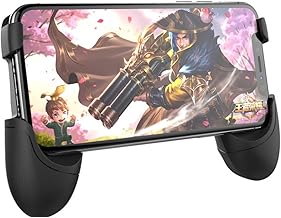
Universal Mobile Game Joystick Spiral Mini Joystick Game Handle Grip Controller Rocker Joypad Foldable Stand Holder for Cellphones (Handle Holder)
Best For:
Gamers wanting portable analog-like control for precise movement without bulky hardware.
Small, simple and often overlooked, the Universal Mobile Game Joystick is a pocket-friendly accessory that sticks to your touchscreen and mimics analog movement. This spiral mini joystick is typically made from a soft cap and a suction or adhesive base, and it’s designed to fold flat when not in use. The benefit is smoother movement for strafing, better thumb rest and improved fine control when you’re making micro-adjustments.
Main benefits
Analog-style control on a touchscreen can feel more natural for certain movement patterns, especially when edging around corners or performing delicate strafes. The joystick’s soft cap provides a tactile surface for your thumb and can reduce finger slip during sweaty matches. Foldable designs add portability — toss it in a pocket or the bottom of a bag when you’re done.
Real-life usage examples
For a player switching between long-range sniping and close-quarters fights, the joystick can make small adjustments feel more predictable. Users who play arena-style shooters or MOBAs that require precise positioning appreciate the extra tactile feedback. Many players pair the mini joystick with shoulder triggers to create a hybrid setup: triggers for shooting and the joystick for movement.
Why this product is valuable
Compared with full-size controller attachments, the mini joystick is far cheaper and far more portable. It’s an excellent entry-level accessory and a good complement to trigger attachments. While not a perfect substitute for a physical analog stick on a dedicated controller, it delivers a noticeable improvement over bare glass for fine movement control.
Who should buy it
Perfect for mobile gamers who want improved analog-like control without bulk — commuters, casual competitive players, and those who value portability. Also handy for players who frequently change phones and want something universal.
Who may not need it
If you already prefer full Bluetooth controllers or find suction/adhesive solutions unreliable, a mini joystick may not add enough to justify carrying it.
Practical observations and considerations
Longevity depends on the adhesive or suction mechanism. Buyers often recommend cleaning the screen area before sticking to improve hold, and rotating or replacing the joystick cap after extended use. Also confirm the joystick’s diameter feels comfortable for your thumb size before committing.
Pros: Highly portable and inexpensive; Improves fine movement control; Folds flat for travel.
Cons: Adhesive/suction can weaken; Not as precise as a full controller’s analog stick.
Check it on Amazon.
Pros
- Compact and foldable for travel
- Improves fine movement and thumb grip
- Affordable entry-level accessory
Cons
- Suction/adhesive can lose effectiveness
- Less precise than a dedicated controller analog stick
Check it on Amazon.
PUK Phone Gaming Grip – Black & Green Ergonomic Mobile Game Handle with Adhesive Pads – Mobile Game Controller Grip to Reduce Hand Fatigue – Android Phone Gaming Accessories

Best For:
Marathon gamers, streamers, and players who prioritize comfort and reduced hand fatigue.
The PUK Phone Gaming Grip focuses on ergonomics: a handle-style mobile grip with adhesive pads that secure the phone in place and provide a contoured surface for long gaming sessions. Its bold black-and-green styling is eye-catching, but the real draw is the emphasis on reducing hand fatigue and providing a steadier aim when playing extended matches.
Main benefits
This grip converts a phone into a controller-like device with handles to distribute weight and reduce strain on fingers and wrists. Players who switch from console controllers to mobile often appreciate the familiar hold. Adhesive pads are designed to be removable and reusable, offering a balance between a firm hold and the ability to reposition or remove the grip when you want to carry your phone normally.
Real-life usage examples
For marathon gamers or streamers who record sessions, the PUK grip is a clear win for comfort. It helps when you’re looting in battle royales, holding aim steady for sniper shots, or simply trying to avoid cramping during a long squad night. Reviewers point out that the adhesive pads work best on clean, case-free phones or thin cases; thicker protective cases sometimes reduce pad effectiveness.
Why this product is valuable
Compared to clip-on plastic triggers, this grip offers a full-hand solution for comfort. It’s particularly valuable for players who prioritize ergonomics over extra inputs. The handle design reduces micro-movements and shakes that can throw off precise shots, which many players say improved their in-game consistency.
Who should buy it
Recommended for players with long gaming sessions, streamers, or anyone who experiences hand fatigue with standard phone holds. Also useful for those who prefer a controller-like experience without buying a dedicated Bluetooth gamepad.
Who may not need it
If you primarily play short bursts or prefer lightweight, minimal setups, a full handle grip may feel bulky. Also, if you use a very thick phone case, adhesive pads may not hold as securely.
Practical observations and considerations
Customers suggest cleaning the phone surface before applying the adhesive pads for best performance. Expect an adjustment period as your hands get used to the new grip. If you plan to switch phones often, keep in mind repeated sticking can leave residue, so check for included replacement pads.
Pros: Ergonomic handle reduces hand fatigue; Reusable adhesive pads; Familiar controller-like hold.
Cons: Adhesive best on thin or no-case phones; Bulkier than minimalist triggers.
Check it on Amazon.
Pros
- Ergonomic handle reduces strain
- Reusable adhesive pads for a secure hold
- Controller-like comfort without Bluetooth
Cons
- Less effective with thick cases
- Adds bulk to the phone
Check it on Amazon.
Mobile Gaming Clip

Best For:
Users who pair phones with Bluetooth controllers or want a compact, portable mounting solution.
A Mobile Gaming Clip is a simple, often affordable accessory designed to attach a phone to other controllers or provide a modest grip solution for handheld gaming. Depending on the model, clips can transform a phone into a pseudo-console controller when paired with a Bluetooth gamepad, or simply provide a stabilizing clamp for better one-handed comfort.
Main benefits
Clips are extremely versatile. If you already own a Bluetooth controller, a clip that connects your phone to the controller eliminates the need for separate accessories. If used on its own, certain clips act as small grips or stands for more stable aiming. The portability and simplicity are the main selling points: clips are light, quick to attach, and usually inexpensive.
Real-life usage examples
Players who mirror console controls to mobile — for example, pairing with a PlayStation-style Bluetooth controller — use clips to mount the phone directly above the controller, creating a compact, all-in-one setup for comfortable sessions on the couch or in transit. Others use single-piece clips to add a bit of hand support for longer mobile-only matches. Reviewers appreciate that many clips fold flat and fit into gaming backpacks.
Why this product is valuable
Compared to dedicated mobile grips or complex trigger kits, a clip is minimalist and low-commitment. It’s a great middle ground for people who want improved ergonomics or plan to use a separate controller too. Since it doesn’t obstruct the screen or side buttons as much as some grips, it’s a flexible choice.
Who should buy it
Perfect for gamers who already use or plan to use a Bluetooth controller and want a neat, integrated setup. Also handy for players who want a small ergonomic boost without extra attachments.
Who may not need it
If you don’t use a Bluetooth controller and prefer physical triggers or full grips, a clip may not provide enough benefit. Heavy competitive players who need fast built-in triggers should look elsewhere.
Practical observations and considerations
Ensure the clip’s clamp range matches your phone’s width and any case you use. Some clips are designed for specific controller widths, so check compatibility if you own a nonstandard gamepad. Users praise those with rubberized clamps that protect the phone finish.
Pros: Lightweight and portable; Integrates well with Bluetooth controllers; Minimalist and unobtrusive.
Cons: Limited functionality by itself; Not a replacement for dedicated triggers for serious competitive play.
Check it on Amazon.
Pros
- Compact and lightweight
- Great for pairing with Bluetooth controllers
- Minimal obstruction of phone buttons and screen
Cons
- Limited standalone functionality
- Compatibility depends on phone/controller sizes
Check it on Amazon.
Final Verdict
Choosing the right phone grip accessory comes down to how you play and what you want to prioritize. If raw competitive edge and extra inputs matter most, the NUOBESTY Six Finger Gaming Trigger brings a controller-like multi-button layout that can speed up reactions once you learn the placement. For players who want a complete starter toolkit, the 13 in 1 combo offers a flexible way to test triggers and grips without committing to one style. If portability and precise analog-like movement are your primary goals, the spiral mini joystick delivers improved strafing and thumb control in a pocketable form. For marathon sessions where comfort is king, the PUK Phone Gaming Grip focuses squarely on ergonomics and reduced hand fatigue. Finally, if you already own a Bluetooth controller or want a minimalist solution, a Mobile Gaming Clip ties your phone to a gamepad without adding bulk.
Practical buying checklist: measure your phone and case thickness, read reviews for notes on adhesive durability, and consider whether you’ll use the accessory solo or paired with a controller. Each of the products above addresses different trade-offs between portability, extra inputs, and comfort.
If you’re unsure, start with a combo kit or a mini joystick to see what matters most in your gameplay. If comfort is your main concern, invest in an ergonomic grip. Competitive players who want more on-screen coverage should consider multi-trigger setups.
Check the latest price on Amazon.
Conclusion
These Phone grip accessory for secure mobile gaming picks are trending now and offer great value and variety. Check the links above for latest prices and reviews.
As an Amazon Associate, I earn from qualifying purchases.
Tags:
phone grip gaming, mobile gaming triggers, mobile game controller, phone joystick, mobile gaming accessories, PUBG mobile grip, COD mobile triggers
