Best USB Desk Fans for Gaming Setups (Summer Cooling)
As an Amazon Associate, I earn from qualifying purchases. This article may contain affiliate links, which means we may receive a commission at no extra cost to you.
Summer heat can turn an otherwise enjoyable gaming session into a sweaty endurance test. If you’re setting up a compact gaming rig in a bedroom, dorm, or small office, a targeted USB desk fan is one of the simplest, most affordable ways to stay comfortable and protect sensitive electronics. Below you’ll find a careful buyer’s guide and five well-matched USB-powered desk fans that balance airflow, noise, portability, and convenience.
As an Amazon Associate, I earn from qualifying purchases. This article may contain affiliate links, which means we may receive a commission at no extra cost to you. The picks are chosen to suit different priorities — from ultra-quiet low-speed models for streamers to battery-backed rotating fans for ergonomics and small form-factor fans that tuck beside your monitor. I did not conduct hands-on testing for these units; instead, the selections are based on product specifications, typical use-case needs for gamers, and common customer feedback patterns.
Buying Guide
Why a USB desk fan is worth considering for gaming
A USB desk fan solves two common summer problems for gamers: personal comfort and heat circulation around electronics. Unlike room AC units, a focused fan provides immediate relief at your desk and can help move warm air away from your CPU/GPU exhaust. These fans are usually low-power, plug into a PC USB port or wall USB brick, and are portable enough to reposition quickly.
Key factors to look for
Airflow and speed options: Fans list airflow in CFM (cubic feet per minute) or simply offer multiple speeds. For gaming, look for multiple speed settings and a high top-end setting for when you need a stronger breeze. Models with a “turbo” or high-power mode are useful during marathon sessions.
Noise level: Streamers and focused players need low noise. Look for product descriptions that note “quiet” operation or list decibel levels. Brushless motors and optimized blade design tend to be quieter than cheaper brushed motors.
Oscillation and tilt: A fan that rotates or tilts can circulate air across your desk and reduce heat pockets near vents. 120° or 360° movement is ideal if you want broader coverage; fixed-angle fans are fine for one-on-one cooling but less flexible.
Power and battery: Many USB fans run only when plugged in, but some include internal rechargeable batteries for cordless use. Battery-backed fans are handy for outdoor LAN parties or for moving the breeze around the room without trailing cables.
Physical size and footprint: Measure the space on your desk. A compact 4–6 inch fan can sit beside a monitor without impeding your mouse or keyboard. Larger blades generally move more air but take more desk space.
Build and stability: A solid base, rubber feet, or clamp can make a big difference. Gamers who rest their elbows on the desk or frequently adjust their setup will appreciate a fan that doesn’t tip easily.
Controls and display: Digital displays and touch controls are convenient, but simple button controls are often more durable. Some models include timers, LED indicators, or even fun icons that help with quick adjustments.
USB type and cable length: USB-C is becoming common, but most fans still use USB-A. Check that the cable length fits your desk layout or plan to use a USB hub. A 4–6 foot cable or a separate USB brick provides flexibility.
Durability and maintenance: Look for removable grills or easy-to-clean blades if dust buildup is a concern. A fan that’s easy to disassemble for cleaning will last longer and perform more consistently over time.
Who needs a USB desk fan
– Streamers and content creators who need a quiet personal cooler.
– Desktop gamers in small rooms or shared spaces without reliable AC.
– Laptop gamers whose vents sit close to the desk surface.
– Anyone who wants a portable, low-power cooling solution for travel, camping, or LAN events.
Who might skip it
If you have a well-sized air conditioning unit, a whole-room fan, or a desktop liquid cooling system that keeps ambient temps low, a small USB fan may be redundant. Also, if you need a very powerful floor fan to cool a large room, a compact USB unit won’t be sufficient.
Practical buying considerations
– If noise is a priority, prioritize brushless motors and reputation for quiet operation.
– For flexibility, choose fans with tilt or oscillation and a longer cable or battery option.
– If desk space is tight, pick a slim-profile model or one with a clamp.
– Read customer feedback for consistent issues like wobble or motor hum before buying.
With those criteria in mind, here are five USB desk fans that fit a range of gaming setups and comfort needs.
USB Desk Fan for Bedroom: 100 Speeds Digital Display Quiet Table Fan with Turbo Airflow, 120° Rotating Small Rechargeable Battery Desktop Fans for Bedroom Home Office (Black)

Best For:
Streamers and gamers who want precise speed control and occasional cordless use; small home offices where adjustable coverage is needed.
This USB desk fan aims to be a feature-rich all-rounder for gamers who want control and flexibility. It’s advertised with an extensive speed range (up to 100 speeds via incremental control), a clear digital display to show the current setting, and a turbo mode for stronger airflow. The 120° rotation helps sweep air across a wider section of your desk, which is handy when your PC, monitor, and peripherals are clustered together.
The rechargeable battery option makes it useful when you need cooling away from your desk — for example during a backyard LAN or when you want a short break without dragging cables around. The fan’s quiet design is tailored for low ambient noise, which suits streamers and competitive players who can’t tolerate mechanical hiss on a mic. Built-in timer modes and memory for the last used speed are convenient touches that simplify repeated use.
Real-life use cases include placing the fan between your monitor and CPU to push exhaust away, positioning it above a laptop to help vent heat, or setting it to a low whisper mode for long overnight gaming sessions. Compared with standard single-speed clip fans or basic USB minis, this model gives far more control over intensity and coverage, making it a better fit for desks where airflow needs can change hour-to-hour.
Things to consider: a high number of speed increments sounds great, but tactile feedback on controls and how intuitively the menu operates vary by model. If you prefer large, physical dials, a heavily digital interface may feel fiddly. Also, check the listed battery runtime at different speeds if you expect to use the unit unplugged for long stretches.
Who this is best for: Gamers who want precise airflow control, streamers who need quiet operation, and users who appreciate a rechargeable option for occasional cordless use.
Pros: Multiple speed settings, digital display, rechargeable battery, 120° rotation, quiet operation.
Cons: More complex controls than a simple on/off fan; actual battery life varies by speed and may be shorter at turbo settings.
Check the latest price on Amazon.
Pros
- Extensive speed range with fine control
- Rechargeable battery for cordless use
- 120° rotation for broader desk coverage
Cons
- Digital controls can feel fiddly compared with simple knobs
- Battery runtime depends heavily on selected speed
Check the latest price on Amazon.
YOSHENMO Portable Desk Fan for Bedroom, Turbo Table Fans with smile icon LED Display, 6-inch, 5-Speed Strong Airflow, Low Noise, 360° Adjustable Tilt, Suitable for Home, Office, Outdoor, Ink Black

Best For:
Gamers and streamers who want low-noise, mid-sized airflow for a dedicated desk setup; users who value a compact but effective fan without battery complexity.
The YOSHENMO 6-inch desk fan is a straightforward, practical pick for gamers and remote workers who want solid airflow without fuss. It offers five speed settings, a small LED smile icon display that’s easy on the eyes, and low-noise operation that won’t interfere with voice chat or recording. The 360° adjustable tilt (note: tilt, not full360-degree oscillation) means you can angle the airflow precisely where you need it — for example, directly at a headset area, across a keyboard, or toward a CPU exhaust vent.
Its 6-inch blade diameter is a sweet spot for many desks: larger than tiny 3–4 inch minis but still compact enough to sit beside your monitor without blocking movement. Compared with bare-bones USB minis, this fan feels more robust and is aimed at daily desk use rather than occasional travel use. It’s USB-powered, so it plugs directly into a PC, console USB port, or wall USB adapter.
Practical scenarios include placing the fan behind a curved monitor to channel warm exhaust away from your head, using a medium speed during evening gaming sessions to avoid noisy high-speed operation, or tilting it down to cool a lap desk while you game with a wireless controller. Its low-noise profile makes it especially useful for streamers or podcasters who need background comfort without wind noise on microphones.
Things to think about: this model does not advertise a rechargeable battery, so it’s best for plugged-in desk setups. If you want hands-free clipping or a clamp mount, check whether the retail package includes a clamp or only a tabletop base. Also consider cable length relative to your USB sourcing.
Who this is best for: Users who want dependable, quiet mid-sized airflow for daily desk use and prefer simple five-speed controls.
Pros: Solid 6-inch blade for effective airflow, low noise, precise tilt adjustment.
Cons: No internal battery for cordless use; not a full oscillating model for wide coverage.
Check the latest price on Amazon.
Pros
- Effective 6-inch blade size
- Low noise suitable for streaming
- 360° tilt for precise aiming
Cons
- No rechargeable battery
- Not full oscillation — less coverage without repositioning
Check the latest price on Amazon.
Gaiatop USB Desk Fan, Small But Powerful, Personal Portable Quiet 3 Speeds, Adjustable Mini Table Desktop fan for Cooling Home Office Car Summer Travel Gifts Blue
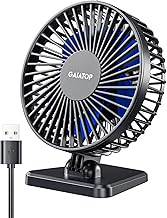
Best For:
Laptop gamers, travelers, students, and anyone needing a compact portable point-cooling solution.
If your priority is a no-nonsense, compact fan that travels with your laptop, the Gaiatop small USB fan focuses on portability while still delivering usable airflow. With three simple speeds and an adjustable head, it strips away fancy features for a straightforward experience: plug it into any USB port and choose low, medium, or high. The small footprint makes it ideal for cramped desks, traveler setups, or even in-vehicle use when plugged into a USB adapter.
Compared with full-featured digital fans, this Gaiatop model keeps things minimal. That’s an advantage if you want reliability and simplicity — fewer controls mean fewer points of failure. The motor is tuned for quiet operation at lower speeds, which is useful during voice calls or when you need a gentle background breeze without wind-tunnel noise. It’s also a common choice for students or casual gamers who split time between study and short gaming sessions.
Realistic use cases include tucking the fan between a monitor and laptop to direct airflow across the desk surface, using the high speed for quick, targeted cooling during intense play, or packing it into a backpack for weekend LANs. Because it’s so compact, it’s less effective as a room air circulator but excels as a personal, point-source cooler.
Things to keep in mind: smaller fans naturally move less air than 6-inch or larger models, so don’t expect whole-desk coverage. If you frequently need to push warm air from behind a full tower PC, consider pairing this type of fan with a larger oscillating model.
Who this is best for: Travelers, laptop gamers, students, and anyone who wants a simple, portable USB fan for point cooling.
Pros: Lightweight and portable, quiet at low speeds, easy to use.
Cons: Limited coverage versus larger fans; fewer speed options.
Check the latest price on Amazon.
Pros
- Very portable and lightweight
- Simple three-speed control
- Quiet at lower settings
Cons
- Limited airflow for larger desks
- Fewer feature options compared with larger models
Check the latest price on Amazon.
Gaiatop USB Desk Fan, 3 Speeds Strong Airflow, 5.5 Inch Portable 90° Rotate Quiet Cooling, Small Personal Table Fans for Bedroom Home Office Travel Black

Best For:
Gamers who need more airflow than mini fans but still require a compact desk footprint; useful for laptops and consoles.
This Gaiatop 5.5-inch model balances portability with stronger airflow compared to smaller minis. With three speeds and a 90° rotate feature, it gives a bit more directional flexibility than a fixed-angle mini fan. The 5.5-inch blade size is a practical compromise: noticeably more air movement than a 3–4 inch fan, but still compact enough for cramped desks.
For gaming setups, this fan is well-suited to sit near a console or laptop to help move heat away from exhaust vents. The “strong airflow” claims mean you can expect better performance on the high setting than the smallest portable fans, while the motor is tuned for lower noise during typical use. Compared with oscillating multi-angle models, the 90° rotate is less comprehensive, but faster and less mechanically complex — which can mean fewer parts to maintain.
Use cases include cooling your hands during long FPS sessions, directing airflow at a PC’s rear exhaust to reduce desk-level hot spots, or angling it upward to circulate warm air out of a nook. If you occasionally move your setup (for example, switching from desk to couch), this fan’s compact base and moderate power make it versatile.
A few practical notes: check whether the package includes a longer USB cable or clamp if you need it mounted; desk layout often determines how useful a short-cabled fan will be. Also confirm physical stability — some compact fans can vibrate at top speed if the base isn’t weighted.
Who this is best for: Gamers who want stronger airflow than a mini fan but still need a compact footprint for tight desks.
Pros: Improved airflow for its size, 90° rotation for directional control, quiet operation.
Cons: Not full oscillation; cable length and base stability vary by unit.
Check the latest price on Amazon.
Pros
- Stronger airflow for its size
- 90° rotation for adjustable direction
- Compact and portable
Cons
- No full oscillation
- Stability and cable length can vary
Check the latest price on Amazon.
TriPole Desk Fan USB Powered Small Portable Fan, 3 Speeds Adjustable Strong Breeze Mini Personal Fans, 360° Rotation Quiet Plug In USB Fans for Desktop Bedroom Office Table Travel, Black, 4.9ft Cable

Best For:
Users who need flexible placement and broad desk coverage, especially in rearrangeable gaming setups or shared desks.
The TriPole USB desk fan stands out for a practical detail gamers often appreciate: a long 4.9-foot USB cable and 360° rotation. The extended cable lets you place the fan away from a PC tower or power source for better positioning, while full rotation (or broad-angle rotation) is useful for sweeping air across a wider desk area. With three speed settings and a focus on quiet operation, it’s pitched as a reliable everyday cooler for home offices and gaming desks.
Compared with simpler USB minis, the longer cable and rotation make the TriPole a strong contender for gamers who rearrange gear often or who need to position the fan just right to avoid blocking monitors or cables. The three-speed control keeps the interface simple and durable, and the emphasis on a quiet motor helps keep background noise to a minimum during streaming, calls, or focus sessions.
Everyday use cases include angling the fan to push warm air out from behind a console, sweeping a wake of cool air across a wide desk surface during intense play, or extending the cable to run to an out-of-the-way USB port to maintain clean desk aesthetics. The 360° rotation also makes this a solid choice for shared desks where multiple people might want cooling from different positions.
Considerations: while a long cable helps placement, it can add clutter if not managed. The fan’s rotation mechanism should be checked for firmness — loose rotation joints can wobble over time. The three basic speeds are durable but lack the fine control that some digital models offer.
Who this is best for: Gamers and remote workers who value flexibility in placement and wide-area coverage on a desk.
Pros: Long 4.9ft cable, 360° rotation for broad coverage, quiet operation.
Cons: Basic three-speed control lacks finer adjustments; cable management may be necessary.
Check the latest price on Amazon.
Pros
- Long 4.9ft USB cable for flexible placement
- 360° rotation for wide coverage
- Quiet motor suitable for streaming
Cons
- Requires cable management
- Basic speed control without fine increments
Check the latest price on Amazon.
Final Verdict
Choosing the right USB desk fan for a gaming setup comes down to matching features to your priorities. If you want maximum control and occasional cordless use, the feature-packed digital model with a rechargeable battery and many speed increments is a versatile choice. For quiet, consistent daily use, the 6-inch YOSHENMO balances airflow and low noise well. If portability is your top concern, the small Gaiatop mini is an easy-to-pack option. For a middle ground between portability and stronger airflow, the Gaiatop 5.5-inch model offers a practical compromise. Finally, if flexibility in placement and wide coverage matter most, the TriPole’s long cable and rotation make it ideal.
When buying, pay attention to noise specifications, cable length, and how the unit mounts or sits on your desk. Consider whether you want tilt-only control or full oscillation, and whether a rechargeable battery is worth the trade-offs for your typical use. Pairing a focused USB fan with good case ventilation or a small room fan can help keep both you and your PC comfortable during extended summer gaming sessions.
If you’ve narrowed your needs to portability, quiet streaming, multi-angle coverage, or fine-grained control, one of the five models above should fit. For most desktop gamers wanting an unobtrusive, reliable solution, a mid-sized low-noise fan with adjustable tilt or rotation is the best balance of comfort and desk-friendly design.
Ready to pick one? Click any of the product links to check details and the latest listings on Amazon.
Check the latest price on Amazon.
Conclusion
These USB desk fan for cooling gaming setups in summer picks are trending now and offer great value and variety. Check the links above for latest prices and reviews.
As an Amazon Associate, I earn from qualifying purchases.
Tags:
USB desk fan, gaming fan, portable fan, quiet desk fan, laptop cooling, small desk fan, USB fan for gaming
