Best Multi-Device Charging Docks for Families
As an Amazon Associate, I earn from qualifying purchases. This article may contain affiliate links, which means we may receive a commission at no extra cost to you.
Managing cords and charging multiple phones, tablets, and even laptops at once is a daily reality in many households. This guide compares five well-reviewed multi-device charging docks designed to keep a family’s devices powered, organized, and safe. Whether you need a compact five-port station for a small counter or a high-watt, multi-USB-C hub to feed power-hungry laptops and phones at once, there’s an option here. Before we dig into the products, a quick note: As an Amazon Associate, I earn from qualifying purchases. This article may contain affiliate links, which means we may receive a commission at no extra cost to you.
Buying Guide
Why a multi-device charging dock makes sense: Most families juggle phones, tablets, e-readers, wireless earbuds, and sometimes laptops. Instead of leaving devices scattered around or using multiple wall adapters and a cluttered power strip, a centralized charging station simplifies charging, reduces cable mess, and helps you spot devices quickly.
Key things to consider when choosing a dock
– Ports and port types: Count the devices you regularly charge. Look for a mix of USB-C and USB-A ports if you have a blend of newer and older devices. USB-C PD (Power Delivery) ports are essential for fast charging laptops and modern phones.
– Total wattage and per-port distribution: A charger might advertise a high total wattage, but how that power is split matters. For families that charge a laptop and multiple phones at once, ensure at least one port delivers high PD output (60W–120W) while other ports can still supply steady current.
– Physical layout and cable management: Vertical docks or those with slots to stand phones and tablets help keep counters tidy. If you prefer to keep your own cables, choose a hub without built-in short cables. If you want an out-of-the-box tidy setup, a dock that includes short cables and slots can be helpful.
– Safety and heat management: Overcurrent, overvoltage, and short-circuit protection are important. A bulky power brick that vents well is often better for continuous multi-device charging than tiny adapters that run hot.
– Use cases and portability: If you plan to move the charger (office to kitchen), a lighter 5–6 port station might be more convenient. For a permanent family charging center, a high-watt desktop hub is worth the space.
Standard alternatives to docking hubs include single-port high-power chargers plus a power strip or wireless charging pads. Those approaches work but usually increase clutter and don’t centralize device placement. The docks below were selected to cover a range of household needs: compact organizers, mid-range multi-port hubs with included cables, and high-watt desktop chargers for laptops and tablets.
420W Charging Station for Multiple Devices, Zobirez 10-Port USB C Fast Charger Stations for MacBook, iPhone, Android Cell Phone, iPad, Tablet, Family Multi-Device Organizer Charging Dock, Black

Best For:
Households or home offices that need a single, high-capacity desktop charging hub for laptops, tablets and multiple phones.
If your household needs are leaning toward a full desktop charging center that can handle laptops, tablets and a handful of phones at once, a 10-port 420W station is designed for that workload. This Zobirez 420W Charging Station advertises a large total output and a mix of USB-C fast charging ports suitable for modern phones and tablets. A setup like this is intended to replace multiple wall bricks and offer a single, more organized power source for family devices.
What this solves: Houses with several active devices—teenagers with phones, partners with tablets and laptops, plus smart accessories—often compete for limited outlets. A single 10-port hub consolidates all charging to one convenient location and reduces cable spaghetti. The high total wattage indicates it’s engineered to distribute power across several devices without starving any single gadget when multiple items charge simultaneously.
Real-life use cases: Imagine a kitchen counter where everyone drops a device before dinner—two phones, a tablet for recipes, a Kindle, and a laptop that needs topping up. This station lets you plug each device into a clearly labeled port and rely on the station to manage distribution. It’s also useful on a shared home office desk where a laptop and peripherals need continuous power while phones are routinely charged.
Features to notice: With a 10-port layout, look for a combination of USB-C and USB-A ports to maintain backward compatibility. Cable routing and a compact footprint are helpful if counter space is limited. Also watch for LED indicators that confirm active charging and ventilation or thermal design notes to ensure the hub runs cool under load.
Who should buy this: Families or small households that routinely charge multiple power-hungry devices at once and want one tidy hub instead of several adapters. Also suited for a communal charging station in a home office or common area.
Who may not need it: If you only ever charge one or two devices at the same time, or you prefer wireless charging pads for phones, a compact 4–6 port charger may be more practical and space-efficient.
Practical buying considerations: Confirm the port mix (USB-C vs USB-A) and whether the charger supports Power Delivery for laptops. Also check the power brick size and how the manufacturer distributes wattage across ports—advertised total wattage alone doesn’t tell the whole story about per-port performance.
Check the latest price on Amazon.
Pros
- High total wattage designed for simultaneous multi-device charging
- Large port count reduces need for multiple wall adapters
- Good choice for centralized family charging station
Cons
- May be bulkier than compact chargers
- Ensure per-port power distribution suits your laptops or high-watt devices
Check the latest price on Amazon.
MSTJRY Charging Station for Multiple Devices : 5 Port Multi USB-A Charger Stations Multi-Device Organizer Charging Dock Designed for iPhone iPad Cell Phone Tablets (7 Short Cables Included)

Best For:
Small families or roommates who want a ready-to-use, compact charging station with included short cables.
The MSTJRY 5-port charging station is a practical, plug-and-play option for kitchens, entryway consoles, or a small home office. Unlike large, heavy desktop hubs, this model focuses on simplicity and immediate usability: it typically includes short cables so you can start charging right out of the box and has a design that helps keep devices upright and easy to grab.
What this solves: Many families want a tidy spot where everyone can place their phone for a quick top-up without hunting for cables. The built-in short cables and five dedicated ports eliminate the daily tangle of cords and make it less likely that a phone will be left plugged in with a long cord trailing across the counter.
Real-life usage scenarios: On school mornings, kids can drop their phones into the station for a quick charge while grabbing backpacks. In living rooms, the dock can host a couple of phones and a tablet for streaming, making it convenient for communal charging. The included short cables are especially handy if you prefer to keep personal longer charging cables stored elsewhere.
Features to look for: A 5-port layout hits a sweet spot for small families: enough capacity for daily essentials without the size of a 10-port hub. When evaluating this kind of organizer, check the cable lengths, whether the unit charges via USB-A or USB-C, and whether there are status LEDs to confirm active charging. Also check if the dock has dedicated slots or rubber feet to prevent phones from sliding.
Who should buy this: Small households, apartment dwellers, or anyone who wants a compact, easy-to-set-up family charging station with included short cables. It’s ideal when you want neatness and convenience more than laptop-level power delivery.
Who may not need it: Power users who need to charge a laptop or high-watt USB-C device simultaneously will be better served by a higher-wattage, USB-C heavy hub.
Practical buying considerations: When short cables are included, consider whether their length and connector types match your device cases. If you use thick protective cases, test if cables fit firmly or if you need slightly longer leads.
Check the latest price on Amazon.
Pros
- Includes short cables for immediate use
- Compact footprint suitable for counters and entryways
- Simple, organized way to charge everyday devices
Cons
- Limited for laptop charging or high-watt devices
- Short included cables may not suit all cases or placements
Check the latest price on Amazon.
320W Charging Station for Multiple Devices, 10 Ports Fast Multi-Device Charger Organizer Compatible with MacBook Pro Laptop, iPhone, Android, Ipad, Tablet, Kindle, Family Multi-Device Charging Dock

Best For:
Families who need a broad-port charger able to handle phones, tablets and occasional laptop charging without the bulk of a heavy-duty hub.
A 10-port 320W charging station aims to offer broad compatibility while keeping power distribution sensible for a family setup. This kind of charger tends to balance the ability to charge phones and tablets quickly with enough overhead to keep a laptop topped up under light to moderate load. The emphasis is usually on safe, intelligent charging that recognizes device needs and allocates power accordingly.
What this solves: If you have multiple devices but not all of them are power-hungry laptops at the same time, a mid-range 10-port hub like this is a practical compromise. It provides sufficient outlet variety to serve kids’ phones, a tablet, a Kindle, and a partner’s laptop without the size or wall footprint of several individual chargers.
Real-life usage examples: A family charging station near the front door can host phones for the morning rush, a tablet for car trips, and a Kindle for travel. At a home office or study area, this charger helps keep a laptop running while also charging wireless headphones, phone and tablet devices used for reference.
Features to notice: With many-port docks, the per-port labeling and port type matter. Look for dedicated USB-C PD ports for devices that need faster charging, and a few USB-A ports left for older accessories. Built-in protections and thermal design reduce the risk of overheating during continuous use.
Who should buy this: Families with a mix of phones, tablets and occasional laptop needs who want a one-stop charging hub that’s more compact than the highest-wattage models.
Who may not need it: If you regularly run a laptop at full load while charging multiple other devices, consider higher-wattage options. Conversely, single-adult households that rarely charge more than two devices at once may prefer smaller chargers.
Practical buying considerations: Confirm whether the hub supports pass-through power and how it behaves when fewer devices are connected. Some mid-range hubs are optimized to deliver higher power to fewer ports and scale down gracefully as more devices connect.
Check the latest price on Amazon.
Pros
- Good balance of ports and total wattage for mixed device households
- More compact than top-tier, high-watt chargers
- Intelligent charging helps distribute power efficiently
Cons
- May not supply full laptop charging under heavy load for multiple devices
- Check port mix to ensure USB-C PD availability
Check the latest price on Amazon.
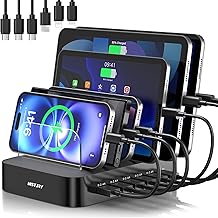
MSTJRY Charging Station for Multiple Devices : 6 Port USB Charger Stations – Family Multi-Device Organizer Charging Dock – Designed for iPhone iPad Android Cell Phone Tablet and Electronic, Black
Best For:
Couples, small families, or roommates needing a modestly sized charging hub with several ports for daily essentials.
The 6-port MSTJRY charging station sits between the compact five-port model and the larger 10-port docks, giving moderate capacity with a smaller footprint. This model is useful when you want a little more headroom than a 4–5 port organizer but don’t need a full 10-port desktop hub. It often appeals to families that need to charge a few phones, a tablet, and an accessory like a wireless speaker or e-reader at the same time.
What this solves: The 6-port layout reduces competition for ports on busy mornings and provides a dedicated spot for the most common devices. It’s especially handy in households where members maintain separate devices but don’t require laptop-level charging from every port.
Real-life usage scenarios: Place it on a family media console to charge phones, controllers, and a tablet used for streaming. Use it on a bedside table shared by a couple—each partner can have a phone and a smartwatch or e-reader charged overnight. The compact body makes it easy to tuck on a shelf while still providing multiple ports.
Features to notice: For 6-port models, pay attention to whether ports are USB-A or USB-C and if any ports support higher output for tablets or quick-phone top-ups. A mix of upright slots and a non-slip base can make charging neater and prevent devices from sliding when connected.
Who should buy this: Couples, small families, or roommates who want a tidy central charging spot with more capacity than ultra-compact hubs.
Who may not need it: Single-device users or those who need laptop-grade charging for multiple devices at once might prefer different solutions.
Practical buying considerations: Check whether the charger includes short cables or if you’ll use your own. Also consider how the charger ventilates; even mid-range docks can get warm when multiple devices draw power, and a bit of thermal headroom improves longevity.
Check the latest price on Amazon.
Pros
- Balanced capacity without large footprint
- Ideal for bedside or media consoles
- Often more affordable than 10-port heavy-duty hubs
Cons
- Not designed for heavy simultaneous laptop charging
- Verify the number of USB-C PD ports if you have modern laptops
Check the latest price on Amazon.
750W Charging Station for Multiple Devices, Zobirez 10-Port Fast Charger, 5 USB-C 120W Each and 5 USB-A 30W Each, Desktop Charging Hub for Laptop Phone Tablet, Black

Best For:
Power users, small home offices, or families that simultaneously charge laptops, tablets and multiple phones and need fast PD across several ports.
For households that routinely need to charge a laptop and numerous phones at once, a 750W 10-port station promises desktop-level power distribution with multiple high-output USB-C ports. The configuration listing five USB-C ports each rated up to 120W and five USB-A ports at 30W each suggests a hub targeted at heavy multi-device workflows where laptops and tablets share charging priority with phones and accessories.
What this solves: This kind of high-wattage hub is designed for shared workspaces and family setups where multiple heavy consumers—laptops, tablets and power-hungry phones—need reliable, fast charging simultaneously. Instead of juggling laptop bricks and phone chargers, this hub centralizes everything and can deliver high PD rates to several devices at once.
Real-life use cases: Consider a household where two people work from home with MacBook Pros while other family members stream and use tablets; a hub like this can keep multiple computers and phones charged during conference calls and video sessions without dropping power to the phones. It’s also useful for a small home office that hosts occasional guests who need laptop power.
Features to note: High-watt hubs should include clear labeling for each port’s maximum output and robust cooling to handle sustained loads. Look for intelligent power allocation so the hub can scale outputs based on connected devices. A sturdy chassis and anti-slip feet help keep heavier charger bricks stable on a desktop.
Who should buy this: Small households or home offices where at least one laptop and several other devices are charged concurrently and where fast PD to multiple USB-C devices is a priority.
Who may not need it: If you rarely charge more than two devices at once, or you favor wireless charging and smaller adapters, this level of power and size may be overkill.
Practical buying considerations: Check whether the hub’s high-watt ports are shared (i.e., total wattage split) and confirm how it behaves when many devices request high PD simultaneously. Proper ventilation and a reputable safety feature list are crucial with high-power units.
Check the latest price on Amazon.
Pros
- Multiple high-watt USB-C ports capable of fast laptop charging
- High total power designed for heavy simultaneous use
- Simplifies complex charging setups into one hub
Cons
- Larger and heavier than compact chargers
- Requires attention to per-port wattage sharing and ventilation
Check the latest price on Amazon.
Final Verdict
Choosing the right multi-device charging dock depends on how many devices you charge at once and whether laptop-level power delivery is a requirement. For compact convenience and immediate usability, the MSTJRY 5-port model with included short cables is a no-fuss solution for entryways and counters. If you need a little more capacity without a huge footprint, the MSTJRY 6-port option provides a good middle ground. For families that want a consolidated desktop charging center, the 10-port 320W or 420W hubs are sensible choices that balance port count with power distribution. If your household routinely charges laptops and needs high PD outputs to several devices at the same time, the 750W 10-port Zobirez hub moves into professional-grade territory and can simplify even heavy-duty setups.
When you shop, double-check port types (USB-C vs USB-A), whether Power Delivery is supported where you need it, and the manufacturer’s notes on per-port wattage sharing. Also consider how the charger will be used in daily life—do you want short built-in cables for neatness or prefer to keep your own longer cords? Do you need a permanent station or a portable solution? All five chargers covered here represent different points on the convenience-versus-power spectrum, and pairing your household needs with the right mix of ports and wattage will result in a much calmer charging routine.
Check the latest price on Amazon.
Conclusion
These Phone charging dock for multiple family devices picks are trending now and offer great value and variety. Check the links above for latest prices and reviews.
As an Amazon Associate, I earn from qualifying purchases.
Tags:
multi-device charger, family charging dock, USB-C charging station, 10-port charger, desktop charging hub, fast charger, device organizer
