Best Study Timers for Focus: Pomodoro Cubes
As an Amazon Associate, I earn from qualifying purchases. This article may contain affiliate links, which means we may receive a commission at no extra cost to you.
If you struggle to start tasks, get distracted mid-session, or want a simple way to structure study and work time, a dedicated study timer can be a game-changer. This guide looks at compact Pomodoro-style cube timers and multi-function desk timers that make it easy to block focused work sessions, pause and reset, and use vibration or sound alerts that won’t jar your flow.
As an Amazon Associate, I earn from qualifying purchases. This article may contain affiliate links, which means we may receive a commission at no extra cost to you.
Why focus timers? They take the friction out of timing sessions: flip a cube, tap a button, or select a preset and the timer runs. For students, remote workers, people with ADHD, or anyone who benefits from short bursts of concentrated effort, these devices remove the need to open apps, worry about phone notifications, or remember to track time. Below you’ll find a practical comparison of five popular cube-style timers, what problems each one solves, how they’re best used, and realistic considerations before you buy.
Buying Guide
How to choose the right study timer
1) Presets and Customization: Decide whether you want fixed Pomodoro presets (e.g., 25/5) or a timer that offers both presets and fully customizable countdowns. Presets are fast; custom modes help when you need non-standard intervals for classes, workouts, or cooking.
2) Alerts: Look for options that include vibration, sound, and silent modes. Vibration is discreet for shared spaces; sound is better if you work alone or need a stronger cue.
3) Pause/Resume and Stopwatch: A pause/resume feature matters if interruptions are frequent. Stopwatch mode can be useful for timed readings or exercises where you want to measure duration without a preset.
4) Size and Portability: Cube timers are small and desk-friendly. If you switch rooms or study locations, check battery type and weight—lighter models are simpler to carry.
5) Build and Interface: A tactile cube with clearly labeled sides or intuitive buttons is faster to use than menus. Consider how easy it is to change settings under time pressure.
6) Power and Battery: Many cubes use AAA/AA batteries or rechargeable batteries. If you dislike replacing cells, choose a rechargeable model or one with a long battery life.
7) Use-case alignment: Students often prefer visual, quick-to-set timers for study blocks; professionals may favor timers with quieter alerts or customizable intervals for meetings; ADHD users may value strong vibration and easy pause/resume.
Common alternatives and trade-offs
– Smartphone apps: More features but more distractions and notifications. A physical timer reduces phone reliance.
– Desktop apps/Browser extensions: Good for computer-based work but not portable. Timers that live on your desk are easier to use during offline tasks, reading, or practicing instruments.
Buying considerations from real users
From research into customer feedback, buyers often highlight simple setup, reliable alerts, and consistent countdown accuracy as decisive features. Complaints typically focus on unclear labeling, weak vibration, or confusing menus. Factor those practical points into your pick.
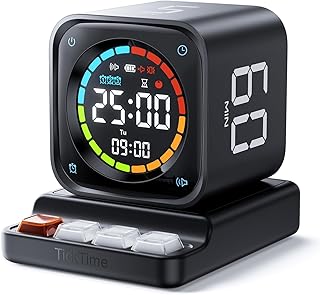
TK3 Pomodoro Timer Cube, Desk Productivity Timer with 5/10/30/60 Min Presets, Custom Countdown, Stopwatch, Clock, 3 Alarm, Silent, Vibrate & Sound Alert, for Task, ADHD, Study, Kitchen, Black
Best For:
Students, remote workers, home cooks, and people with ADHD who want a quick, physical way to start timed focus sessions without using a phone.
The TK3 Pomodoro Timer Cube is designed for people who want an immediate, tactile way to start focused sessions without digging through apps or menus. With common presets of 5, 10, 30, and 60 minutes printed on the cube faces and a custom countdown mode, it covers the basic Pomodoro kit while adding a few thoughtful extras: stopwatch functionality, a simple clock display, and three alarm modes (silent, vibrate, and sound). The device aims to be a one-stop desktop companion for students, home cooks, remote workers, and those managing ADHD who need reliable external structure.
Main benefits
– Immediate, no-friction setup: flip the cube or press the top to select a preset, and the countdown begins. That speed makes it easy to start when motivation is low.
– Versatile alerts: choose vibration for shared spaces, sound for solo focus, or silent mode when you want an unobtrusive visual cue.
– Extra modes: stopwatch and custom countdowns let you use the TK3 for workouts, time-limited readings, or pacing presentations.
Real-life usage examples
– Student study block: flip to 30 minutes for reading, then to 5 minutes for a break—no phone handling required.
– Kitchen timing: the 60-minute preset works for longer recipes while the sound or vibration alerts ensure you don’t miss the end.
– ADHD support: the tactile act of flipping and the vibration option provide stronger external cues that many users find helpful for initiating and sustaining tasks.
Why this product is valuable
Compared with smartphone apps, the TK3 removes distractions and the temptation to check messages. Compared with simpler single-preset timers, its combination of presets, custom countdown, and stopwatch make it a more flexible everyday tool. Its intuitive interface is good for people who want something that ‘just works’ without reading a long manual.
Who should buy this
Buyers who want a compact, versatile physical timer with multiple alert modes and straightforward controls will appreciate the TK3. It’s a solid choice for students, home cooks, and remote workers who need a reliable, easy-to-use timing tool.
Who may not need it
If you prefer a timer with advanced app integration, or you want a touchscreen display with extensive scheduling features, this simpler cube style may feel limited.
Practical observations and buying considerations
From user feedback on similar products, pay attention to vibration strength if you rely on that alert; some devices vary in intensity. Also check battery type—if portability and minimal maintenance matter, consider how often you’ll replace batteries.
Pros:
– Quick, tactile operation (flip to start)
– Multiple alert modes: sound, vibrate, silent
– Preset and custom countdowns plus stopwatch
Cons:
– Not app-connected for cross-device sync
– Vibration strength may vary between units
If you want a dependable, no-fuss Pomodoro cube that balances presets with customization, the TK3 is worth considering. Check the latest price on Amazon.
Pros
- Intuitive flip-to-start design for low-friction use
- Three alert modes (sound, vibrate, silent) for flexible environments
- Includes stopwatch and custom countdowns in addition to presets
Cons
- No smartphone app or advanced scheduling features
- Vibration intensity may be weaker than expected for some users
If you want a straightforward, versatile cube timer that covers common session lengths and offers vibration and sound alerts, check it out on Amazon.
Qumox Pomodoro Timer, Cube Productivity Timer with Adjustable Sound and Vibration Alert, Ideal for Work, Office, ADHD, Study, and Tasks – 5/10/30/60 Minutes & Custom Countdown – Black

Best For:
Students and professionals who move between quiet and noisy environments and need adjustable vibration and sound alerts for discrete, reliable cues.
The Qumox Pomodoro Timer is another cube-style timer that targets people who want a simple, visible way to manage focus. It includes the familiar 5/10/30/60 minute presets, plus a custom countdown option and adjustable alert intensity for both vibration and sound. The emphasis here is on adjustability—particularly the ability to tune alerts so they are noticeable without being disruptive in quiet environments.
Main benefits
– Adjustable alerts let you pick a level that works in a library, open-plan office, or home study. Many users appreciate that they can make the vibration stronger or the sound softer depending on the setting.
– Easy-to-read labeling and a compact footprint make it a good desk accessory.
– A custom countdown mode adds utility for tasks that don’t fit standard Pomodoro slots, like lab experiments or timed presentations.
Real-life usage examples
– Library or study hall: use low-volume sound or vibration to get a cue without disturbing others.
– Open-plan office: set a stronger vibration to ensure you notice the end of a focused session amid background noise.
– Exercise intervals: the custom countdown is useful for circuit times or short movement breaks between study blocks.
Why this product is valuable
Compared to no-frills timers that only offer a single beep, the Qumox’s adjustable alert levels offer a meaningful advantage in shared spaces. Its design balances the immediate access of a cube timer with more thoughtful alert control, which aligns with what many buyers say they want: reliability plus discretion.
Who should buy this
People who study in variable environments—students who move between dorm rooms, libraries, and cafes, or professionals who switch from quiet meeting rooms to noisy offices—will benefit most from the Qumox’s alert customization.
Who may not need it
If you never leave a single workspace or you prefer app-synced session logs and analytics, this physical timer may be more basic than you need.
Practical observations and buying considerations
Some customers report minor learning curves around setting custom times; overall the interface is straightforward but take a moment to practice pause/resume. Battery life varies by usage and alert intensity.
Pros:
– Adjustable vibration and sound strength for flexible environments
– Compact, easily readable cube design
– Custom countdown for non-standard intervals
Cons:
– Slightly more configuration required for custom modes
– No companion app or session tracking
If adjustable alerts are important to you, the Qumox brings a useful blend of discretion and visibility. Check the latest price on Amazon.
Pros
- Customizable alert intensity (sound and vibration)
- Compact, clear labeling for quick use
- Supports custom countdowns for non-standard tasks
Cons
- Small learning curve for advanced settings
- No app or long-term session tracking
Want a cube timer with adjustable alerts for different study environments? See details on Amazon.
Mini 12 Sided Cube Timer, 11 Preset Times Pomodoro Timer for Enhanced Productivity. Ideal for ADHD Management, Workout, Study & Kitchen Cooking. Easy to Use (Pink)

Best For:
Parents, teachers, students with variable attention needs, fitness enthusiasts, and anyone who benefits from many quick preset durations.
This Mini 12-Sided Cube Timer takes the cube concept and increases granularity: with 11 preset times, it’s geared toward users who want a larger range of quick-select durations without tapping through menus. The compact 12-sided shape gives more labeled options on the surface, making it especially handy for activities that need many short and medium intervals—think study sprints, workout circuits, or kitchen tasks with varied timers.
Main benefits
– Variety of presets: the 11 preset times reduce the need for manual input, so you can flip to the precise interval you want and start immediately.
– Eye-catching color options and small footprint make it easy to spot on a crowded desk or in a backpack.
– Straightforward operation makes it ideal for younger students or anyone who benefits from simple tactile controls.
Real-life usage examples
– ADHD management: the quick availability of many preset lengths helps tailor sessions based on attention span and task complexity—shorter bursts for hard concentration, longer blocks for reading or essay writing.
– Fitness and circuits: use different faces for intervals within a single workout (e.g., warm-up, high-intensity set, cooldown).
– Cooking and crafting: the range of presets covers short timers for eggs up to longer intervals for simmering.
Why this product is valuable
Compared to standard 6-faced cube timers with four or five presets, the 12-sided design reduces the need to switch to custom modes. For people who prefer visual variety and immediate choices, it streamlines workflow and helps remove decision friction—flip and go.
Who should buy this
Buyers who want many quick choices at their fingertips—teachers, parents, ADHD users, or fitness enthusiasts who rotate through different short intervals—will find this handy.
Who may not need it
If you prefer a minimalist timer with only one or two presets or you rely on log-keeping and analytics through apps, this analog-style cube is more about immediate utility than data tracking.
Practical observations and buying considerations
Because the timer prioritizes preset convenience, confirm the preset values match your typical needs. Some users mention that smaller physical size can impact button feel; if you need stronger tactile feedback, look for models with larger buttons.
Pros:
– Wide range of ready-to-use presets (11 options)
– Very portable and visually easy to use
– Good for varied activities: study, workouts, kitchen
Cons:
– Smaller size can mean lighter button feedback for some users
– Less useful for those who prefer app integrations and session logs
If you want a colorful, variety-packed cube that minimizes setup and maximizes quick choices, this 12-sided timer is a practical option. Check the latest price on Amazon.
Pros
- Eleven preset times for quick selection
- Highly portable and brightly colored for easy spotting
- Great for mixed uses: study, workouts, and cooking
Cons
- Smaller size may reduce tactile feedback
- No app connectivity or long-term tracking
If a wide range of immediate presets suits your workflow, take a closer look on Amazon.
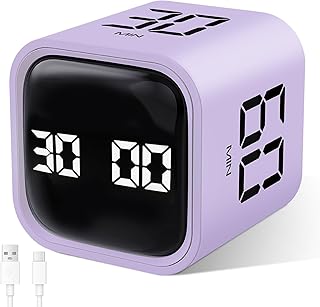
GuDoQi Multi-Function Cube Timer, 5/10/30/60 Min & Custom Count Down, Included Pause & Resume Feature, Silent, Vibrate & Adjustable Sound Alarm for Productivity in Tasks, Study & Kitchen, Purple
Best For:
People who face frequent interruptions—parents, professionals on-call, tutors, and students in busy environments who need a pause/resume function.
The GuDoQi Multi-Function Cube Timer focuses on user control, pairing standard Pomodoro presets with useful real-world features like pause & resume and adjustable alarm sound. The combination of silent, vibration, and variable sound alerts makes it adaptable to dorms, offices, and shared households while the pause/resume feature keeps interrupted sessions accurate.
Main benefits
– Pause and resume: particularly helpful when interruptions are common; you won’t lose a partially completed focus block.
– Adjustable alerts and silent mode: choose how you want to be notified depending on your environment and preference.
– Custom countdown alongside presets: adds flexibility for nonstandard tasks while keeping everyday setups simple.
Real-life usage examples
– Remote meetings and study interruptions: pause the countdown for impromptu calls and resume without losing track of elapsed focus time.
– Shared apartments: use vibration or silent mode to avoid disturbing roommates while still keeping session structure.
– Classroom or tutor sessions: tutors can use the timer to pace drills and switch modes quickly between students.
Why this product is valuable
Compared to simpler cube timers, the GuDoQi stands out with its pause/resume feature—an often-cited pain point in other devices. If you frequently get cut off mid-session, being able to resume the same countdown is a practical improvement. Its flexible alerts and clear presets make it a balanced daily driver.
Who should buy this
Ideal for people who face unpredictable interruptions—parents, professionals on call, or students who study in lively places—this timer helps retain structure without punishing unavoidable pauses.
Who may not need it
If your sessions rarely get interrupted and you prefer the simplest possible timer, the extra pause/resume complexity might be unnecessary.
Practical observations and buying considerations
Users appreciate clear labeling and the feel of a responsive pause button. Battery life depends on alert intensity and frequency of use; if you expect heavy daily use, consider a model with rechargeable power or easily replaceable batteries.
Pros:
– Pause & resume preserves partially completed sessions
– Adjustable sound and vibration with silent mode for shared spaces
– Presets plus custom countdown for flexibility
Cons:
– Slightly more complex interface than single-function cubes
– Battery life varies with alert usage
If interruptions are part of your study routine and you want a timer that adapts rather than resets, the GuDoQi is a strong contender. Check the latest price on Amazon.
Pros
- Pause and resume feature to handle interruptions
- Adjustable alerts including silent mode
- Combination of presets and custom countdown
Cons
- A bit more complex to operate than ultra-minimal timers
- Battery life depends on alert frequency
Need a cube timer that handles interruptions gracefully? View it on Amazon.
Jack Pomodoro Timer – Productivity Cube, Visual Focus Timer, Mute & Vibration & Adjustable Sound Alert, for Office, ADHD, Study, Work, 3/5/10/25/30/60min & Custom Countdown – Black

Best For:
Users who mix micro-tasks and full Pomodoro sessions—students, professionals with varied workflows, and people who like quick warm-up intervals.
The Jack Pomodoro Timer aims to be a visually clear and flexible cube timer with a mix of common Pomodoro lengths plus a 3-minute option for very short tasks. It positions itself as a visual focus tool with adjustable sound and vibration settings so you can match alerts to your environment. The inclusion of both short (3 and 5 minutes) and longer (25 and 60 minutes) presets makes it suitable for highly varied routines.
Main benefits
– Range of presets: the addition of very short timers alongside classic Pomodoro lengths makes the Jack useful for micro-tasks, warm-ups, and quick breaks.
– Visual clarity: clear labeling and a simple layout reduce the chance of selecting the wrong interval mid-session.
– Silent, vibration, and adjustable sound modes let you adapt alerts to a library or a home office.
Real-life usage examples
– Micro-productivity: use the 3-minute preset for quick inbox triage or to prime momentum before starting a longer session.
– Study rotation: students can alternate 25-minute study blocks with 5-minute reviews and 3-minute recaps to reinforce retention.
– Short practice runs: musicians can use the shorter intervals for warm-up scales and longer ones for full practice sections.
Why this product is valuable
Compared with single-purpose timers, the Jack’s mixture of micro and classic Pomodoro presets adds practical versatility. Many buyers like having a short burst option for low-effort tasks that still benefit from a timebox.
Who should buy this
Ideal for people who use both micro-sessions and standard Pomodoro blocks: students refining study techniques, professionals needing quick resets, or anyone who wants a flexible set of built-in intervals.
Who may not need it
If you only use a single timing interval (for example, always 50-minute blocks) a multi-preset cube may be overkill.
Practical observations and buying considerations
As with other cubes, check the tactile feel of buttons if you prefer a heavy, precise press. Look at battery type and expected life if portability and long sessions are priorities.
Pros:
– Broad range of presets including 3-minute micro-timers
– Clear visual labeling reduces selection errors
– Adjustable alerts for varied environments
Cons:
– Could be unnecessary for users who only use one interval
– No cloud sync or session history
If you want a cube that supports both micro-tasks and classic Pomodoro routines, the Jack Pomodoro Timer is flexible and user-friendly. Check the latest price on Amazon.
Pros
- Includes very short and classic Pomodoro presets
- Clear visual layout to prevent picking the wrong interval
- Mute, vibration, and adjustable sound modes
Cons
- Unnecessary complexity if you only use one timing interval
- No session tracking or app integration
Looking for a timer that handles micro and standard focus sessions? Find it on Amazon.
Final Verdict
Choosing the right study timer comes down to how you work and where you study. If you want the simplest flip-and-go experience with multiple alert modes and stopwatch capability, the TK3 offers a balanced mix of presets and extras. If you need adjustable sound and vibration levels to move between quiet libraries and noisy offices, Qumox gives you nuanced control. For people who want many immediate choices without entering custom modes, the Mini 12-Sided Cube delivers a wide palette of preset options. If interruptions are part of your routine, the GuDoQi’s pause/resume ability prevents wasted focus time. And if you like mixing micro-sprints with classic Pomodoro blocks, the Jack Pomodoro Timer packs short and long presets into one compact cube.
Practical tip: map your typical day—how many short vs long sessions, how often interruptions happen, and whether you need silent alerts—and match that to the timer features above. Real user feedback suggests prioritizing clear labeling, strong vibration if you rely on it, and battery or power preferences.
Whether you want a simple analog-style cube that removes phone distractions or a multi-feature desktop timer that adapts to interruptions, there’s a physical study timer here to fit your routine. Check each product’s features against your daily workflow and environment to pick the best match.
Check the latest price on Amazon.
Conclusion
These Study Timers for Better Focus picks are trending now and offer great value and variety. Check the links above for latest prices and reviews.
As an Amazon Associate, I earn from qualifying purchases.
Tags:
study timer, pomodoro timer, focus tools, ADHD productivity, cube timer, study accessories, productivity timers
