Best Wireless Presenters for Classrooms & Conferences
As an Amazon Associate, I earn from qualifying purchases. This article may contain affiliate links, which means we may receive a commission at no extra cost to you.
As an Amazon Associate, I earn from qualifying purchases. This article may contain affiliate links, which means we may receive a commission at no extra cost to you.
A reliable wireless presenter can transform a lecture or conference talk from awkward to effortless. Whether you’re teaching in front of a classroom, presenting at a small meet-up, or leading a keynote in a large auditorium, the right clicker keeps your focus on message and audience rather than fumbling with your laptop. In this guide I cover five strong options—ranging from a no-frills laser-pointer model to feature-rich rechargeable remotes with countdown timers and USB-C compatibility. Each pick is described with realistic use cases, who benefits most, and practical buying considerations. The recommendations are based on product specifications, common user feedback, and typical classroom and conference needs, not personal hands-on testing.
Below you’ll find a clear buying guide and full reviews of each recommended model. If you want a quick reference, skip to the product list; if you’re deciding between a lightweight plug-and-play clicker and a rechargeable multi-function presenter, read the buying guide for the features that matter most.
Buying Guide
What to consider before buying a wireless presenter
Compatibility and wireless type: Most modern presenters use a 2.4GHz RF USB receiver (plug-and-play) or Bluetooth. RF is nearly universal and works without drivers on Windows and macOS, while Bluetooth removes the dongle but may need pairing. If you switch between a laptop and a tablet or use USB-C ports, look for models with USB-C receivers or those that include both USB-A and USB-C adapters.
Range and reliability: Classroom and conference rooms vary in size. Standard RF clickers commonly advertise 30–50 feet of reliable range; higher-end models can exceed that. If you’ll present in large halls, prioritize range and a strong connection—interference in busy Wi-Fi environments is possible, so a stable 2.4GHz implementation with a snug-fit receiver helps.
Controls and ergonomics: Slide forward/back, black screen, start/stop, and volume buttons are the basics. Many presenters add a laser pointer (red or green), programmable buttons, and an integrated countdown timer. Choose a shape that fits comfortably in your hand and has tactile buttons you can operate without looking.
Power: Rechargeable presenters remove the need for constant battery swaps and often provide USB charging. Remotes with removable batteries can be lighter and last months on a single set. If you teach or present frequently, rechargeable models with a battery indicator and a long uptime are more convenient.
Extra features: Volume control, multimedia controls, and an on-board countdown timer are helpful extras. A visible countdown or vibration alert is a big plus for timed talks. Some models include a multi-function dongle that stores the receiver in the body for travel.
Pointer type: Red laser pointers are common and adequate for classrooms. Green lasers are brighter and easier to see on distant screens but are usually more expensive and may not be allowed in some venues. If you mainly point at projected slides in close to mid-range rooms, a red laser is fine.
Build and travel convenience: If you move between rooms often, look for presenters with built-in receiver storage or compact form factors. Also consider the finish—matte grips reduce slipping during longer sessions.
Who should prioritize which feature
– Teachers and frequent lecturers: rechargeable battery, countdown timer, and ergonomic design.
– Conference speakers and keynote presenters: longer range, reliable RF or Bluetooth, and visible pointer.
– Casual users: simple plug-and-play RF clicker or USB-C dongle, minimal buttons.
With these points in mind, the five products below cover a range of needs—from budget-friendly basics to feature-packed clickers for timed conference talks.
Presentation Clicker Wireless Presenter Remote for PowerPoint, Powerpoint Clicker with Volume Control PowerPoint Slide Advancer for Mac, Computer, Laptop

Best For:
Teachers and meeting hosts who want dependable slide control with volume adjustment and plug-and-play simplicity.
This compact wireless presenter is aimed at people who want a straightforward, no-fuss remote for slide control with a couple of handy multimedia features. The design focuses on core tasks—advance and reverse slides, a play/pause-style button for media, and integrated volume control—making it a suitable upgrade over using a laptop keyboard during a talk. Its plug-and-play USB receiver should work with Windows and macOS without installing drivers, which is ideal for teachers who switch between classroom PCs and personal laptops.
Ergonomically, the remote has a slim profile that fits comfortably between fingers for extended sessions without hand fatigue. The buttons are tactile and slightly raised so you can feel the control during a presentation without having to look down. For speakers who use Apple devices, compatibility notes indicate PowerPoint and Keynote will recognize standard keystrokes from this presenter, though the experience depends on how your presentation software handles media keys.
Battery life leans on replaceable batteries rather than a built-in rechargeable pack, which keeps the unit light. If you don’t want to worry about charging, this approach is convenient—swap in fresh batteries before a big talk and you’re set. However, if you’re on back-to-back conference days, plan a spare set of batteries.
Compared with cheap single-button clickers, this model adds real multimedia control and volume adjustment, so it’s closer to a small remote control than a bare clicker. It lacks advanced features like a countdown timer, vibration alerts, or a laser pointer, so it’s best where reliable slide control and sound adjustments matter most and where pointing at slides with a fingertip or a laser pointer isn’t essential.
Practical use cases: community college instructors leading multi-media lessons; meeting facilitators who need to control sound and slides from a distance; workshop hosts who switch between laptops and shared classroom machines. If you need a simple, reliable tool to keep your presentation flow smooth without extra bells and whistles, this is a sensible pick.
This presenter is a solid choice if you want dependable slide control plus basic media functions without the weight of a rechargeable unit or complex feature set. Check the latest price on Amazon.
Pros
- Plug-and-play USB receiver works across platforms
- Integrated volume control and media key support
- Lightweight, comfortable form factor
Cons
- Uses replaceable batteries instead of rechargeable battery
- No built-in laser pointer or countdown timer
Check the latest price on Amazon.
2-in-1 USB Type C Presentation Clicker, Rechargeable Wireless Presenter Remote, Clicker for PowerPoint Presentations, Pointer for Presentations Slide Advancer with Volume Control for Mac,Computer, PPT

Best For:
Presenters who use USB-C laptops or tablets and prefer rechargeable, travel-friendly hardware.
This 2-in-1 USB Type-C wireless presenter addresses a growing need for USB-C compatibility in modern laptops and tablets. Instead of relying solely on a USB-A dongle, this model includes a USB-C interface or adapter, so you can plug the receiver directly into a MacBook, Chromebook, or newer Windows laptop without a separate adapter. That convenience matters in classrooms where students or faculty bring a mix of devices.
On the power side, the rechargeable battery is a strong selling point. It eliminates one-time battery waste and the awkwardness of running out of juice mid-session—typical usage reports indicate multiple hours of continuous use per charge, and a short USB charge gets you back on stage quickly. The presenter keeps a slim profile and stores the receiver securely in the remote body during transport, which is a thoughtful touch for anyone who moves between rooms or travels.
Functionally, the remote covers the essentials: forward/back slide buttons, a black screen/blank slide function in many presentation apps, and volume control. The ergonomic button layout is intuitive for right- and left-handed users alike. Compared with older USB-A-only clickers, the Type-C compatibility removes the need for additional dongles and avoids blocking adjacent ports.
This presenter isn’t a high-end model with a multi-color laser or an integrated countdown timer, but it does strike a balance between modern connectivity and the practical needs of frequent presenters. Use cases include university lecturers using new MacBook models, corporate trainers carrying a single cable-free setup, and anyone who values rechargeable convenience and USB-C readiness.
When compared to basic plug-and-play clickers, this model’s rechargeable battery and Type-C compatibility make it more future-proof. If you value travel-friendly receiver storage and the convenience of USB-C, this is a pragmatic choice.
Best for modern laptop users who need USB-C compatibility and rechargeable convenience. Check the latest price on Amazon.
Pros
- USB-C compatibility for modern laptops and tablets
- Rechargeable battery reduces the need for spare batteries
- Receiver stores in the remote for safe transport
Cons
- No advanced timing features like a countdown timer
- May lack a bright laser pointer for large venues
Check the latest price on Amazon.
Logitech Wireless Presenter R400, USB-A PowerPoint Clicker with Laser Pointer, Wireless Presentation Clicker Remote

Best For:
Educators and business presenters who want a proven, reliable remote with a laser pointer and long battery life.
The Logitech R400 is a long-standing favorite among educators and corporate presenters because it focuses on reliability and clarity. It includes a built-in red laser pointer—handy for drawing attention to charts and small details on slides—and a simple, tactile layout that’s easy to use without looking down. The R400’s strong brand reputation is backed by a consistent plug-and-play USB-A dongle that pairs quickly and stays connected, even in busy environments.
Ergonomics are solid: the curvature fits naturally in the hand, and the range—often rated to around 50 feet—makes it suitable for small to mid-size lecture halls and most conference rooms. The forward and back buttons are large and clearly separated to avoid accidentally skipping slides, and the wireless dongle stores inside the receiver compartment for transport. Battery life is long on common alkaline cells, so you can go months between changes under regular use, though you’ll need to carry spares for multi-day conference runs.
Compared with newer USB-C presenters, the R400 is a more traditional USB-A device, so if you use recent MacBooks you’ll need an adapter or a separate USB-C-compatible model. It also sticks to essential features—there’s no built-in countdown timer or vibration alerts—but its straightforward feature set is exactly what many presenters want: no bloat, dependable performance.
Typical use cases include secondary school teachers, university lecturers who present from campus machines, and corporate leaders delivering slide-heavy briefings. The red laser pointer is adequate for most rooms, though in very large auditoriums a green laser might be more visible.
If you want a proven, no-surprises presenter that focuses on reliability and comfortable handling, the Logitech R400 remains a top pick. Check the latest price on Amazon.
Pros
- Proven reliability and long-range performance
- Built-in red laser pointer for clear on-screen highlighting
- Comfortable ergonomic design with easy-to-find buttons
Cons
- USB-A dongle may require an adapter for modern USB-C laptops
- Lacks advanced features like a countdown timer or rechargeable battery
Check the latest price on Amazon.
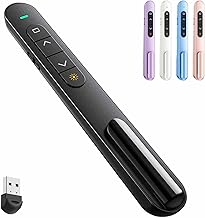
QUI Presentation Clicker for PowerPoint, RF 2.4GHz USB Wireless Presenter Remote with Volume Control, PowerPoint Clicker Slide Advancer for Mac, Windows, Laptop, Keynote
Best For:
Budget-minded educators, startup presenters, and workshop facilitators who want reliable RF performance plus volume control.
The QUI RF 2.4GHz presenter is tailored for users who need a balance between price and practical features. With a plug-and-play USB receiver, it works with Windows and macOS and supports Keynote and common presentation software. One of the helpful additions is integrated volume control—useful for lesson plans that include embedded video or audio—so you don’t have to return to your laptop to adjust sound levels mid-presentation.
Ergonomically, this clicker is compact and easy to pocket, and the buttons have a positive click that reduces accidental inputs. The 2.4GHz wireless connection offers a reliable range suitable for most classrooms and mid-size conference rooms. Battery operation relies on common replaceable batteries, which keeps the remote lightweight and straightforward; if you prefer rechargeable hardware, consider a different model, but for many users the simplicity of replaceable batteries is an advantage.
Compared to the Logitech R400, the QUI model leans more budget-friendly and focuses on broader compatibility. It lacks high-end features such as a built-in countdown timer or a premium laser pointer, but it delivers the essentials with a couple of useful extras.
Practical scenarios: substitute teachers who need a dependable plug-and-play remote; startup founders presenting in investor meetings who want cost-effective but functional gear; workshop leaders who bring minimal tech and need dependable slide control and volume adjustment.
If you’re on a budget but want better-than-basic control with multimedia adjustments, the QUI presenter is a sensible compromise between ultra-cheap clickers and premium models.
Suitable for budget-conscious presenters who still need reliable RF performance and volume control. Check the latest price on Amazon.
Pros
- Affordable with solid RF 2.4GHz connectivity
- Integrated volume control for media-heavy presentations
- Compact, pocketable design
Cons
- Uses replaceable batteries rather than rechargeable power
- No advanced timing or haptic alert features
Check the latest price on Amazon.
DinoFire Presentation Clicker with Countdown Timer, USB A & USB C Rechargeable Wireless Presenter Powerpoint Remote for Teachers, Office, Classroom, Conference

Best For:
Speakers and teachers who need built-in timing features and modern USB compatibility in a rechargeable presenter.
The DinoFire presenter stands out because it adds a built-in countdown timer and dual USB-A/USB-C compatibility, addressing two common pain points for busy presenters. The visible countdown (and sometimes vibration or audible alerts depending on model variants) helps you keep talks within a strict timeframe—a feature conference speakers and lecturers appreciate during timed sessions. The inclusion of both USB-A and USB-C receivers or adapters covers modern laptops and legacy machines without needing additional dongles.
Rechargeable operation is another convenience—charge via USB before travel rather than hauling extra batteries. The remote stores the receiver in its body during transport, which reduces the chance of losing the dongle between sessions. Button layout usually includes slide forward/back, black-screen blanking, and a dedicated access to the timer controls, which makes it easy to set and read while on stage.
Compared with simple plug-and-play clickers, the DinoFire provides better time management for presentations and is built for presenters who must hit strict time slots. Teachers running timed classroom activities, panelists subjected to strict conference time caps, and corporate trainers overseeing multiple short sessions will find the timer a major productivity boost. The rechargeable battery also means less downtime between sessions during busy conference days.
A potential trade-off is slightly increased complexity: if you only present occasionally, you may not use the timer and could prefer a simpler remote. Also, while many users like the timer feedback, check whether your preferred model offers vibration or sound alerts if that’s important to you.
Who should buy: frequent conference speakers, timed workshop leaders, and teachers who use strict classroom timings. Check the latest price on Amazon.
Pros
- Built-in countdown timer for precise talk timing
- Rechargeable battery with USB-A and USB-C support
- Receiver storage for travel convenience
Cons
- More features may be unnecessary for occasional presenters
- Slightly higher complexity to learn timer functions
Check the latest price on Amazon.
Final Verdict
Choosing the right wireless presenter depends on how often you present, the tech you use, and which features keep you confident on stage. For basic slide control with handy media functions, the Presentation Clicker Wireless Presenter Remote is an approachable, lightweight option. If you use modern USB-C laptops and prefer rechargeable hardware, the 2-in-1 USB Type C Presentation Clicker gives you future-ready convenience without a lot of extra bulk. The Logitech R400 remains a stalwart pick for users who want proven reliability and a simple laser pointer in an ergonomic package. For budget-conscious presenters who still want reliable RF range and volume control, the QUI RF presenter is a practical compromise. Finally, if you regularly face strict time limits and need to stay on schedule, the DinoFire presenter’s countdown timer and dual-port compatibility make it a standout choice.
When making a decision, match the presenter’s connectivity (USB-A vs USB-C vs Bluetooth), power approach (replaceable batteries vs rechargeable), and any extras (timer, pointer, volume control) to your most frequent scenarios. For teachers and frequent lecturers, prioritize ergonomics and battery convenience; for conference speakers, prioritize range and timing features; for casual presenters, pick straightforward plug-and-play reliability.
All five options here cover a useful slice of needs across classrooms and conference stages. Consider the features that will reduce friction during your next talk—whether that’s a bright laser, an integrated timer, or the convenience of USB-C—and pick the one that aligns with your workflow. Check the latest price on Amazon.
Conclusion
These Wireless presenter for classroom and conference presentations picks are trending now and offer great value and variety. Check the links above for latest prices and reviews.
As an Amazon Associate, I earn from qualifying purchases.
Tags:
wireless presenter, presentation clicker, PowerPoint remote, USB-C presenter, rechargeable presenter, laser pointer, presentation timer
