Best Portable Monitors for Spreadsheet Editing on the Go
As an Amazon Associate, I earn from qualifying purchases. This article may contain affiliate links, which means we may receive a commission at no extra cost to you.
If you travel for work and rely on spreadsheets, a second screen can transform how productive you are away from your desk. Laptops are convenient, but squinting through columns, juggling multiple files, or comparing tabs becomes a time sink on a single display. A portable monitor adds screen real estate without the bulk of a full-size external display, letting you run Excel side-by-side with email, Slack or a browser while on a train, in a hotel room, or at a café.
Affiliate disclosure: As an Amazon Associate, I earn from qualifying purchases. This article may contain affiliate links, which means we may receive a commission at no extra cost to you.
Below you’ll find an in-depth buyer’s guide plus five recommended portable monitors well-suited for editing spreadsheets while traveling. I’ve focused on models with straightforward connectivity (USB-C/HDMI), good 1080p clarity, thin profiles, and practical stands or covers that make setup quick. Each product section explains who it’s best for, real-world use cases, and practical pros and cons to help you choose the right travel screen for your workflow.
Buying Guide
Why a portable monitor helps spreadsheets: Spreadsheets benefit from width and legible text. A second 15.6" monitor lets you view more columns without shrinking fonts, and a larger 18.5" model gives even more room for wide tables. Portable displays are typically lightweight, slim, and use USB-C or HDMI for easy plug-and-play — meaning fewer adapters when you’re on the move.
Key factors when choosing a travel monitor:
– Size and weight: 15.6" is the sweet spot for balance between portability and usable workspace. If you often work from a fixed temporary desk (hotel or coworking), consider 18.5" for extra horizontal space. Pay attention to weight (sub-1kg for easiest carrying) and thickness.
– Resolution and text clarity: Full HD (1080p) is ideal for spreadsheets: text is sharp, and the resolution scales well on screens between 15–19 inches. Avoid sub-1080p panels if you rely on dense data.
– Color accuracy: Not crucial for spreadsheets but important if you also do light photo work or want consistent visuals for presentations. Look for coverage figures like 85% sRGB or higher if color matters.
– Connectivity: USB-C with DisplayPort Alternate Mode simplifies cables — single-cable video and power with compatible laptops. HDMI adds compatibility with older laptops, tablets, consoles, and docking stations. Some monitors support power delivery so the monitor can pass power back to your laptop — handy for minimal cable setups.
– Stand and cover: A stable kickstand or folio cover that doubles as a stand makes setup fast and reduces wobble while typing. VESA compatibility is useful if you plan to mount the monitor on a portable arm at a fixed location.
– Speakers and extras: Built-in speakers are convenient for video calls, but don’t expect studio quality. HDR or high refresh rates are nice-to-have for gaming, but are not essential for spreadsheet work.
Who should buy a portable monitor? Traveling professionals, consultants, remote workers, and frequent presenters who need extra screen space without hauling a full monitor. Who may not need one: users who primarily use their laptop for light browsing or who carry a full docking setup and a larger external monitor at their destination.
Practical buying considerations: check compatibility with your laptop’s ports, whether the monitor supports charging via USB-C, and whether the included cover or kickstand supports your preferred viewing angles. If you plan to use the monitor with a phone or tablet, verify the device supports video output over USB-C.
Use cases to keep in mind: side-by-side spreadsheet comparison, multi-window data entry, video conferences while referencing documents, and pinch-and-zoom-free presentations when you need to show a collaborator a full spreadsheet layout. The right portable monitor turns cramped, inefficient laptop sessions into focused, efficient work time while traveling.
cocopar Portable Monitor 15.6 Inch 1080P FHD 60Hz 85% sRGB Travel Monitor with Speaker HDMI USB-C Second Screen for Laptop MacBook Surface PC Xbox PS4/5, VESA Mountable, with Cover Stand

Best For:
Traveling professionals and remote workers who need a lightweight, simple second screen to boost productivity while on the go.
The cocopar 15.6" portable monitor targets travelers who want a dependable second screen without adding bulk. Its 1080p IPS panel delivers clear text and decent viewing angles that make reading spreadsheets and scanning long rows comfortable. With 85% sRGB coverage, colors look natural—useful if you occasionally prepare charts or color-coded reports for presentations. The monitor includes both USB-C and full-size HDMI ports, so it’s easy to connect to recent MacBooks and modern Windows laptops as well as older systems or an HDMI-enabled docking station. The 60Hz refresh rate is standard and perfectly adequate for productivity tasks.
Practical benefits: The cocopar weighs in as a slim, travel-friendly option and comes with a protective cover that doubles as a stand. That folio-style cover keeps the screen safe in a backpack and props it at usable angles for typing on your laptop or elbow room on a small table. Speakers are built-in for conference calls, though they’re best considered a convenience rather than a replacement for a headset during long meetings.
Real-life usage examples: Imagine opening a full spreadsheet on this 15.6" screen at a coffee shop while your laptop handles email; the extra width means fewer horizontal scrolls, and you can comfortably compare two sheets side-by-side. In a hotel room with limited desk space, the slim profile of the cocopar allows quick setup on a suitcase or nightstand. If you occasionally run webinars, the HDMI input lets you mirror slides from a travel laptop or connect to a small HDMI switch for client presentations.
Why it’s valuable: The cocopar balances cost, portability, and a clear 1080p panel, which is the mix most business travelers need. It outpaces tablets used as secondary displays because of its native 16:9 aspect and larger physical screen area. Compared with full-size desktop monitors, it sacrifices a bit of brightness and stand rigidity but wins on size and ease of setup.
Who should buy it: Frequent travelers who prioritize a light, protective travel monitor that’s easy to pack and quick to connect. It’s ideal for consultants, finance professionals, and remote workers who need readable text and reliable compatibility. Who may not need it: creatives needing very high color accuracy or users who prefer a built-in battery for untethered use.
Practical observations and considerations: Check that your laptop supports USB-C DisplayPort Alt Mode for single-cable video. If your setup requires a very sturdy stand or multiple tilt angles, you may want a model with a thicker kickstand. The cocopar’s folio cover stands up well on flat surfaces but can be less stable on uneven café tables. Overall, it’s a solid, straightforward choice for spreadsheet-focused productivity on the road.
Check the latest price on Amazon.
Pros
- Slim, travel-friendly design with protective folio cover
- USB-C and HDMI inputs for broad compatibility
- 85% sRGB for natural-looking charts and visuals
Cons
- Cover stand can be less stable on uneven surfaces
- No integrated battery for untethered use
Check the latest price on Amazon.
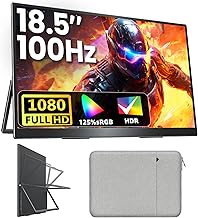
Upperizon Portable Monitor 18.5 inch FHD 125% sRGB 100Hz IPS HDR HDMI USB-C Travel Monitor for Laptop MacBook PC Surface PS5 Xbox, Large External Display with Kickstand & Speakers, VESA Compatible
Best For:
Users who want extra horizontal space for wide spreadsheets and prefer a near-desktop viewing experience while still being portable.
If you want more workspace while still staying portable, the Upperizon 18.5" portable monitor is an attractive alternative to standard 15.6" travel screens. Its larger 18.5" Full HD display provides extra horizontal space for wide spreadsheets, reducing the need to constantly scroll or hide side panels. The panel claims around 125% sRGB coverage and HDR support for punchier visuals—a benefit if you create colorized dashboards or client-facing reports. The 100Hz refresh rate is a bonus for smooth cursor movement and a slightly snappier feel during navigation, though it’s not necessary for spreadsheet work.
Practical benefits: The larger screen is particularly useful when you work with complex pivot tables, multi-column financial models, or dashboards that benefit from an expanded view. Upperizon includes a built-in kickstand and VESA compatibility, so you can use the included stand on a temporary desk or mount it when you have a more permanent workspace during longer trips. The USB-C and HDMI inputs cover modern laptops and older devices alike, and integrated speakers help during calls when you don’t want to dig out headphones.
Real-life usage examples: On a long flight with a tray table, the 18.5" panel gives you near-desktop convenience for checking spreadsheets, drafting reports, and keeping a reference document open while you update another. In a co-working space, you can run a full spreadsheet on the upper monitor and keep your email and notes on the laptop screen for efficient multitasking. If you’re presenting data to a client in a small meeting room, the larger display reads better across the table.
Why it’s valuable: Compared with standard 15.6" portable monitors, the Upperizon’s larger display dramatically reduces horizontal scrolling and makes multi-window work more comfortable. Compared to a heavy desktop monitor, it still wins on portability and quick setup. The trade-offs are slightly increased weight and the need for a sturdier support surface.
Who should buy it: Professionals who want maximum screen space while traveling—data analysts, consultants working with wide spreadsheets, or anyone who prefers fewer on-screen compromises. Who may not need it: ultralight travelers who prioritize minimal carry weight or those who rarely work with wide data sets.
Practical observations and considerations: Because of the larger size, check suitcase dimensions and be aware that using it on cramped surfaces can be awkward. The 100Hz and HDR features are nice extras but not essential for spreadsheet editing—focus on size, connectivity, and stand stability when making your choice.
Check the latest price on Amazon.
Pros
- Larger 18.5" screen minimizes horizontal scrolling
- High color coverage and HDR for vivid charts
- VESA compatible and includes a built-in kickstand
Cons
- Heavier and less compact than 15.6" options
- Larger footprint can be awkward on small trays or cramped tables
Check the latest price on Amazon.
MNN Portable Monitor 15.6inch FHD 1080P USB C HDMI Gaming Ultra-Slim IPS Display w/Smart Cover & Speakers,HDR Plug&Play, External Monitor for Laptop PC Phone Mac (15.6” 1080P)

Best For:
Travelers and hybrid workers seeking a lightweight, plug-and-play 15.6" monitor for spreadsheet work and meetings.
The MNN 15.6" portable monitor aims at users who want a lightweight, sharp 1080p display for productivity and occasional entertainment. As a full HD IPS screen with HDR support, it keeps numbers crisp and charts easy to read. The monitor is plug-and-play with USB-C and HDMI connectivity, and the included smart cover doubles as a folio stand that folds into a couple of viewing angles—handy for quick setups on hotel desks or when you’re working from a coffee shop table.
Practical benefits: The smart cover is a real convenience for travelers: it protects the screen during transit and gives enough tilt for comfortable viewing without needing a separate stand. Built-in speakers make video calls and quick media playback manageable when you don’t have headphones handy. The HDR mode improves contrast on charts and makes highlights easier to spot, though HDR on portable panels is modest compared to desktop HDR displays.
Real-life usage examples: Use the MNN as a side-by-side extension to your laptop screen while traveling to reduce the need to switch tabs constantly. It’s particularly helpful for scrubbing through long sales spreadsheets or performing reconciliation tasks where you need a large view of rows and columns. The monitor also works well for quick client demos: plug in a laptop via HDMI and walk through a spreadsheet or presentation without crowding around a small laptop screen.
Why it’s valuable: The MNN strikes a strong balance between portability and usability. Compared to using a tablet as a secondary display, it gives you native 16:9 desktop real estate and easier text readability. Compared to heavier desktop monitors, it’s far easier to pack and less of a hassle to set up during travel.
Who should buy it: Frequent travelers and hybrid workers who want a no-frills, reliable second screen for data-heavy tasks and occasional media. Who may not need it: users who require premium color fidelity for professional photo or video editing, or those who want an integrated battery for truly untethered use.
Practical observations and considerations: Verify that your laptop supports display over USB-C for single-cable use, and test the viewing angles in your typical work environments—foliostand stability can vary by surface. The MNN’s combination of lightweight design, smart cover, and clear 1080p panel makes it a strong pick for spreadsheet-focused productivity.
Check the latest price on Amazon.
Pros
- Ultra-slim and lightweight with smart cover
- Plug-and-play USB-C and HDMI connectivity
- Built-in speakers and HDR for improved contrast
Cons
- Folio stand offers limited tilt options
- HDR effect is modest on a portable panel
Check the latest price on Amazon.
ASUS ZenScreen 15.6” Portable Monitor for Laptop (MB169CK) – Dual USB-C, Mini-HDMI, Plug & Play External Screen for Travel Dual Setup, Full HD, IPS, Anti-Glare Surface, 360° Kickstand, 3yr Warranty

Best For:
Professionals who want a durable, ergonomic portable monitor with anti-glare and portrait orientation support for varied spreadsheet workflows.
The ASUS ZenScreen series has built a reputation for blending reliability, thoughtful ergonomics, and travel-ready features. The 15.6" MB169CK model is a great example for spreadsheet users who want a thin, durable monitor with flexible mounting and a practical anti-glare surface. Dual USB-C inputs simplify connections across many laptops and devices, and the mini-HDMI lets you hook into older hardware. ASUS includes a 360° kickstand design that allows both portrait and landscape orientations—particularly useful when you want to view long tables in portrait mode without extreme scrolling.
Practical benefits: The anti-glare surface keeps reflections down in bright cafés and hotel rooms, which improves readability of tiny numbers and gridlines. A 360° kickstand offers more mounting and angle options than typical folio covers, letting you position the screen precisely for long editing sessions. ASUS’s three-year warranty provides peace of mind for frequent travelers who want dependable hardware on the road.
Real-life usage examples: Use the ZenScreen in landscape for side-by-side editing and switch to portrait when reviewing long transaction logs, receipts, or vertical reports—portrait mode is a rare but powerful feature for certain spreadsheet workflows. In a cramped co-working spot, the anti-glare screen reduces eye strain under mixed lighting. For consultants presenting to small groups, the monitor’s flexible stand and clear image make it easy to show a client a detailed spreadsheet without crowding.
Why it’s valuable: Compared with budget portable displays, the ZenScreen places emphasis on build quality, ergonomic versatility, and warranty support. It’s a better match for users who value durability and flexible mounting over raw extras like HDR or gaming refresh rates.
Who should buy it: Business travelers and professionals who want a dependable, well-built portable monitor with anti-glare and flexible mounting—especially those who benefit from portrait orientation for long documents. Who may not need it: casual users who prefer a lower-cost folio-style monitor and don’t require the extended warranty or advanced stand options.
Practical observations and considerations: If you frequently switch between devices, dual USB-C inputs are convenient. Portrait mode is terrific for select workflows but requires a sturdy surface or a stand when typing next to it. The ASUS ZenScreen is a solid choice when reliability and ergonomic options are priorities.
Check the latest price on Amazon.
Pros
- Anti-glare screen and 360° kickstand for flexible orientation
- Dual USB-C and mini-HDMI for broad compatibility
- Three-year warranty for added reliability
Cons
- Slightly higher cost than basic folio-style monitors
- Kickstand setup can be fiddly on uneven surfaces
Check the latest price on Amazon.
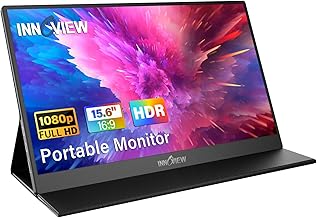
InnoView Portable Monitor, 15.6 Inch FHD 1080P HDMI USB C Second External Monitor for Laptop, Desktop, MacBook, Phones, Tablet, PS5/4, Xbox, Switch, Built-in Speaker with Protective Case
Best For:
Users seeking a reliable, protective, and travel-ready 15.6" monitor for daily spreadsheet tasks and client meetings.
The InnoView 15.6" portable monitor is a well-rounded, widely recommended option for travelers who want dependable picture quality and a protective case for frequent transit. Its Full HD IPS panel keeps text crisp, and the included protective case doubles as a folding stand for quick setups. The monitor supports USB-C and HDMI connections, which makes it compatible with a broad set of laptops and compact PCs. Built-in speakers are handy for calls, and the screen’s brightness and anti-glare coating help when working in varied lighting conditions.
Practical benefits: InnoView focuses on delivering a balanced experience: easy setup, protective travel case, and reliable compatibility. For spreadsheet editing, the screen size and resolution provide comfortable column visibility and legibility for financial work or detailed tables. The foldable case and protective shell make it easy to toss the monitor into a carry-on or backpack without worrying about screen damage.
Real-life usage examples: If you’re hopping between client sites, the InnoView lets you open a client workbook on a stable, readable display and quickly swap between devices using HDMI or USB-C. It’s especially useful when you need to compare multiple spreadsheets or maintain a reference document on the second screen while you update another file on your laptop. For hybrid workers, it becomes a semi-permanent second monitor when you set up at a coworking desk for a week.
Why it’s valuable: Compared with cheaper screens, InnoView puts more emphasis on a protective case and stable folio angles, which lengthens the life of the product in a travel-heavy routine. Compared with higher-end portable monitors, it keeps things simple and reliable without adding unnecessary gaming or HDR bells and whistles.
Who should buy it: Travelers who need a durable, no-nonsense portable display for spreadsheets and meetings. Who may not need it: users who require advanced color accuracy or integrated battery operation for untethered fieldwork.
Practical observations and considerations: Confirm that your phone or tablet supports video output over USB-C if you plan to use multiple devices. The included case is convenient, but if you prefer a wider range of tilt angles consider an external stand. Overall, InnoView is a dependable, travel-ready choice for spreadsheet-focused productivity.
Check the latest price on Amazon.
Pros
- Protective case that doubles as a stand
- Clear 1080p IPS panel with anti-glare
- Good compatibility with USB-C and HDMI
Cons
- Stand offers limited angle adjustments
- Not targeted at users needing pro-level color accuracy
Check the latest price on Amazon.
Final Verdict
Picking the right portable monitor for editing spreadsheets while traveling comes down to balancing screen real estate, portability, and the connectivity you need. If you want the best mix of portability and value, a 15.6" Full HD monitor like the cocopar, MNN, or InnoView gives clear text, simple setup, and protective covers that survive frequent travel. If you often work with very wide spreadsheets or prefer a near-desktop experience on trips, the Upperizon 18.5" provides noticeably more horizontal space. For travelers who value build quality, anti-glare surfaces, and orientation flexibility, the ASUS ZenScreen is worth the premium for its ergonomic features and warranty.
Consider how you travel (carry-on space and surface sizes), what ports your laptop has, and whether you want single-cable USB-C convenience or the additional compatibility of HDMI. For most spreadsheet-focused users a 15.6" 1080p monitor with USB-C will be the most practical choice—lightweight, easy to pack, and quick to set up for focused work.
Whichever model you choose, a portable monitor can immediately boost your productivity on the road by letting you view more columns, compare sheets side-by-side, and reduce the time spent switching tabs. Check the latest price on Amazon.
Conclusion
These Portable monitor for editing spreadsheets while traveling picks are trending now and offer great value and variety. Check the links above for latest prices and reviews.
As an Amazon Associate, I earn from qualifying purchases.
Tags:
portable monitor, travel monitor, portable screen for spreadsheet, USB-C monitor, 15.6 inch monitor, portable second monitor, laptop extender
