Best Portable SSDs for Travel Photography Backups
As an Amazon Associate, I earn from qualifying purchases. This article may contain affiliate links, which means we may receive a commission at no extra cost to you.
Travel photographers know the anxiety of a full memory card or a camera failure while on the road. Reliable, pocket-sized storage that can quickly ingest RAW images and video is essential for protecting weeks of work. This guide walks through five strong 1TB portable SSDs tailored to travel workflows—options that prioritize speed, durability, and cross-platform compatibility. As an Amazon Associate, I earn from qualifying purchases. This article may contain affiliate links, which means we may receive a commission at no extra cost to you.
Whether you shoot landscape panoramas, destination weddings, or time-lapse sequences, a purpose-built portable SSD can turn a tense backup chore into a fast, routine step. Below you’ll find a buying guide to help you choose the right drive and in-depth descriptions of five 1TB models from Sandisk, Samsung, Lexar, and a high-speed USB 3.2 Gen 2 portable SSD. Each product section explains who will get the most value from that model, everyday use cases, and practical pros and cons based on common customer experiences and technical specs.
Buying Guide
Why a portable SSD is the best travel backup option
Speed: Fast write and read speeds matter when you’re offloading multiple CFexpress or XQD cards full of RAW and 4K video. Look for sequential write speeds that match or exceed the rate you need to clear a card quickly—many modern 1TB portable SSDs advertise 1,000MB/s and up.
Durability: Travel photography exposes gear to bumps, temperature changes, dust, and occasional splashes. Drives with IP65 dust/water resistance, shock-rated enclosures, or ruggedized housings reduce the risk of a data loss event in the field.
Interface compatibility: USB-C with USB 3.2 Gen 2 (or Gen 2×2 for higher-end units) is the current standard. Confirm that the SSD comes with USB-C to USB-C and/or USB-A cables if your laptop, camera, or phone uses older ports. For iPhone users, you’ll likely need a Lightning-to-USB adapter or the Apple Camera Adapter to connect directly.
Software and encryption: Many portable SSDs include optional software for automatic backups, password protection, and hardware encryption. These features add convenience and help protect client files when traveling.
Heat management and sustained performance: Some drives throttle under heavy continuous writes. If you transfer multiple high-bitrate clips or tether-to-disk, choose a model that manages thermals well to maintain consistent speeds.
Power and portability: SSDs are bus-powered and draw negligible current, but size and weight do matter when minimizing your kit. Look for compact, lightweight designs that fit in a camera bag pocket.
Reliability vs. archival storage: Portable SSDs are excellent for active backups and editing on the go, but consider a secondary archival solution (cloud backup, NAS, or LTO tapes) for long-term storage.
Capacity and future proofing: 1TB is an excellent starting point for travel photographers, holding hundreds of RAW files or dozens of hours of compressed video. If you regularly shoot high-resolution video, a 2TB option may be safer.
Real-world buying considerations
– Check the included cables and whether you’ll need adapters for phones or older laptops.
– Confirm warranty length and brand reputation—most reputable manufacturers offer multi-year warranties.
– Read customer feedback about real sustained speeds (not just peak specs) and reliability over months of travel.
How to use a portable SSD on a shoot
– Offload memory cards at the end of the day and keep the SSD powered off while in transit.
– Perform a quick verify of copied files before erasing cards.
– Use folder organization and a simple naming convention so you can locate images quickly later.
Comparing to alternatives
– Portable HDDs: Cheaper per TB but slower and more fragile—less suited for rapid in-field backups.
– Cloud backup: Great for redundancy but limited by upload speed and data caps while traveling.
Following the guide above will help you pick a drive that fits your workflow. Below are five well-regarded 1TB models with detailed use cases and buying considerations.
1TB External Hard Drive, Up to 2100MB/s, USB 3.2 Gen 2 Portable SSD, External Solid State Drive for Mac, Windows PC, Laptops, Gaming, iPhone — Ideal for File Backup, Content Creators & Videographers
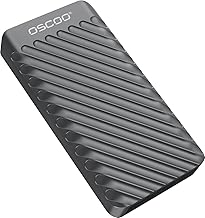
Best For:
Travel photographers and videographers who need the fastest possible transfers from memory cards and responsive editing on modern laptops with USB-C Gen2/Gen2x2 support.
This 1TB portable SSD advertises exceptionally high peak speeds (up to 2100MB/s) over a USB 3.2 interface, positioning it at the top end of what bus-powered portable drives can offer. Physically it’s compact enough for a travel kit and targets photographers, content creators and videographers who need fast card dumps and responsive file access while on the road. The 2100MB/s claim suggests a PCIe NVMe-based controller inside, which means transfers of large RAW or ProRes files happen quickly—ideal when you need to clear multiple memory cards between shoots.
Who should consider this drive: photographers and videographers who rely on quick offloads and often transfer large volumes of data in one go. If you travel with an ultrabook or modern laptop that supports USB-C Gen 2 or Gen 2×2, this SSD will minimize downtime between shoots.
Practical benefits and real-life usage: Imagine finishing a full-day shoot with several 64GB cards; a fast SSD like this will cut the time you spend waiting for copies from tens of minutes down to a few. It’s also helpful when editing on a laptop—loading photo catalogs and previewing high-resolution files feels snappier compared to spinning HDDs. The drive’s NVMe-based architecture also helps when working with scratch space for light video edits.
Problems it solves: slow card-to-drive transfers, long wait times when opening large image libraries on the road, and bottlenecks during on-location editing sessions. Compared to a standard portable HDD, the SSD eliminates mechanical vibrations, reduces weight, and provides a much quicker workflow.
Limitations and buying considerations: peak speeds are often measured under lab conditions and can be lower during sustained writes or when the drive heats up. Confirm the included cable type and whether you need an adapter for iPhone or older USB-A laptops. Also check warranty terms and manufacturer support for travel claims. If you primarily need low-cost bulk storage for simple archiving, a portable HDD might be a more economical choice.
Customer-observed notes: users commonly report that actual sustained speeds depend on host device capabilities; faster laptops and quality cables make a noticeable difference. Thermal throttling can appear during extended heavy transfers, so consider brief cooling breaks during marathon copy sessions. Overall, many photographers appreciate the time saved when offloading multiple cards.
Check the latest price on Amazon.
Pros
- Very high advertised peak speeds (up to 2100MB/s) for quick offloads
- Compact, bus-powered design suitable for travel
- NVMe-based architecture provides responsive file access and editing
Cons
- Real-world sustained speeds may be lower than peak claims
- Potential thermal throttling under long continuous writes
Check the latest price on Amazon.
Lexar ES3 1TB External SSD, USB 3.2 Gen2 Portable SSD, PSSD Up to 1050MB/s Read, 1000MB/s Write, External Solid State Drive Compatible with iPhone 16/15 Series/Mac/PS5/XBOX/Laptop/PC, Silver

Best For:
Traveling photojournalists, hybrid shooters, and hobbyists who want strong daily performance and broad device compatibility without paying premium prices.
The Lexar ES3 1TB is positioned as a balanced portable SSD for creators who want fast everyday performance without climbing to premium price tiers. With rated read speeds up to 1050MB/s and write speeds near 1000MB/s, it comfortably handles RAW images and most 4K video workflows for on-the-go transfers and light editing. Its slim, metal-finish enclosure helps dissipate heat better than thin plastic shells and feels durable in a camera bag.
Who should consider this drive: photographers and hybrid shooters who need a reliable, mid-range portable SSD for quick card backups, travel editing, and compatibility across devices—including Windows, Mac, consoles, and many phones. If you use an iPhone 15/16 series or a MacBook, this drive’s USB-C support makes it straightforward to connect with the proper cables or adapters.
Practical benefits and real-life usage: for many travel scenarios, the Lexar ES3 is the workhorse—copy RAW photos at speeds that shave minutes off routine offloads. It’s especially handy for photographers who shoot burst-heavy sessions or multi-format assignments where speed and reliability matter. Its form factor allows it to sit comfortably in a small gear pocket or tucked into a camera bag organizer.
Problems it solves: reduces time spent waiting for transfers compared with traditional HDDs, enables faster previews and selects in Lightroom or other DAM software, and provides portable scratch space for light edits. It also offers a safer alternative to card-only storage—freeing up cards for more shooting while keeping backups compact.
Limitations and buying considerations: while fast, the ES3 is not the absolute fastest SSD available—pros doing sustained high-bitrate video editing might want a Gen 2×2 or Thunderbolt solution. Check whether cables are included and whether you need adapters for phone connections. Warranty and customer support reputation are additional factors to weigh when buying for frequent travel.
Customer-observed notes: many users appreciate Lexar’s balance of value and performance; reported real-world speeds are typically close to advertised figures when used with compatible hosts. For extended 4K/RAW video dumps, allow occasional pauses to avoid thermal limits.
Check the latest price on Amazon.
Pros
- Balanced performance: ~1050MB/s read and ~1000MB/s write
- Slim, metal-finish enclosure for durability and heat dissipation
- Wide device compatibility (PC, Mac, consoles, phones with adapters)
Cons
- Not as fast as Gen2x2 or Thunderbolt SSDs for heavy sustained video work
- May require adapters or specific cables for some phones
Check the latest price on Amazon.
SANDISK 1TB Extreme Portable SSD (Old Model) – Up to 1050MB/s, USB-C, USB 3.2 Gen 2, IP65 Water and Dust Resistance, Updated Firmware – External Solid State Drive – SDSSDE61-1T00-G25

Best For:
Adventure and travel photographers who need a durable, water- and dust-resistant drive that balances speed with ruggedness.
The older SANDISK Extreme Portable SSD is a proven favorite among travel photographers for its dependable blend of speed, ruggedness, and a compact footprint. With up to 1050MB/s sequential speeds and IP65 dust and water resistance, it’s engineered to cope with outdoor shoots that include dust, light rain, or sandy conditions. The textured rubberized exterior provides extra grip and some shock protection without adding bulk to your bag.
Who should consider this drive: landscape and travel photographers who regularly shoot outdoors and need a near-pocketable drive that won’t be ruined by a splash or a dusty trail. It’s well suited to someone who values reliability and real-world durability over pushing absolute peak performance.
Practical benefits and real-life usage: on a multi-day trip you might spend mornings shooting coastal sunrises and afternoons hiking in dusty canyons. The Sandisk Extreme’s IP65 rating and ruggedized casing mean you can safely stash it in an external pocket without worrying about dust or a sudden drizzle. Speeds up to 1050MB/s still slice through card dumps quickly, and many users find transfer times fast enough to maintain a steady workflow between captures.
Problems it solves: fragile portable HDDs and unprotected SSDs can fail or be damaged during adventure travel. The SANDISK Extreme reduces that risk while delivering SSD-level speed. It also makes it practical to offload cards multiple times per day—freeing up space and reducing stress about running out of cards.
Limitations and buying considerations: it’s not the absolute fastest option available, and the older model lacks Gen2x2 throughput. If you perform long, continuous transfers of very high-bitrate video, consider higher-bandwidth choices; however, for stills and standard 4K workflows it’s more than sufficient. Also check if the latest firmware updates are applied for the best compatibility and performance.
Customer-observed notes: buyers often praise the durability, small size, and consistent speeds in field conditions. A few photographers note the importance of keeping the rubber cap (if included) on the port to maintain dust resistance.
Check the latest price on Amazon.
Pros
- IP65 water and dust resistance—good for outdoor shoots
- Compact, rubberized design for grip and minor impact protection
- Solid ~1050MB/s speeds for quick RAW and 4K transfers
Cons
- Not the fastest option for heavy continuous video transfers
- Older model lacks the highest bandwidth interfaces like Gen2x2
Check the latest price on Amazon.
SANDISK 1TB Extreme PRO Portable SSD – Up to 2000MB/s – USB-C, USB 3.2 Gen 2×2, IP65 Water and Dust Resistance, Updated Firmware – External Solid State Drive – SDSSDE81-1T00-G25

Best For:
Professional photographers and videographers who need top-tier portable speeds and a durable enclosure for intensive travel workloads.
The SANDISK Extreme PRO Portable SSD is aimed at professionals and serious enthusiasts who need a combination of speed and field-ready durability. With advertised speeds up to 2000MB/s via USB 3.2 Gen 2×2, it’s a compelling option for on-location photographers and videographers who transfer large RAW files or high-bitrate video regularly. The IP65-rated enclosure and improved thermal design help maintain higher transfer rates for longer before throttling.
Who should consider this drive: professionals, wedding photographers, videographers, and content creators who demand faster transfers and minimal downtime between shooting sessions. If your workflow includes frequent multi-card dumps and some amount of in-place editing on a laptop, this drive reduces wait times and speeds up review sessions with clients.
Practical benefits and real-life usage: imagine finishing a wedding reception with dozens of RAW files and several hours of ceremony footage—an Extreme PRO lets you offload and organize files quickly, leaving time for basic culling or a fast preview for clients. On adventure trips, its IP65 resistance and sturdy build mean you can move between locations without excessive worry about weather or dust.
Problems it solves: long transfer times and slow previews during client demos; it also lowers the chance that you’ll need to carry multiple drives simply to keep up with a demanding shoot schedule. Compared with lower-tier SSDs, the Gen 2×2 bandwidth enables noticeably faster full-volume transfers when paired with a compatible host.
Limitations and buying considerations: to get close to the top speeds you need a host device that supports Gen 2×2; otherwise, you’ll be limited by your laptop’s ports or cable. These drives also tend to cost more than standard Gen2 SSDs. For strictly incidental or occasional backups, the extra speed may be overkill.
Customer-observed notes: reviewers often highlight the time savings for large transfers and the peace of mind the rugged case provides. Some users recommend pairing the drive with a small padded pouch to avoid scratches when carrying in a bag.
Check the latest price on Amazon.
Pros
- Very fast—up to 2000MB/s with Gen 2×2 hosts
- IP65-rated ruggedness for travel and outdoor shoots
- Better thermal handling for sustained transfers
Cons
- Requires Gen 2×2-capable host to reach peak speeds
- Higher cost than standard Gen2 portable SSDs
Check the latest price on Amazon.
Samsung T7 Portable SSD, 1TB External Solid State Drive, Speeds Up to 1,050MB/s, USB 3.2 Gen 2, Reliable Storage for Gaming, Students, Professionals, MU-PC1T0T/AM, Gray

Best For:
Photographers who want a dependable, secure, and compact SSD with strong software support for encryption and management.
The Samsung T7 remains a go-to portable SSD for many creators due to its solid mix of speed, reliability, and polished software support. With speeds up to 1050MB/s and a compact aluminum body, the T7 is easy to slip into a camera bag or pocket and provides secure file storage with optional password protection and AES 256-bit encryption via Samsung’s software.
Who should consider this drive: photographers who want dependable performance and strong software features in a small package. The T7 is particularly appealing if you prioritize cross-platform compatibility, robust encryption options for client work, and a proven track record from a major manufacturer.
Practical benefits and real-life usage: for travel shoots, the T7 quickly ingests card dumps and helps you keep organized folders for different clients or days. The included management software makes it simple to set up password protection for sensitive client images, and Samsung’s reputation for drive reliability is reassuring when carrying important files across multiple time zones.
Problems it solves: slow offloads from memory cards, lack of secure encryption on some budget drives, and the need for a compact, reliable portable working drive. Compared to generic SSDs, the T7’s software suite and consistent build quality are frequently cited as differentiators.
Limitations and buying considerations: the T7’s top advertised speeds are typical of Gen2 SSDs—excellent for stills and moderate video but not the fastest on the market for multi-hour high-bitrate video transfers. If you anticipate extreme workloads, consider a Gen 2×2 or Thunderbolt solution. Also verify cable inclusion and whether you need adapters for phones.
Customer-observed notes: owners consistently note the T7’s reliability and ease of use. A few mention that heavy sustained writes cause throttling over long sessions, but for most travel photography use cases the drive delivers excellent real-world performance.
Check the latest price on Amazon.
Pros
- Reliable brand reputation and software for encryption
- Compact metal design and consistent performance (~1050MB/s)
- Good balance of speed, features, and portability
Cons
- Not the fastest option for extended high-bitrate video transfers
- Sustained writes may lead to throttling during marathon sessions
Check the latest price on Amazon.
Final Verdict
Choosing the right portable SSD for travel photography depends on your priorities. If maximum peak speed and fast card dumps are crucial, the high-end NVMe/Gen2x2 options (like the 2100MB/s model or the Sandisk Extreme PRO) deliver the quickest transfers when paired with a compatible laptop. For a balanced mix of speed, price, and ruggedness, the Lexar ES3 and Samsung T7 are excellent all-rounders that cover most travel workflows. The older SANDISK Extreme remains a veteran favorite when outdoor resistance and proven field performance matter.
Remember that advertised peak speeds are often achieved under ideal conditions; real-world throughput depends on your host device, cables, and whether the drive needs thermal recovery during long transfers. Also consider whether you need hardware encryption, IP ratings for weather protection, and the included cables and adapters for phones.
For most travel photographers, a 1TB portable SSD is the sweet spot—large enough for multiple days of RAW shooting but small and light enough to carry everywhere. Pair your SSD with a simple backup workflow: offload at day’s end, verify copies, and maintain an additional offsite or cloud copy when practical. If long-term archival is a concern, plan a secondary storage strategy.
Whichever model you choose from the list above, you’ll likely notice a significant improvement in speed and reliability compared with portable HDDs or ad-hoc card storage. Pick the one that matches your editing needs, host compatibility, and ruggedness requirements, and you’ll spend less time waiting and more time behind the camera.
Check the latest price on Amazon.
Conclusion
These Portable SSD for backing up travel photography files picks are trending now and offer great value and variety. Check the links above for latest prices and reviews.
As an Amazon Associate, I earn from qualifying purchases.
Tags:
portable ssd, travel photography backup, 1TB external ssd, Sandisk Extreme, Samsung T7, Lexar ES3, portable storage, SSD for photographers
