Best Portable Monitors for Remote Coding on the Road
As an Amazon Associate, I earn from qualifying purchases. This article may contain affiliate links, which means we may receive a commission at no extra cost to you.
If you write code while traveling, a second screen can be the single upgrade that makes hotel desks and coffee-shop work sessions actually productive. Portable monitors give you a full 15.6-inch display, USB-C and HDMI connectivity, and lightweight protective covers so you can open a laptop, dock a monitor, and get to work in minutes. This guide walks through the practical benefits, common trade-offs, and four reliable 15.6" FHD options that regularly appear in recommendations and product listings.
Affiliate disclosure: As an Amazon Associate, I earn from qualifying purchases. This article may contain affiliate links, which means we may receive a commission at no extra cost to you.
This article is based on product specifications, manufacturer information, and common user feedback from owners who use these monitors for coding, debugging, and remote collaboration. I don’t claim personal hands-on testing here; instead, you’ll get a practical, research-driven buying guide and in-depth descriptions to help you choose the right portable monitor for your travel workflow.
Buying Guide
Why a portable monitor matters for remote coding
Coding on a single laptop screen is possible but limiting. A portable monitor adds an external display for editor + terminal, documentation, or a live preview. That extra real estate speeds context switching and reduces the friction of running and testing code while on the move.
Key features to prioritize
– Screen size and resolution: 15.6" FHD (1920×1080) is a sweet spot—large enough for split windows but compact for a backpack.
– Panel type: IPS panels offer wider viewing angles and more accurate colors than basic TN panels. For coding, IPS helps if you share the screen or use it at odd angles in cafés or hotel rooms.
– Connectivity: USB-C with DisplayPort Alt Mode is the most convenient single-cable option (power + video). HDMI remains essential for compatibility with gaming consoles, docking stations, or older laptops without full USB-C support. Check whether the monitor supports power delivery over the same cable or whether it needs a separate power source.
– Stand and cover: Built-in kickstands or smart covers that fold into stands make a huge difference in stability and ergonomics. Look for a 60–90° adjustable stand or a durable smart cover that doubles as a stand.
– Extras: Built-in speakers are handy for video calls and quick debugging audio, but they aren’t a replacement for dedicated headphones. A low-reflection screen protector, anti-glare coating, or HDR support can help with contrast in bright hotel lobbies.
Practical trade-offs
– Weight vs durability: Thinner, lighter monitors are easier to carry but often need a slim sleeve for protection. If you frequently travel with fragile gear, prioritize a protective case.
– Brightness and battery-free operation: Most portable monitors are bus-powered and don’t have built-in batteries. If you work outdoors, check the nits (higher brightness preferred). For indoor coding sessions, standard brightness typically suffices.
– Color fidelity vs price: If you do color-sensitive work like UI design, seek models with better color coverage. For pure coding, FHD IPS panels in these models are more than adequate.
Connectivity checklist before buying
– Confirm your laptop’s USB-C port supports DisplayPort Alt Mode and power delivery if you want single-cable setup.
– If you plan to use HDMI with a dongle, verify the monitor’s HDMI input supports 60Hz at 1080p.
– Make sure the protective case or smart cover is included or available separately.
How to set up for coding on the go
1. Pack the monitor in a sleeve and lay your laptop and monitor on a stable surface. 2. Use a USB-C to USB-C cable (or HDMI + USB-A power) to connect. 3. Choose an ergonomic layout: laptop on right for keyboard, monitor left for code; or laptop elevated on a stand with the monitor as the main screen. 4. Keep a small external keyboard and mouse in your bag for longer sessions.
Buying considerations
– Who should spend more: frequent road warriors who pair a laptop and monitor daily should invest in sturdier cases and larger brightness range. Occasional travelers can prioritize budget models with solid basics.
– Who might skip: if you’re doing short bursts of text editing or you primarily use cloud-based IDEs with responsive UIs on one screen, a portable monitor might be unnecessary overhead.
Use this guide alongside the product sections below to choose a model that fits your workflow and travel habits.
KYY Portable Monitor 15.6inch 1080P FHD USB-C, HDMI Computer Display HDR IPS Gaming Monitor w/Premium Smart Cover & Screen Protector, Speakers, for Laptop PC MAC Phone PS4 Xbox Switch

Best For:
Traveling developers who want a lightweight dual-screen setup with both USB-C and HDMI compatibility.
Overview: The KYY 15.6" portable monitor is built around a bright FHD IPS panel and includes a smart cover, screen protector, and built-in speakers. It supports both USB-C and HDMI inputs, which makes it broadly compatible with modern laptops, MacBooks, phones with video output, and gaming consoles. Based on the specs and common user reports, this model positions itself as an all-round travel monitor—light enough to carry, but with enough I/O to work with multiple devices.
Main benefits: For remote coders, the KYY monitor’s real appeal is convenience. The USB-C option offers a near-plug-and-play experience when paired with a laptop that supports DisplayPort Alt Mode. Multi-input options mean you can switch between a MacBook, a Windows laptop, or a handheld gaming device without swapping monitors. The included smart cover doubles as a protective sleeve and an angled stand—useful for cramped coffee shop tables or a temporary hotel workspace.
Real-life usage examples: Imagine debugging a microservice locally on your laptop while keeping API docs or Postman on the second screen. Use the KYY as a preview display for web work while the main laptop runs your editor and terminal. Users also cite the speakers for quick video calls when headphones aren’t handy. If you pair it with a compact keyboard and mouse, you essentially recreate a lightweight dual-screen workstation anywhere.
Why it’s valuable: Compared with a standard office monitor, the KYY trades a touch of brightness and resolution headroom for portability and flexible inputs. If you often travel between different host devices, the HDMI + USB-C combination reduces the need for adapters. The smart cover and screen protector add practical protection for frequent packing.
Who should buy and who may not need it: If you’re a developer who spends hours debugging, switching between windows, or referencing docs while on the road, KYY is a sensible, budget-friendly option. If you need color-accurate panels for UI design or higher brightness for outdoor work, consider a monitor marketed specifically for color-critical work or higher-nit screens.
Practical observations and buying considerations: Check your laptop’s USB-C port for DisplayPort Alt Mode and PD support if you want single-cable power and video. Expect the built-in speakers to be serviceable for calls but not studio-quality. The included smart cover is a nice touch; users recommend also buying a padded sleeve if you frequently toss the monitor into luggage.
Check the latest price on Amazon.
Pros
- USB-C and HDMI inputs for broad compatibility
- Includes smart cover and screen protector for protection
- IPS panel gives good viewing angles for collaborative work
Cons
- Speakers are basic — use headphones for better audio
- Not aimed at color-critical design work
Check the latest price on Amazon.
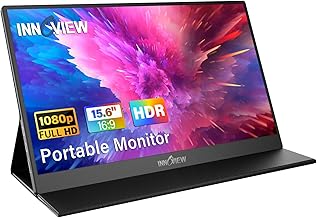
InnoView Portable Monitor, 15.6 Inch FHD 1080P HDMI USB C Second External Monitor for Laptop, Desktop, MacBook, Phones, Tablet, PS5/4, Xbox, Switch, Built-in Speaker with Protective Case
Best For:
Developers and remote workers who want a travel-ready 15.6" monitor with a dependable protective case and clear text rendering.
Overview: InnoView’s 15.6" portable monitor is a frequently recommended option that balances build quality and features. The FHD IPS panel promises clear text rendering and wide viewing angles; the protective case included in the package folds into a stand with multiple viewing angles. With USB-C and HDMI inputs and built-in speakers, it’s a straightforward choice for developers who need consistent, plug-and-play external display support.
Main benefits: The InnoView shines in practical touches—robust case, easy switching between inputs, and a reliably sharp 1080p screen. For coding, crisp text is essential. InnoView’s panel and anti-glare finishing typically render code editors clearly, reducing eye strain during long sessions. The adjustable stand lets you tilt the screen into a comfortable angle on uneven surfaces like airplane trays or small café tables.
Real-life usage examples: Use it as a second monitor for a split view: code editor on one screen, terminal and logs on the other. When you need to demo a feature during a video call, flip the monitor to show a preview or slides while keeping the laptop’s webcam view intact. It’s also a handy companion for creative breaks—connect a Switch or console for downtime between commits.
Why it’s valuable: Compared to budget alternatives that skimp on case quality or rely on fragile magnetic covers, InnoView’s protective case and build feel more travel-ready. Its consistent text clarity and stable stand make it less fiddly when setting up in cramped workspaces.
Who should buy and who may not need it: This monitor fits developers who value a balance of reliability and value. If your work requires ultra-high brightness for outdoor usage or you need a built-in battery for off-grid sessions, look for specialized models. Casual users or those who occasionally need extra screen space may find a simpler, cheaper option sufficient.
Practical observations and buying considerations: Confirm your laptop’s USB-C features to leverage single-cable video and power. Users often recommend packing a small microfiber cloth for the anti-glare surface and keeping a compact cable organizer to manage USB-C and HDMI cords.
Check the latest price on Amazon.
Pros
- Protective case that folds into a sturdy stand
- Clear FHD IPS display for comfortable reading and coding
- Plug-and-play with USB-C and HDMI
Cons
- No built-in battery—requires host power
- Speakers are adequate but not great for media-heavy use
Check the latest price on Amazon.
MNN Portable Monitor 15.6inch FHD 1080P USB C HDMI Gaming Ultra-Slim IPS Display w/Smart Cover & Speakers,HDR Plug&Play, External Monitor for Laptop PC Phone Mac (15.6” 1080P)

Best For:
Developers and digital nomads who prioritize a thin, lightweight monitor for frequent travel with occasional media or preview needs.
Overview: The MNN 15.6" portable monitor targets travelers who want a slim profile without sacrificing functionality. With an FHD IPS panel, HDR support, USB-C and HDMI inputs, an included smart cover, and built-in speakers, it aims to deliver a polished experience for both productivity and casual gaming. The HDR tag hints at enhanced contrast performance for darker scenes, which can make reading dark-themed editors and terminal windows feel a bit more readable in certain lighting.
Main benefits: For a developer on the road, the MNN monitor offers a balanced mix of portability and feature set. The ultra-slim chassis keeps backpack weight low, while the smart cover protects the panel and doubles as a stand. HDR support—though modest on portable displays—can improve perceived contrast when viewing previews or media. The simple plug-and-play nature with USB-C reduces setup fuss in shared workspaces.
Real-life usage examples: Use MNN as a code + preview setup: write HTML/CSS on the laptop and preview on the portable screen. While running containerized services and logs, keep the monitor dedicated to logs and debugging output so your main screen stays focused on the editor. The HDR characteristics sometimes help when comparing dark UI themes during late-night debugging.
Why it’s valuable: Compared to generic portable monitors, MNN emphasizes a slim, travel-first profile with a few niceties—HDR and a sturdy smart cover—that make it feel slightly more premium. The combination of USB-C and HDMI keeps it useful across multiple device types.
Who should buy and who may not need it: Frequent travelers who want a light, slim second screen and occasional HDR benefits will appreciate this model. If you need a brighter display for outdoor use or a monitor with professional-level color calibration for design work, look at higher-end alternatives.
Practical observations and buying considerations: Be aware that HDR on portable monitors is often limited by brightness and tone mapping; it improves contrast in some scenes but won’t match a desktop HDR monitor. Check cable quality—using the supplied cables or a high-quality USB-C cable reduces the risk of flicker or intermittent connections.
Check the latest price on Amazon.
Pros
- Ultra-slim, lightweight design for easy transport
- HDR support for improved contrast in media previews
- Smart cover doubles as a protective sleeve and stand
Cons
- HDR benefits are limited by portable monitor brightness
- May need higher-quality cables to avoid flicker
Check the latest price on Amazon.
InnoView Portable Monitor 15.6" 1080P for Laptop with Protective Sleeve, Built-in 90° Adjustable Stand USB C HDMI Ultra-Slim Portable Laptop Monitor for MacBook Phone PS Xbox Switch

Best For:
Remote coders who prioritize ergonomic, stable positioning for long work sessions away from a desk.
Overview: This InnoView variant focuses on ergonomics with a built-in 90° adjustable stand and an included protective sleeve. It keeps the same 15.6" FHD IPS panel and USB-C/HDMI inputs that make the brand dependable for portable displays. The 90° adjustable stand is notable—allowing more flexible tilt and better stability on uneven surfaces compared with simple foldable covers.
Main benefits: The key strength of this model is ergonomics. Developers who set up temporary workstations in airports, coworking spaces, or hotel rooms will appreciate a stand that locks into position and stays steady with a laptop placed beside it. The protective sleeve protects the panel during transit while the built-in stand shortens setup time when you arrive at a new workspace.
Real-life usage examples: Picture a full-day remote workshop where you run a local server on your laptop and leave logs and monitoring dashboards on the portable monitor. The 90° stand gives you comfortable angles for prolonged sessions. It’s also handy for pair-programming sessions in public areas when you want consistent screen positioning to share with a colleague.
Why it’s valuable: Compared to simple magnetic covers or soft sleeves, the integrated stand and sleeve combo reduces setup friction and adds stability. If your workflow includes long coding sprints away from your desk, this model helps maintain a consistent ergonomic posture.
Who should buy and who may not need it: Choose this InnoView if you value a sturdy, adjustable stand and plan longer mobile working sessions. If you only need temporary second-screen support for quick checks, a lighter smart-cover-only model may suffice.
Practical observations and buying considerations: The trade-off for a more robust stand is a slight bump in thickness and weight versus the lightest travel displays. Check that your laptop’s USB-C port supports video output for the simplest single-cable setup. If you frequently use external docks, verify HDMI input behavior with your docking solution.
Check the latest price on Amazon.
Pros
- Built-in 90° adjustable stand for stable setups
- Protective sleeve included for travel protection
- FHD IPS panel for crisp text and good viewing angles
Cons
- Slightly thicker than ultra-slim alternatives
- No built-in battery—requires host power
Check the latest price on Amazon.
Final Verdict
Choosing the right portable monitor for remote coding depends on how and where you work. If you need broad compatibility and a protective package, the KYY model is a practical all-rounder. InnoView strikes a nice balance between build quality and travel-ready features—pick the protective-case variant for general use or the adjustable-stand variant for longer sessions when ergonomics matter. If thinness and minimal carry weight are your priority, the MNN model offers a slim profile with helpful HDR perks for previews.
Before buying, verify your laptop’s USB-C capabilities (DisplayPort Alt Mode and power delivery) and consider whether you need a higher-brightness or color-accurate display. For most remote developers and digital nomads, a 15.6" FHD IPS portable monitor with USB-C and HDMI will transform cramped travel setups into productive, dual-screen workstations.
If you’re ready to add a reliable second screen to your travel kit, pick the model above that best matches your priorities—portability, ergonomics, or multi-device flexibility—and check current details and shipping on the Amazon product page.
Check the latest price on Amazon.
Conclusion
These Portable monitor for remote coding while traveling picks are trending now and offer great value and variety. Check the links above for latest prices and reviews.
As an Amazon Associate, I earn from qualifying purchases.
Tags:
portable monitor, travel monitor, portable monitor for coding, USB-C monitor, 15.6 inch monitor, remote work monitor, InnoView, KYY
