Best Desk Gadgets for Real Productivity Routines
As an Amazon Associate, I earn from qualifying purchases. This article may contain affiliate links, which means we may receive a commission at no extra cost to you.
Small, intentional desk tools can turn scattered work sessions into reliable routines. This guide looks at compact gadgets people actually reach for during focused work: tactile timers that remove phone distractions, a glass desk whiteboard for quick notes, and a versatile LED lamp that protects your eyes while powering devices. Each recommendation is chosen for realistic daily use—short sprints, quick planning, and comfortable long hours—so you can pick what fits your workflow.
Buying Guide
When choosing desk gadgets, focus on fit and friction: will the tool reduce the steps between intention and action? For timers, tactile controls and preset intervals matter more than bells and whistles—look for silent or vibration modes for shared spaces. For desktop whiteboards, durability and a smooth glass surface beat cheap melamine boards that ghost. A desk lamp should offer adjustable color temperature, brightness levels, and a reliable charging port if you rely on your phone. Consider size, power source (battery vs. USB), and whether the accessory complements the way you actually work—standing vs. seated, solo vs. shared space. If you prefer fully digital analytics, an app-based timer might outshine a physical cube; if you want lower distraction and tactile feedback, a hardware timer is superior.
Productivity Timer 1, 5, 10, 30, 60 Minutes Preset, Desk Cube Timer with Gravity Sensor/Mute/Vibration for ADHD, Work, Study, Kitchen, Back to School (Wood Grain)

Best For:
Students, ADHD users, remote workers, and anyone who needs a tactile, low-distraction timer for short focus sprints.
This wood-grain desk cube folds simplicity into a tactile focus tool. With one-touch presets for 1, 5, 10, 30 and 60 minutes, a gravity sensor to start with a flip, and mute/vibration options, it’s designed for people who need a low-friction way to begin timed work or breaks. The natural finish blends with home-office décor, and the vibration/silent modes let you use it in shared spaces without interrupting others.
Compared with smartphone Pomodoro apps, the cube cuts the decision fatigue—no unlocking or app setup—so it’s excellent for students, remote workers with frequent context switches, and people managing ADHD who benefit from immediate, tangible cues. Practical observations from similar products suggest the presets cover most short-sprint needs but won’t replace apps if you want long-term analytics or integration with task lists.
Buying considerations include battery life (keep a spare coin cell or check the product details) and the cube’s weight—lightweight models are easy to knock over. If you want a visually striking timer with vibration and a simple start gesture, this wood-grain cube is a low-fuss pick. Grab it for quick focus sessions and kitchen timers alike. Check it on Amazon.
Pros
- Easy one-touch presets
- Gravity sensor start
- Silent and vibration modes
- Attractive wood-grain finish
Cons
- No long-session analytics
- Requires battery replacements
- May be too simple for power users
See this wood-grain focus cube on Amazon.
SELEAD Desktop Glass Whiteboard with Calculator & Built-in Mirror, Dry Erase White Board Computer Pad Keyboard Stand with Organizer Drawer, Desk Accessories for Home, School, Office

Best For:
People who jot quick notes during calls, students, home-office workers who want a tidy workflow with easy access to a calculator and small organizer.
A desktop glass whiteboard pulls quick notes off sticky notes and into a reusable surface. This model doubles as a keyboard pad and riser, with a built-in calculator and a small mirror—features aimed at multitaskers who like keeping essentials visually available. The glass surface resists staining better than melamine and offers a smooth write/erase experience that holds up to frequent use.
Real-life usage scenarios include jotting a running to-do list while on calls, drafting a short outline before drafting a longer doc, or using the board as a stage for quick mental math with the integrated calculator. The drawer and organizer space help keep pens, sticky tabs, and charging cables within reach, reducing desk clutter that breaks focus.
Compared to sticky notes or paper notepads, a glass board reduces paper waste and keeps your desk looking cleaner; compared with wall-mounted boards, this desktop version sits in reach, which matters when you want to capture a thought immediately. Consider desk depth—if your workspace is compact, verify the footprint and keyboard placement. If you prefer digital note syncing, a tablet or app might replace the tactile benefit of a physical board. For quick capture and a tidy desk, this glass pad is a practical, everyday upgrade. Check it on Amazon.
Pros
- Durable glass writing surface
- Built-in calculator and organizer
- Doubles as keyboard pad/riser
- Cleaner look than sticky notes
Cons
- Larger footprint than a notepad
- No digital sync for notes
- Mirror may be unnecessary for some
Check this desktop glass whiteboard on Amazon.
Digital Pomodoro Timer Cube 5/10/25/50min, Visual Productivity Flip Timer for Kids Classroom Desk, Custom Countdown, Silent and Sound Mode for ADHD Study Work Game Kitchen (Pink)

Best For:
Classrooms, parents, students, and anyone who benefits from a visual, tactile Pomodoro timer—especially children and people managing screen distractions.
This pink digital Pomodoro cube is made for visually guided focus sessions. With flip-to-start actions and presets for 5, 10, 25 and 50 minutes, plus custom countdown capability, it’s great for classrooms, study corners, or kitchens. The visual simplicity makes it kid-friendly—teachers can set clear activity windows without fuss—and adults will appreciate the silent mode for co-working spaces.
Practical use-cases include timing reading blocks for children, breaking work into manageable Pomodoro rounds, and timing quick kitchen tasks while cooking. The color and tactile flip action encourage commitment to the chosen interval and remove the temptation to pick up a phone. Compared to smartphone timers, this cube is less distracting and simpler to operate, although it won’t provide logs or integrations for productivity apps.
Buying considerations: check the flip sensitivity so it doesn’t start accidentally, and confirm battery type and expected lifespan. If you want a cheerful, straightforward visual timer that encourages consistent sprints—with modes for silence or sound—this pink cube is a friendly option for mixed-age environments. Check it on Amazon.
Pros
- Flip-to-start presets
- Custom countdown option
- Silent and sound modes
- Kid-friendly design
Cons
- No app integration or usage history
- May start accidentally if flipped roughly
- Battery needs replacing
Find this pink Pomodoro cube on Amazon.
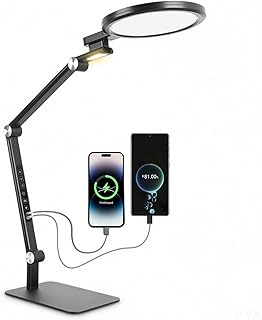
LED Desk Lamp for Home Office with Full Spectrums Eye Care, 5 Color Color 5 Brightness, 4-Axis Flexible Rotation, Dual Output Charging, Memory & Timer Func, Desk Lamps with Small Night Light
Best For:
Home office workers, students, and anyone who needs adjustable, eye-friendly lighting plus device charging at their desk.
Lighting affects comfort, focus, and fatigue. This LED desk lamp offers five color temperatures and five brightness levels so you can match the light to the task—cool white for detail work, warm for reading at night. The 4-axis flexible rotation helps position light without glare, and dual output charging gives your phone a spot to charge while you work. Memory and timer functions simplify repeating routines by remembering your preferred settings.
In practical terms, use it for long spreadsheets, late-night study sessions, or video calls where consistent, flattering illumination matters. The small night light feature is handy for late breaks without blasting the room with bright light. Compared with basic single-bulb lamps, this model reduces eye strain by allowing temperature and intensity adjustments and removes the need for an extra USB charger on your desk.
Buying considerations include cord length, whether the lamp base fits your desk edge, and how the lamp’s controls feel—tactile buttons are faster than touch sliders for repeated changes. If you often shift between reading, typing, and video calls, this adaptable lamp is a practical upgrade. Check it on Amazon.
Pros
- Multiple color temperatures and brightness levels
- Flexible 4-axis positioning
- Dual charging outputs
- Memory and timer functions
Cons
- May take desk space if base is large
- Cord length may limit placement
- Touch controls can be sensitive
Shop this adjustable desk lamp on Amazon.
Rotating Pomodoro Timer 5, 25, 10 50 Minutes Preset, Desk Productivity Flip Timer, ADHD Tool Cube Countdown Stopwatch, Vibration/High/Low Volume/Custom Modes, for Work, Study, Back to School, Kitchen

Best For:
People who want customizable alerts (vibration/high/low volume) and multiple preset intervals for varied daily tasks.
This rotating Pomodoro cube adds a layer of customization with multiple volume levels and a vibration alert, plus presets for 5, 10, 25 and 50 minutes. The rotating action to select a mode gives clear physical feedback and reduces accidental starts. For people who juggle varied tasks in a day—short check-ins, mid-length focused work, and longer study blocks—the mix of presets and adjustable alerts makes this a versatile desktop companion.
Real-life use scenarios include setting a 5-minute micro-break between meetings, a 25-minute focused sprint for writing, or a 50-minute study block for deep concentration. The ability to lower volume or switch to vibration is especially useful in shared offices or libraries. Compared with app timers, this cube’s tactile interface helps users commit to intervals without opening a phone; compared with simpler cubes, the custom modes offer more granular control for different environments.
Consider how you’ll power the device and whether the rotating mechanism feels sturdy enough for daily handling. If you value audible and haptic feedback and want more volume control than basic timers, this rotating Pomodoro cube is a practical, flexible choice. Check it on Amazon.
Pros
- Rotating selection and presets
- Multiple volume and vibration modes
- Custom countdown option
- Good for shared spaces
Cons
- More features can complicate quick use
- Requires batteries or charging
- Rotation mechanism may wear with heavy use
See this rotating Pomodoro timer on Amazon.
Final Verdict
Small, intentional desk gadgets can materially improve how you structure focus and breaks. Timers like the wood-grain cube or rotating Pomodoro cube replace distracting phone timers with immediate tactile starts; the pink flip cube adds a kid-friendly visual cue for classrooms and families. The SELEAD glass whiteboard keeps short tasks and ideas visible without paper clutter, and an adjustable LED lamp protects your eyes while powering devices. Choose a timer if you struggle to start work or break attention on your phone; choose the glass board if you need quick capture and a tidier desk; choose the lamp if lighting and device charging are recurring friction points. Each of these items solves a specific routine problem—start friction, visual clutter, or poor lighting—so pick the one that addresses your biggest daily pain point. Check the latest price on Amazon.
Conclusion
These Desk gadgets people use during realistic productivity routines picks are worth comparing if you want practical options with useful features, clear use cases, and buyer-friendly details.
As an Amazon Associate, I earn from qualifying purchases.
Tags:
desk gadgets, pomodoro timer, desk lamp, productivity tools, desktop whiteboard, adhd focus, study tools, home office, desk gadgets people use during realistic productivity routines, best desk gadgets for real productivity routines, gifts, amazon affiliate, product recommendations, buying guide, shopping guide
