Desk Gadgets Creators Use for Productive Afternoons
As an Amazon Associate, I earn from qualifying purchases. This article may contain affiliate links, which means we may receive a commission at no extra cost to you.
When creators need to turn a distracted afternoon into a stretch of deep, focused work, the right desk tools make all the difference. This guide highlights compact, practical gadgets that writers, designers, and solo entrepreneurs actually reach for: a structured desk notepad to corral tasks, tactile timers to lock in attention, a sleek glass whiteboard that doubles as a charger and organizer, and a wellness-minded activity timer that nudges you toward healthy breaks. Each pick solves a common workflow problem — from scattered to-dos to endless digital interruptions — and fits a different working style.
Buying Guide
Start by deciding whether you want physical structure or a minimal digital setup. Paper planners like the Dashboard Weekly Notepad are best if you need a visible, tactile layout to segment projects and clients; they beat ephemeral sticky notes and give each day a purpose. Timers (rotating cubes or focused activity trackers) are essential when you struggle with concentration or ADHD — they create predictable work/rest cycles that apps often fail to enforce because your phone is a distraction. If your desk doubles as a creative station, consider a desktop whiteboard with storage and wireless charging to keep ideas visible while keeping cables out of the way. Practical considerations: available desk space, whether you prefer reusable tools (whiteboards) versus consumable ones (notepads), and whether you need wellness prompts built into your routine. Finally, weigh integration needs — creators who need analytics might still prefer app-based systems, whereas anyone who benefits from less screen time will appreciate physical timers and planners.
Weekly Productivity Planner – 8.5" x 11" Dashboard Desk Notepad Has 6 Focus Areas to List Tasks for Goals, Projects, Clients, Academic or Meal-Organize Your Daily Work Efficiently, 54 Weeks, Green

Best For:
Creators, freelancers, students, and anyone who prefers visible, paper-based planning
If your afternoons are a swirl of ideas, deadlines, and tiny admin tasks, a structured planner can be the simplest fix. This 8.5" x 11" dashboard desk notepad lays out six focused areas so you can sort tasks by goals, projects, clients, academics, meals, or any category that maps to your workflow. With 54 weeks of pages, it’s designed to sit on your desk as a visible, persistent guide rather than disappear into a drawer. Creators often tell me a visible planner reduces decision fatigue: when you sit down, you don’t have to re-evaluate what to work on — it’s on the page.
Compared with loose sticky notes or a generic to-do app, this notepad nudges you to prioritize across multiple workstreams, which is especially useful for content creators balancing ideas, edits, and outreach. Real use cases include mapping a content week (idea, draft, edit, publish), blocking client work by day, or combining meal planning with focused creative blocks. Practical observations from shoppers note the page layout is oversized enough to write quick outlines and check off progress without feeling cramped.
Who should buy: creators, freelancers, students, and anyone who benefits from a visual, day-by-day action plan. Who may not need it: people who prefer synced digital calendars or those who dislike single-use paper. Ready to give your desk routine structure? Tap the link to view more on Amazon and see whether this planner fits your workflow.
Pros
- Clear 6-area layout for multi-stream planning
- Large 8.5" x 11" pages for easy notes
- 54 weeks of consistent visibility
Cons
- Single-use paper (not reusable)
- Takes desk space compared with digital apps
See details and order on Amazon.
Rotating Pomodoro Timer 5, 25, 10 50 Minutes Preset, Desk Productivity Flip Timer, ADHD Tool Cube Countdown Stopwatch, Vibration/High/Low Volume/Custom Modes, for Work, Study, Back to School, White

Best For:
Writers, students, ADHD users, and anyone who wants a distraction-free Pomodoro tool
When focus slips, a physical timer that enforces short, reliable work blocks can be transformative. This rotating Pomodoro cube offers preset intervals (including common 5, 10, 25 and 50 minute options) and a tactile flip action that makes starting a session almost automatic. It’s intentionally simple: instead of unlocking your phone and getting sucked into social feeds, you rotate the cube and the countdown begins — and the unit offers vibration and adjustable volume modes so you can tailor alerts to a shared workspace.
Compared with phone apps or browser extensions, the cube removes digital temptations and gives a visible commitment to your block. Creators use it to time drafting sessions, limit email checking to set windows, and turn afternoon editing into a series of focused sprints. Students and people with ADHD find the physical feedback and preset times especially helpful for maintaining momentum. Practical experiences highlight the timer’s ease of use: no menus, no app pairing, just predictable cycles that make it easier to measure productivity.
Who should buy: anyone who needs a distraction-free timer (writers, coders, students, ADHD users). Who may not need it: people who prefer deeply integrated digital analytics or automated task timers. Want a simpler way to start and stop work blocks? Check the product page on Amazon to learn more.
Pros
- Tactile, easy-to-use flip design
- Multiple preset intervals for common workflows
- Adjustable vibration and volume modes
Cons
- Limited integration with digital task tools
- May be bulky for very small desks
Tap to view this Pomodoro timer on Amazon.
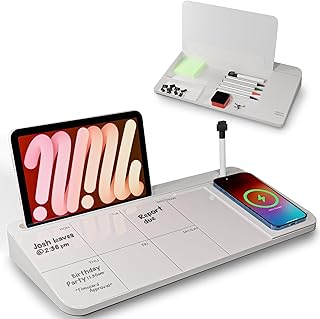
NEXTLUXE Glass Desk Whiteboard with Wireless Charger – Desktop Whiteboard with Storage, Weekly Planner, Dry Erase Pad, Organizer Drawer for Home, School, Office Gadgets – White
Best For:
Creators who want a reusable planning surface and integrated phone charging
A compact, elegant desktop whiteboard that doubles as a wireless charger can streamline a creator’s workflow in surprising ways. The NEXTLUXE glass desk whiteboard provides a writable weekly planner area for pinning priorities, plus an organizer drawer to stash pens, clips, and small gadgets. The built-in wireless charger keeps your phone topped up without adding cords across your workspace, so it’s easier to glance at a notification without picking the device up and losing focus.
Compared with a plain sticky-note wall or a small felt board, this glass surface feels more professional and is easier to clean. Creators use it for sketching quick layouts, noting daily publishing goals, or leaving themselves brief visual prompts between long writing sessions. The drawer is handy for keeping charging cables, a pair of noise-cancelling earbud tips, or a spare stylus within reach. Real-life buyers note the glass surface looks sharp on a home desk and reduces paper clutter when combined with a simple planner.
Who should buy: creators who want a polished, reusable planning surface and cable-free phone charging. Who may not need it: people with very limited desk space or those who prefer entirely digital whiteboards. Interested in an organized, cable-minimized desktop? Click through to view it on Amazon.
Pros
- Glass surface doubles as a writable weekly planner
- Built-in wireless charger reduces cable clutter
- Organizer drawer keeps small items tidy
Cons
- Glass can show fingerprints and needs regular cleaning
- Takes more desk space than a simple notepad
View the NEXTLUXE desk whiteboard on Amazon.
Mindsight Focused Activity Timer & Tracker | Promotes Work Life Balance & Productivity | Pomodoro ‘Plus’ w/ 5 Fixed timers + 5 curated Wellness Activities | Office Desk Accessory | Mindfulness | ADHD

Best For:
People seeking productivity plus wellness prompts — creatives, remote workers, and ADHD users
The Mindsight Focused Activity Timer is built around a simple idea: productivity is easier to sustain when your breaks actually refuel you. Rather than only timing work blocks, this device pairs five fixed Pomodoro-style timers with five short, curated wellness activities — think breathing exercises, stretches, or screen breaks — that encourage better posture and mental reset. For creators juggling long editing sessions or back-to-back meetings, those small structured breaks can reduce burnout and keep afternoons productive.
Compared to a bare timer, this unit nudges you toward healthier habits; compared to smartphone wellness apps, it’s a single-purpose desk device that won’t pull you into other apps. Use cases include timing morning writing sprints with mindful breathing between blocks, scheduling micro-walks to avoid sitting fatigue, or setting a rhythm for teams during collaborative work sessions. Customer feedback often highlights the gentle reminders to move and the approachable interface — it’s simple enough for shared office use yet thoughtful for solo routines.
Who should buy: creators who want a productivity timer that also promotes wellbeing, and people managing ADHD or long screen time sessions. Who may not need it: those who only want a basic countdown timer or who prefer app-based tracking. Curious about adding wellness-driven structure to your desk? Follow the link to see more on Amazon.
Pros
- Combines Pomodoro timing with curated wellness activities
- Encourages healthier breaks and better focus
- Simple interface suitable for shared desks
Cons
- More feature-rich than users who only want a basic timer
- May duplicate functions of phone wellness apps
Check the Mindsight timer on Amazon.
Final Verdict
For focused afternoon sessions, pairing a physical planner with a distraction-free timer covers most creators’ needs: the Weekly Productivity Planner creates clarity, the rotating Pomodoro timer enforces attention, the NEXTLUXE glass whiteboard keeps ideas visible while charging your phone, and the Mindsight timer adds wellness to your routine. Choose the planner if you want visible daily structure, pick a simple Pomodoro cube if you need no-friction timing, get the glass whiteboard if you want a polished, reusable surface plus wireless charging, or opt for the Mindsight device if mindful breaks are crucial to your productivity. Combine two items — a planner plus a timer — to turn scattered afternoons into consistent, measurable work blocks. Check the latest price on Amazon.
Conclusion
These Desk gadgets creators use during productivity focused afternoons picks are worth comparing if you want practical options with useful features, clear use cases, and buyer-friendly details.
As an Amazon Associate, I earn from qualifying purchases.
Tags:
desk gadgets, productivity tools, pomodoro timer, desk organizer, weekly planner, focus timer, adhd tools, creator workflow, desk gadgets creators use during productivity focused afternoons, desk gadgets creators use for productive afternoons, gifts, amazon affiliate, product recommendations, buying guide, shopping guide
