Desk Gadgets Creators Use for Focused Productivity
As an Amazon Associate, I earn from qualifying purchases. This article may contain affiliate links, which means we may receive a commission at no extra cost to you.
When creators need to block time, limit distractions, and get real work done, a few small desk tools can make a big difference. From tactile Pomodoro cubes to a sleek glass whiteboard for fast brain dumps, these gadgets are chosen to help writers, designers, coders, and other makers enter and stay in a flow state. Below you’ll find practical options that emphasize simplicity, tactile feedback, and mindful breaks—tools many creators reach for when deadlines loom or focus feels fleeting.
Buying Guide
Choose a focus gadget based on how you prefer to track time and handle interruptions. Pomodoro cubes and rotating timers are best if you want a physical, screen-free cue—look for presets you’ll actually use (5/25/30 minutes are common), mute and vibration options, and a reliable alert tone. If you’re visually oriented, a small glass desktop whiteboard doubles as a mini planning canvas and keyboard riser; prioritize size, marker quality, and storage. For people who need gentle reminders to do more than just pause—stretch, breathe, hydrate—a wellness-focused timer that suggests curated activities can stop breaks from becoming accidental distraction. Practical buying considerations: battery life, ease of re-setting/custom countdowns, discreet alerts for shared spaces, and whether the gadget complements (not complicates) your workflow. Compared to phone apps, these desk devices reduce context switching and keep attention anchored to the task at hand.
Jack Pomodoro Timer – Productivity Cube, Visual Focus Timer, Mute & Vibration & Adjustable Sound Alert, for Office, ADHD, Study, Work, 3/5/10/25/30/60min & Custom Countdown – Black

Best For:
Creators who want a screen-free tactile Pomodoro timer with multiple presets and discreet alerts.
This tactile productivity cube is built for creators who prefer hands-on cues over phone notifications. Flip it to select one of several built-in time blocks (3, 5, 10, 25, 30, 60 minutes) or use the custom countdown when a task needs a nonstandard length. The cube’s mute and vibration modes let you keep alerts discreet during studio sessions or in shared workspaces, while adjustable sound gives a clear end-of-session cue when you’re alone. Designers and writers often use it to chunk edits or idea-generation into short sprints, then take a definitive break. Compared with smartphone timers, this cube removes the temptation to check apps and keeps your workflow physically grounded. Practical observations from user experiences suggest the cube is simple to operate—no fiddly apps or Bluetooth needed—and the variety of timing options makes it flexible for micro-tasks and deeper sessions alike. Consider this if you want a low-friction, screenless way to practice Pomodoro cycles. If you rely on integrated tracking or multi-device sync, a feature-packed app might still be necessary. Friendly CTA: Grab this tactile focus cube on Amazon to try blocking time more intentionally.
Pros
- Hands-on flipping action for quick setup
- Multiple presets plus custom countdown
- Mute and vibration modes for shared spaces
- Adjustable sound levels
Cons
- No app sync or cloud tracking
- May feel basic for users wanting analytics
See this Pomodoro cube on Amazon and simplify your focus sessions.
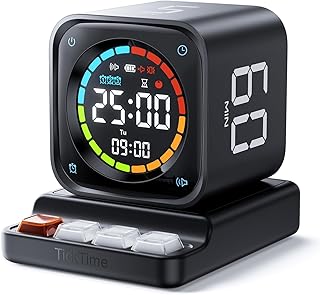
TK3 Pomodoro Timer Cube, Desk Productivity Timer with 5/10/30/60 Min Presets, Custom Countdown, Stopwatch, Clock, 3 Alarm, Silent, Vibrate & Sound Alert, for Task, ADHD, Study, Kitchen, Black
Best For:
People who need multiple timing modes (stopwatch + presets) and discreet alerts for varied tasks.
The TK3 is a compact desk cube that blends simplicity with a few neat extras—stopwatch and clock modes alongside 5/10/30/60 minute presets and a custom countdown. It’s a solid pick for creators who juggle different task lengths throughout a day: use 5 minutes for quick inbox triage, 30 for focused drafting, and the stopwatch for brainstorming sessions where you want flexible timing. Three alarm types plus silent and vibrate modes mean the device adapts to quiet studios or busy home offices. Compared to basic single-mode timers, the TK3’s versatility reduces the need to reach for your phone when switching contexts. People managing ADHD, deep editing sprints, or kitchen timers for coffee breaks report appreciating its clear tactile control and visible orientation. Practical buying notes: it’s easy to place on a desk and set up in seconds, but if you want session logs or cross-device reminders you’ll still need software. The TK3 is a dependable, fuss-free option for creators who value immediate, physical timekeeping without extra tech.
Pros
- Versatile modes: presets, stopwatch, clock
- Three alarm types plus silent/vibrate
- Quick to set and physically intuitive
Cons
- No activity logging or analytics
- Basic display compared with smart devices
Tap through to Amazon to check the TK3 and streamline your timeboxing.
Rotating Pomodoro Timer 5, 25, 10 30,60 Mins Preset Stopwatch, Desk Flip ProductivityTimer, ADHD Tool Hexagon, Vibration/Mute/Alarm, for Work, Study, Back to School, Kitchen, Black

Best For:
Users who want ultra-fast, physical switching between preset session lengths and low-distraction alerts.
This rotating hexagon timer is designed for quick, one-handed changes—flip to the face that matches your intended session length and it starts. That action feels satisfying and eliminates menu diving, which is why many creators prefer it for quick context switches during tight deadlines. Presets include common Pomodoro intervals (5, 10, 25, 30, 60 minutes) and the unit supports vibration, mute, and audible alarms so it fits studio etiquette. It’s especially handy for people who teach, run workshops, or juggle back-to-back short tasks because flipping is faster than programming a timer. Compared with app-based timers, this gadget keeps you away from screen distractions and makes the transition between work and break obvious to co-workers. Observationally, customers like the physical feedback and durable feel; those who need deep analytics or smartphone integration should pair this with a tracking app. If you want a no-friction way to enforce time blocks and keep sessions discrete, this rotating timer is a practical choice.
Pros
- Instant flip-to-set operation
- Common Pomodoro presets available
- Vibration and mute for quiet spaces
Cons
- Limited to preset lengths
- No connectivity or logging features
Flip to better focus—view this rotating timer on Amazon.
Chalkola Black Glass Desktop Whiteboard with Storage – Dry Erase Board, Work Desk Organizers, Computer Keyboard Stand, Home Office Desk Accessories, Workspace Desktop Buddy + 3 Markers

Best For:
Visual creators and planners who want a reusable, tidy space for quick notes and sketches at their desk.
A small glass desktop whiteboard can transform a creator’s workspace from scattered tabs to clear visual priorities. This Chalkola black glass board doubles as a low-profile keyboard stand and features a built-in storage groove for markers—handy when you need to sketch a quick sitemap, list three priorities before deep work, or mark a single metric for a sprint. Visual thinkers use such boards to capture fleeting ideas without opening new files, creating a physical staging area that encourages action. Compared to sticky notes and paper scraps, the glass surface is easier to clean, looks neater on camera during remote calls, and feels more intentional. Practical observations suggest the board’s included markers are adequate for crisp lines, but users who favor color-coding may want additional marker shades. This accessory is ideal if you frequently jot down micro-plans, daily targets, or visual references while working on creative projects.
Pros
- Double duty as a keyboard stand
- Smooth glass surface for vivid dry-erase writing
- Includes storage groove and markers
Cons
- Smaller surface area than wall boards
- Markers may run out faster with heavy use
Add visual clarity to your desk—check this Chalkola board on Amazon.
Mindsight Focused Activity Timer & Tracker | Promotes Work Life Balance & Productivity | Pomodoro ‘Plus’ w/ 5 Fixed timers + 5 curated Wellness Activities | Office Desk Accessory | Mindfulness | ADHD

Best For:
Creators seeking structured focus plus guided, restorative breaks to support sustained productivity and wellbeing.
Mindsight takes the classic Pomodoro idea further by weaving short, curated wellness activities into break time—think stretch prompts, breathing exercises, or hydration reminders. Creators who notice their breaks either vanish into doomscrolling or fail to refresh will appreciate these guided mini-routines that help reset attention without derailing momentum. The device offers five fixed timers and complementary activities so breaks become purposeful, not passive. Compared with plain timers, Mindsight nudges users toward healthier pause habits, which is especially useful for remote workers, long-edit sessions, or anyone managing ADHD who benefits from structured breaks. In practice, users report the break prompts keep energy steadier across long days and reduce decision fatigue about how to spend 5–10 minutes. If you want measurable focus time plus gentle wellbeing prompts, this is a compelling middle ground between a basic timer and a full wellness app.
Pros
- Built-in wellness activities to structure breaks
- Five fixed timers for consistent routines
- Encourages healthier pause habits
Cons
- Less suited for users wanting full customization
- No cloud-based session analytics
Explore this wellness-focused timer on Amazon to upgrade your breaks.
Final Verdict
Small, focused desk tools can change how creators manage attention. If you want a screen-free, tactile method to time work, the Jack cube and TK3 offer flexible presets and discreet alerts. Flip-based timers are ideal when you need instant set-and-go operation, while a glass desktop whiteboard supports visual planning and quick idea capture. For creators who want breaks to actually recharge, the Mindsight ‘Pomodoro Plus’ brings guided activities into the rhythm of work. Choose based on whether you prioritize physical interaction, guided wellness, or visual organization—any of these picks will help enforce boundaries and reduce context switching. Check the latest price on Amazon.
Conclusion
These Desk gadgets creators use during focused productivity sessions picks are worth comparing if you want practical options with useful features, clear use cases, and buyer-friendly details.
As an Amazon Associate, I earn from qualifying purchases.
Tags:
pomodoro timer, desk gadgets, productivity tools, focus timer, desktop whiteboard, adhd productivity, office accessories, wellness breaks, desk gadgets creators use during focused productivity sessions, desk gadgets creators use for focused productivity, gifts, amazon affiliate, product recommendations, buying guide, shopping guide
