Best Desk Pads for Creative Workspace Makeovers
As an Amazon Associate, I earn from qualifying purchases. This article may contain affiliate links, which means we may receive a commission at no extra cost to you.
As an Amazon Associate, I earn from qualifying purchases. This article may contain affiliate links, which means we may receive a commission at no extra cost to you.
A thoughtfully chosen desk pad does more than protect your desktop — it sets the tone for your day, anchors your workspace visually, and can improve comfort and productivity. Creators and knowledge workers often swap bare desks and flimsy mouse pads for stylish, multifunctional desk mats that solve common problems: scratched wood, noisy mouse tracking, tape-marked planners, and clutter that disrupts focus. Below you’ll find a curated selection of desk pads creators turn to during productivity workspace makeovers, plus a practical buying guide to help you decide which material, size, and features matter for the way you work.
Buying Guide
How to choose a desk pad for a creative productivity upgrade
Material and feel: Desk pads come in PU leather, cork, fabric, rubber, and laminate (like dry-erase surfaces). PU leather gives a smooth writing surface, easy cleaning, and a premium look without the cost or maintenance of genuine leather. Cork is breathable, naturally grippy on the underside, and eco-friendlier; it pairs well with warmer, organic color palettes. Fabric or stitched cloth pads are soft for wrists and best when precise mouse glide isn’t critical, while rubber-backed cloth mats can be larger for gaming or multi-device setups. Dry-erase laminates double as writable planners for people who sketch ideas or prefer having an always-ready whiteboard under their hands.
Size and layout: Measure your desk and think in zones. Extended mats (30"+ long) allow room for keyboard, mouse, and a laptop, creating a single visual canvas. Narrower mats (12–14" deep) work for compact desks. If you use a standing desk, choose one that covers space consistently at different heights to prevent items from shifting.
Non-slip and stability: A secure base matters. Look for rubberized or cork undersides; dual-sided designs that offer different textures on each face can be handy. Some faux leather pads include stitched edges that resist curling.
Durability and maintenance: Waterproof or water-resistant finishes protect against coffee spills and ink. PU leather and laminate surfaces wipe clean with a damp cloth. Cork and fabric may need periodic deodorizing or careful drying. If you want write-and-erase capability for quick lists, a dry-erase desk pad is a functional alternative to a separate whiteboard.
Design and aesthetics: Think about contrast with your desk and monitor bezels. A bold color or patterned mat can become the visual centerpiece of a creative setup; neutral tones help keep attention on work. Compare these pads to standard alternatives like small mouse pads or desk blotters: standard mouse pads can leave your desk vulnerable to scratches and feel disjointed when you position multiple items; larger desk pads provide cohesion and easier cable routing.
Who should buy a desk pad? Creators who use multiple input devices, people who work with paper or pens at their desk, and anyone wanting a comfortable wrist surface will benefit. Those who frequently change desk locations or need ultra-portable solutions might prefer smaller mouse pads or thin, rollable mats.
Aothia Leather Desk Pad Protector, Mouse Pad, Office Desk Mat,Non-Slip PU Leather Desk Blotter, Laptop Desk Pad, Waterproof Desk Writing Pad for Office and Home (Dark Pink, 23.6" x 13.7")

Best For:
Creators and remote workers who want a stylish, easy-to-clean PU leather desk pad for everyday digital work and handwritten notes.
If you want an elevated, minimal desk surface that’s as practical as it is pretty, the Aothia PU leather desk pad is a solid pick. The dark pink finish introduces a soft but lively color that lifts a neutral workspace without screaming for attention. Built from PU leather, this mat offers a smooth, slightly cushioned surface that works well for both mouse movement and handwritten notes—an attractive hybrid for creators who alternate between digital tasks and paper sketches.
One of the main practical wins is the water-resistant PU finish. Coffee drips, ink smudges, and the occasional snack spill wipe away with a damp cloth. The underside has a non-slip backing that keeps the mat from wandering on smoother desks; users who place their keyboard and laptop on the pad report noticeably quieter typing and fewer scratches on desk finishes. At 23.6" x 13.7", it’s a good mid-size option—large enough to accommodate a compact keyboard plus mouse area but small enough for smaller desks and apartment work nooks.
Compared to standard thin mouse pads or cheap cloth mats, the Aothia pad feels thicker and more cohesive. It replaces the need for separate mouse pads and desk blotters, giving the workspace a unified look. Many creatives appreciate the aesthetic matchup with pastel or coastal themes, though the dark pink tone works surprisingly well against darker desks too. Edge stitching reduces the risk of fraying and keeps the pad looking neat over time.
This desk mat is best for creators who want style and easy maintenance without the higher cost of genuine leather. It solves common problems like noisy desk surfaces, ink and coffee stains, and awkward mouse slips. Consider that the PU surface offers less heat dissipation than fabric pads, so if you run multiple hot devices directly on the mat you may want to monitor heat-sensitive equipment. It’s also not a writable surface like dry-erase mats, so if you rely on quickly jotting plans directly on your mouse pad you’ll need a notepad alongside it.
Use cases: a freelance designer setting up a colorful home studio, a student pairing a laptop and notebook on a minimalist desk, or a remote worker wanting a quieter, visually cohesive surface. The balance of aesthetics, easy care, and mid-size footprint make the Aothia pad a dependable choice for many creative workspaces.
Pros
- Smooth, wipe-clean PU leather surface
- Water-resistant and easy to maintain
- Non-slip backing and stitched edges
Cons
- Not a writable/erasable surface
- PU leather can feel warm under sustained laptop heat
Check the latest price on Amazon.
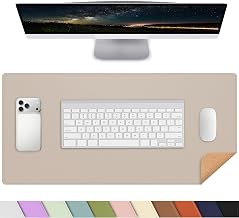
AFIING Desk Mat 23.6" x 13.7", Dual-Sided Natural Cork & PU Leather Desk Pad Protector, Waterproof Non-Slip Mouse Pad, Laptop Desk Blotter for Office, Home & Study (Beige)
Best For:
Multidisciplinary creators, crafters, and anyone who wants two functional surfaces in one desk pad.
The AFIING dual-sided desk mat is aimed at people who want options. One face is smooth, waterproof PU leather; flip it over and you get natural cork. That versatility appeals to creators who shift between digital work and tactile tasks like sketching, gluing, or using craft tools.
Cork brings a pleasantly tactile surface that’s naturally grippy and slightly softer for pins or thumbtacks if you pin reference material to the pad. It’s also breathable and doesn’t trap moisture the way some fabrics do—handy if you’re working with paints or pens. The PU leather side keeps things easy to wipe clean and provides a slicker glide for mouse movements. At 23.6" x 13.7", the pad fits most small to medium desks and is especially well-suited to desks that double as craft stations.
Compared with standard alternatives, this mat removes the need to buy separate craft mats and mouse pads. The dual-sided design gives you the option to change the visual texture of your desk quickly: cork for a warm, natural look and leather for a sleeker studio vibe. The waterproof PU side is useful for coffee or tea near your keyboard, while the cork side helps anchor papers and small tools.
From user feedback and product specs, the non-slip backing is consistently called out as effective at keeping the pad in place during heavy typing. The cork does have an organic smell out of the box that fades with airing, which is typical for natural cork products. Thickness feels substantial without being bulky; many reviewers note that it adds a small layer of comfort when typing.
Who should choose this? Creators who alternate between digital tasks and hands-on projects—illustrators, crafters, hobbyists, and anyone who appreciates a materials switchable surface. If you need a glossy dry-erase board or a very large extended mat for multi-monitor setups, this medium-sized dual-surface pad might be limiting. For mixed-use desks that host both laptop work and occasional crafting, though, its flexibility is a strong selling point.
Pros
- Dual-sided with cork and PU leather
- Waterproof PU side and naturally grippy cork
- Mid-size fits most compact desks
Cons
- Cork may have an initial odor
- Not as large as extended desk mats
Check the latest price on Amazon.
Dry Erase Desk Mat, Waterproof Desk Pad, Erasable Writing White Board for Making Plans, Non-Slip Large Desktop Protector for Office, Home, School 31"x13"(Pink)

Best For:
Visual planners, designers, project managers, and anyone who benefits from writing directly on their workspace.
If your day relies on lists, timelines, and quick sketches, a dry-erase desk mat can be transformative. This 31" x 13" waterproof dry-erase desk pad blends an extended workspace with a writable surface — essentially giving you a whiteboard that sits under your hands all day. For creators who plan visually or sketch wireframes, being able to write directly on the mat without grabbing a separate whiteboard reduces friction and keeps ideas flowing.
The surface wipes clean easily with a dry cloth or a whiteboard cleaner, so spilled coffee and marker smudges are simple to remove. Because the mat is large, it accommodates a keyboard, a mouse, and still leaves plenty of room for notes, to-do lists, or quick diagrams. The non-slip underside helps the mat stay put during typing or when leaning on the desk while sketching.
Compared to a traditional whiteboard propped nearby, this option removes context switching — you don’t have to stand up to jot a note and then return to your desk to continue typing. It also beats tiny whiteboard pads because it’s sized for desktop workflows and doubles as a protective layer for your desk finish. That said, the writing surface differs from soft PU or cork mats: it’s a bit glossier and less cushioned, so it may not be the most comfortable surface for long hours of wrist rest.
This mat is ideal for project managers, designers, and creators who plan visually. If you work primarily with delicate electronics or need a soft wrist surface for ergonomics, you might add a separate wrist rest or choose a softer pad. Some creatives report ghosting if low-quality markers are used, so use recommended dry-erase markers and periodic deep cleaning to keep the surface pristine.
Use cases include mapping a sprint board while coding, sketching webpage layouts during a brainstorming session, or keeping an evolving daily schedule in sight while you work. For anyone who thrives on visual planning, the writable desktop changes the way you interact with tasks and ideas throughout the day.
Pros
- Large writable surface for planning and sketching
- Waterproof and easy to clean
- Non-slip underside keeps it stable
Cons
- Less cushioning for wrists
- Dry-erase markers can ghost if not maintained
Check the latest price on Amazon.
Large Mouse Pad for Desktop, Cute Desk Mat Pad Protector for Work & Gaming, Aesthetic Pretty Anti-Slip Laptop Blotter Cover for Office School Home Supplies, Wildflowers, 31.5" x 11.8"

Best For:
Creators and gamers who want an aesthetic extended fabric desk pad that offers accurate mouse tracking and visual flair.
For creators who want personality in their workspace, this large mouse pad with a wildflower design blends aesthetics and function. At 31.5" x 11.8", it’s an extended mat that accommodates a keyboard and mouse while offering a decorative surface that can inspire creativity. The printed design is bright without being distracting, making it well-suited for anyone who prefers an artistic touch in their setup.
The anti-slip rubber base prevents shifting during heavy typing or gaming sessions, and the fabric top surface balances mouse tracking with a comfortable wrist feel. Compared with plain black or gray mats, the printed pattern brings warmth to a workspace and pairs nicely with plants, notebooks, or warm-toned accessories. The extra length is useful for multi-device setups or when you need extra wrist space for drawing tablets and trackpads.
Practical considerations: fabric tops perform well with optical and laser mice, offering accurate tracking for both photo editors and gamers. The fabric can pick up dust and lint more readily than PU leather, so occasional washing or spot cleaning is necessary. The stitched edge finish is a nice durability touch, preventing fraying after repeated use. Because it’s larger than a typical mouse pad, it covers and protects more of the desktop finish from scratches and spills.
This mat is best for creators and gamers who place value on style and comfort, and who want an extended surface for multi-device workflows. If you prefer a wipeable, waterproof surface or need a writable whiteboard feature, a dry-erase or PU leather mat might suit you better. For anyone looking to brighten a workspace while keeping high mouse precision, though, this wildflower pad is a delightful choice.
Real-life uses include a content creator editing photos with a tablet on one side and mouse on the other, a student spreading notes and a calculator, or a remote worker aiming for an aesthetic desk backdrop for video calls.
Pros
- Large extended surface with artistic design
- Comfortable fabric top with accurate mouse tracking
- Anti-slip rubber base and stitched edges
Cons
- Fabric surface needs occasional cleaning
- Not waterproof like PU leather
Check the latest price on Amazon.
Excel Cheat Sheet Desk Pad: XL Extended Mouse Pad with Windows Keyboard Shortcuts – 31.5" x 11.8" Non-Slip Desk Mat for Productivity – Functional Office Decor & Accountant Gift

Best For:
Spreadsheet users, data analysts, accountants, and students who want quick keyboard shortcuts visible at their desk.
This Excel cheat sheet desk pad is a clever blend of function and reference material. The printed shortcuts and quick tips on the surface make it a living desk accessory for spreadsheet-heavy users. Sized at 31.5" x 11.8", it’s an extended mat that provides space for keyboard, mouse, and reference glanceability without breaking workflow to search menus.
The non-slip base keeps the mat steady while you type, and the printed shortcut layout is designed to be unobtrusive yet accessible. This mat solves the common problem of repeatedly pausing to look up keyboard functions—handy for accountants, analysts, finance students, and anyone who spends long hours in Excel. Instead of sticky note cheat sheets or printed pages, the shortcuts stay visible in your line of sight and reduce context switching.
Compared to standard mouse pads, this mat provides far more surface area and adds a productivity-first feature set. The printed content doesn’t interfere with mouse tracking or typing comfort, and many users find it accelerates routine tasks once they commit to referencing it. It’s particularly useful in shared workspaces or study areas where quick onboarding to Excel basics matters.
A practical consideration is that the mat’s print will limit writing directly on the surface, and like most printed fabric mats it’s not designed for heavy marker use or being a dry-erase board. Cleaning requires gentle spot cleaning rather than a full wipe-down like PU leather. While this pad is excellent for spreadsheet-focused workflows, if you need a writable planning surface or a waterproof finish, pairing it with a small PU blotter or a dry-erase mat for notes might be wise.
Who should buy? Accountants, financial analysts, data-entry professionals, students learning Excel, and anyone who wants quick keyboard-reference access built into their workspace. It also makes a practical, thoughtful gift for office colleagues who live in spreadsheets.
Pros
- Handy Excel shortcuts printed on an extended mat
- Large work area for keyboard and mouse
- Non-slip base keeps mat stable
Cons
- Printed surface not suitable for writing or heavy cleaning
- Not waterproof like PU leather pads
Check the latest price on Amazon.
Final Verdict
Upgrading to a desk pad is one of the simplest ways to make a workspace feel intentional and work better. If you want a clean, low-maintenance look with easy spill protection, the Aothia PU leather pad is a dependable mid-size choice. If you value flexibility and tactile options, AFIING’s dual-sided cork/PU mat gives two useful surfaces in one. For planners and people who sketch on the fly, the dry-erase pad integrates whiteboarding into your daily workflow. Creators who prefer personality and accurate mouse tracking should consider the floral fabric extended mat, while spreadsheet-heavy users will appreciate the Excel cheat sheet pad for productivity gains.
Think about your daily tasks: do you write on your desk, prefer a softer wrist surface, or need a wipe-clean finish? Matching the pad’s material and size to those needs will make the biggest difference. Each product here solves specific problems — protection, planning, precision, or reference — so pick the mat that aligns with how you work and the look you want. Check the latest price on Amazon.
Conclusion
These Desk pads creators use during productivity workspace makeovers picks are trending now and offer great value and variety. Check the links above for latest prices and reviews.
As an Amazon Associate, I earn from qualifying purchases.
Tags:
desk pad, desk mat, PU leather desk pad, cork desk mat, dry erase desk pad, large mouse pad, productivity accessories
