Desk Cable Organizers for Workspace Upgrades
As an Amazon Associate, I earn from qualifying purchases. This article may contain affiliate links, which means we may receive a commission at no extra cost to you.
As an Amazon Associate, I earn from qualifying purchases. This article may contain affiliate links, which means we may receive a commission at no extra cost to you.
If you’ve spent time staring at a cluttered desk, you know how distracting a tangle of chargers, power bricks, and cables can be. Creators and professionals upgrading their workspaces often prioritize cable management early because it improves focus, prevents wear and tear on cords, and gives your desk a cleaner silhouette for video calls and content creation. This guide walks through five practical cable organizers—cable boxes, under-desk trays (both drill and no-drill options), and clamp-mount solutions—that fit different desks, budgets, and setups. I’ve compiled product details, common real-world use cases, and buying considerations based on product specs and customer feedback so you can pick the right solution without guesswork.
Buying Guide
Why cable management matters
A neat cable setup isn’t just about aesthetics. Organized cables reduce trip hazards, protect expensive adapters and power strips from accidental spills or tugging, and make it easier to rearrange or service equipment. For creators who stream, edit, or record, a tidy background improves perceived professionalism; for remote workers, it reduces distractions and fatigue.
Types of cable organizers and when to choose them
– Cable organizer boxes: Best for hiding power strips and bulky chargers on or under desks. Choose a vented, stackable box if heat management and modular expansion matter. Boxes are simple to tuck away and are ideal when floor or cabinet space is limited.
– Under-desk trays (no-drill): Great for renters or adjustable desks. These clamp-on trays keep power strips and surge protectors off the floor and out of sight. Look for models with secure clamps, good weight capacity, and a shallow profile so legroom isn’t compromised.
– Under-desk trays (drill): If you own your desk and want a permanent solution, bolting a metal tray offers the most rigid support and higher load capacity—good for heavy power bricks, multiple adapters, and thick cable bundles.
– Clamp mount two-piece systems: These are versatile for standing desks and situations where you need to periodically remove the tray. A clamp mount that increases capacity lets you expand as your setup grows.
Key features to evaluate
– Mounting method: No-drill clamps are renter-friendly; screws/drilled mounts are more secure long-term.
– Capacity and dimensions: Match the internal width and depth to your power strip and adapter sizes.
– Ventilation and access: Boxes should have ventilation or cable channels. Trays should allow easy cable routing and access for unplugging.
– Material and finish: Metal trays last longer and hold more weight; fabric or plastic trays are lighter and quieter.
– Cable routing options: Look for built-in clips, Velcro straps, or slots for clean exits.
Who shouldn’t buy certain solutions
If you frequently unplug devices and move them around, a fully enclosed cable box might be inconvenient. If you’re renting and uncomfortable with clamps or potential desk marks, opt for a completely non-invasive solution like desktop cable clips or adhesive channels.
Practical buying considerations
Measure twice: measure your power strip, chargers, and the underside clearance before choosing a tray. Consider future growth—if you plan to add monitors or a dock, pick a solution with a little extra capacity. Read reviews for long-term durability and instructions clarity; many issues come from poor installation rather than design.
The next sections review five recommended products with realistic use cases, pros and cons, and who each is best for.
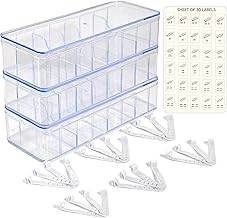
Set of 3 Cable Organizer Box W/Labels – Charger Box, Stackable W/Lids-Cord Organizer Junk Drawer- Cord Storage Box for Desk -Cable Organizer case
Best For:
Creators, students, renters, and multi-device households who need a portable, labeled solution to hide power strips and chargers without drilling.
If your primary challenge is hiding power strips, large chargers, and that mess of phone and laptop cables that gather around a desk corner, a stackable cable organizer box can be the simplest, lowest-effort fix. This Set of 3 Cable Organizer Boxes comes with lids and labeling, designed for creators who want modular, tidy storage for multiple power bricks and chargers. The stackable design is one of the main advantages: separate boxes let you sort by device type (work devices, camera gear, smart-home chargers), keeping cables organized and preventing adapters from bumping into each other.
Practical benefits and real-life usage
These boxes are great for desks with limited under-desk mounting options. Plug your power strip into the side cable slot, arrange adapters inside each box, and snap on the lid to immediately reduce visual clutter. The included labels help you create a semi-permanent system—mark one box for camera batteries, another for charging cables, and a third for guest/phone chargers. Creators who swap batteries and external drives will appreciate the quick-identify labels, which save time when searching for the right charger during a shoot or livestream.
Problems it solves
– Hides bulky power strips and reduces dust buildup on adapters.
– Prevents accidental unplugging and keeps pets from chewing cables.
– Creates a neat background for on-camera shots and video calls.
Who should consider this box
Best for home creators, students, and content producers who want a no-fuss, portable solution that doesn’t require drilling or permanent installation. It’s also helpful for multi-user households that need labeled, separable charging stations.
Limitations and considerations
An enclosed box can trap heat if you crowd many high-wattage adapters inside—look for boxes with ventilation or leave some spacing between big power bricks. If you frequently move or unplug devices, the lid can be an extra step compared with open trays or clips. Also, the box is a surface-level solution rather than a completely hidden under-desk installation, so it works best when placed out of immediate view or under a desk overhang.
Comparing to alternatives
Compared with under-desk metal trays, these boxes are portable and easier to set up—but they don’t offer the same permanence or under-desk invisibility. They are quieter and lighter than metal trays, and better suited for renters and temporary setups.
Overall, this set gives creators an affordable, organized way to hide common cable clutter without tools or permanent changes. Check the latest price on Amazon.
Pros
- Stackable and labeled for organized sorting
- No tools or installation required
- Portable and easy to relocate
Cons
- Can trap heat if overloaded with high-wattage adapters
- Less permanent and visible compared to under-desk trays
Check the latest price on Amazon.
Univivi No Drill Under Desk Cable Management Tray, 36" Cord Organizer for Table, Clamp/Screw Mount Desk Cable Management, Premium Fabric Cable Management Tray for Office, Home

Best For:
Renters, creators with medium-weight adapters, and anyone seeking a removable, quieter under-desk tray with a large 36" span.
Under-desk trays are a favorite among creators who want the look of a clean desktop without losing access to plugs and power strips. The Univivi 36" No Drill Under Desk Cable Management Tray advertises a hybrid approach: it supports clamp mounting for renters and optional screws for homeowners seeking a permanent installation. The tray itself uses a premium fabric basket design with reinforced mounting points to balance flexibility and capacity. For many people, that fabric construction reduces rattling noise and avoids the sharp edges that sometimes come with metal trays.
Main benefits and usage scenarios
Creators with longer desks or dual-monitor setups will appreciate the 36" span: a single tray can cover the length under most home workstations, capturing multiple charging cables and a power strip or two. Content creators who alternate between seated and standing positions will find the clamp mount useful because it allows removal or repositioning if the desk configuration changes. The fabric design is especially helpful when you need a gentle cradle for exposed USB hubs, SSDs, or rhythmically vibrating devices (no metallic resonance).
Problems it solves
– Cleans desktop surface area by tucking cords underneath.
– Keeps cables organized and off the floor, reducing dust and tripping risks.
– Provides a renter-friendly mounting option while still offering a screw-mounted alternative for permanence.
Realistic considerations
The fabric tray trades rigidity for noise reduction and ease of installation. While it supports typical power strips and small adapters comfortably, extremely heavy or irregularly shaped brick adapters may require additional tie-downs or a supplemental rigid tray. Installation clarity matters: clamp tightening should be even to avoid scuffing desk surfaces—add protective pads if concerned.
Comparing to metal alternatives
Compared to metal under-desk trays, a fabric tray is lighter, often easier to install, and gentler on cables and small electronics. Metal trays tend to carry heavier loads and offer cleaner cable routing with guardrails; fabric trays are quieter and less obtrusive but can sag if overloaded.
Who should buy it
This product is a strong pick for those renting, creators with medium-weight adapters, and anyone who prefers a no-drill, removable solution that still looks neat and professional. If you need to support very heavy transformers or require a super-rigid mounting, consider a metal clamp or drilled metal tray instead.
Check the latest price on Amazon.
Pros
- No-drill clamp with optional screw mounting
- Large 36" coverage for long desks
- Fabric design reduces noise and protects cables
Cons
- Less rigid than metal trays—may sag if overloaded
- Clamp edges can mark desks without protective pads
Check the latest price on Amazon.
Cable Management, 25.3” Under Desk Cable Management Tray No Drill, Metal Cable Organizer with Clamp for Wire Management, Cord Organizer for Home Office, Desk Accessories Organizer, Black

Best For:
Creators with heavier power supplies who need a rigid, no-drill metal tray that resists sagging and organizes multiple bulky adapters.
For creators who want a balance of strength and ease of installation without committing to drilled holes, this 25.3" metal under-desk cable management tray with a no-drill clamp is an attractive middle ground. The rigid metal construction resists sagging, gives a tidy anchor for cable ties and velcro straps, and holds heavier adapters and small power strips more securely than many fabric options. The no-drill clamp design makes it renter-friendly while still delivering a professional, low-profile look under the desk.
Main benefits and practical uses
A metal tray is excellent for those who use multiple power bricks, external GPU enclosures, or heavier multi-port chargers that would overwhelm a fabric basket. The metal surface makes it easy to secure bundles with zip ties or adhesive cable clips, and the tray’s width (25.3") fits under many standard desks without intruding on legroom. Streamers and creators who keep multiple devices permanently connected—like audio interfaces, mixer power supplies, and monitor power bricks—will find this type of tray minimizes cable tangles and keeps everything accessible but out of sight.
Problems it solves
– Prevents sagging and supports heavier power bricks than fabric trays.
– Keeps cables off the floor and reduces dust accumulation and trip hazards.
– Provides a tidy routing channel so that cables exit near monitor and peripheral locations.
Installation notes and practical observations
Clamp strength and pad protection are key. Many customers report that adding a thin protective pad (rubber or felt) between the clamp and the desktop prevents surface dents. The metal tray’s finish can show fingerprints and dust more than fabric, but it’s also easier to wipe clean. Because it’s rigid, access for adding or removing cords may require unfastening bundles rather than simply pulling from a flexible basket.
Comparison to drilled metal trays
Compared with drill-mounted metal trays, clamp-mounted metal trays are simpler to install and removable if you move desks. However, drill-mounted trays can offer slightly higher load ratings and a completely flush mount if you own your desk and want permanence.
Who should buy it
This tray suits creators with heavier power supplies and people who want a solid, no-drill option that blends durability with renter-friendly mounting. If you prefer an ultra-low-profile permanent solution and own your desk, consider a drilled metal tray instead.
Check the latest price on Amazon.
Pros
- Rigid metal construction supports heavier loads
- No-drill clamp mounting for renter-friendly installation
- Low-profile, easy-to-clean finish
Cons
- Clamps can mar desk surfaces without protective pads
- Less flexible for quick access compared to fabric baskets
Check the latest price on Amazon.
KEEGH 16" Under Desk Cable Management Tray, No Drill Clamp Mount, Desk Cord Organizer Upgrade Capacity, Cord Management Tray for Home Office, Gaming Desk, Standing Desk, Black, 2 Pack

Best For:
Gamers, creators with multi-zone desks, and users who prefer distributing cable loads using multiple compact, clamp-mounted trays.
If you’re outfitting a multi-zone desk or an L-shaped workstation, a pair of shorter, high-capacity trays can be more flexible than one long tray. The KEEGH 16" Under Desk Cable Management Tray two-pack aims at that exact use case: two compact metal trays with no-drill clamp mounts that let you distribute cable storage across different zones—one under your monitor area and another near your docking station or charging hub.
Why creators like modular trays
Modularity is practical. Placing one tray beneath a standing desk’s control area and another under the monitor cluster keeps weight balanced and prevents a single tray from becoming overloaded. Gamers who have a separate station for consoles or external drives can mount a tray under that dedicated surface, minimizing cable crossover. The KEEGH trays are metal, offering the rigidity needed for heavier bricks and multiple adapters while being short enough to fit inside tighter under-desk spaces, which reduces interference with desk-mounted drawers or sliding keyboard trays.
Things it solves
– Splits cable loads across zones to avoid sagging and overcapacity.
– Provides more precise placement so cords exit near the devices they serve, avoiding long visible runs.
– The clamp system provides a non-permanent installation suitable for renters or those who like to rearrange.
Practical observations
Because these are shorter rigs, they’re easier to install behind objects and less likely to intrude on legs. They’re a good match for standing desks where you want the tray positioned away from column mechanisms. Customers often pair these trays with adhesive cable clips for tidy exits and with Velcro straps to group cables neatly inside.
Compare to single long trays
Compared to a single long tray, two short trays offer placement flexibility and distribute load, but they may cost slightly more and need more clamps. If you prefer a one-piece solution for aesthetic continuity beneath a long desk, a single wide tray may be simpler.
Who should buy it
This two-pack is ideal for gamers, creators with multi-zone setups, and anyone who needs flexible placement under varied desk layouts. It’s especially useful when you want to keep heavy adapters close to their devices without a single overloaded tray.
Check the latest price on Amazon.
Pros
- Two-pack offers modular placement and load distribution
- Rigid metal construction supports heavier adapters
- Short length fits under drawers and tight spaces
Cons
- Requires multiple clamps—more hardware to install
- May be pricier than a single long tray for some budgets
Check the latest price on Amazon.
Cable Management, 25” Cable Management Under Desk No Drill, Metal Cord Organizer with Clamp for Standing Desk, Cable Organizer for Home Office, Black

Best For:
Content creators, podcasters, and standing-desk users who want a medium-width, no-drill metal tray to securely manage power strips and bulky adapters.
This 25" no-drill metal under-desk cable organizer is another solid option if you want a straightforward, low-profile solution that works with standing desks and traditional desks alike. The mid-length form factor provides a compromise between very short trays (which require multiple units) and long spans that might be harder to clamp securely. The robust metal construction holds weight well and provides a clean anchor point for zip ties, adhesive cable mounts, and Velcro straps.
Main benefits and real-life uses
For creators who frequently rearrange desk height or position, a stable clamp-mounted metal tray that clears standing desk mechanisms is invaluable. This tray’s 25" width fits neatly under many standard desks without impeding legroom, and it performs well when used to house a single power strip and a handful of bulky adapters. Podcasters and streamers who keep audio interfaces and small mixers nearby will find the tray keeps those power connections tidy and out of frame.
Problems it solves
– Keeps power strips and bulky chargers off the floor to reduce dust and tripping hazards.
– Consolidates cable routing so you can change or move devices without crawling under the desk each time.
– Preserves desk aesthetics by reducing visible cable runs.
Installation and durability notes
The no-drill clamps make installation fast, but protective padding is recommended to avoid desk surface wear. Because it’s metal, the tray is less likely to flex under load; however, very irregular power bricks may need creative orientation or additional securing.
How it compares
Compared with fabric trays, this metal tray carries heavier loads and is easier to clean. Compared to longer metal trays, it’s more versatile in tight spaces and more likely to avoid interfering with desk drawers or leg supports.
Who should buy it
This model is best for creators who need a dependable, medium-width metal tray for standing desks or standard desks and who appreciate a no-drill installation approach. It’s a practical, durable choice for most home-office and content-creation setups.
Check the latest price on Amazon.
Pros
- Strong metal construction resists sagging
- Mid-size width fits most desks without obstructing legroom
- No-drill clamp for easy, renter-friendly installation
Cons
- Clamp may need padding to protect desk surfaces
- Rigid tray can be less convenient for frequent cable swaps
Check the latest price on Amazon.
Final Verdict
Choosing the right desk cable organizer comes down to matching mounting preference, capacity needs, and how permanent you want the solution to be. For creators who prioritize portability and labeled organization, the Set of 3 Cable Organizer Boxes offers a quick, no-tools approach. If you need large-span coverage without drilling, the Univivi 36" fabric tray balances noise reduction and renter-friendly installation. For heavier adapters and a more rigid anchor, the 25.3" metal tray with a no-drill clamp is a dependable choice. The KEEGH 16" two-pack is ideal when you want modular placement across zones, while the 25" metal no-drill tray is a great mid-size option for standing desks and podcasters.
Measure your power strips, consider how often you’ll access plugs, and decide whether a renter-friendly clamp or a permanent drilled mount fits your situation. Combine a solid under-desk tray with adhesive cable clips, Velcro straps, and strategic labeling for the cleanest, most flexible setup. With the right organizer in place, your desk will look cleaner, be safer, and let you focus on creating instead of untangling.
Check the latest price on Amazon.
Conclusion
These Desk cable organizers creators use during workspace upgrades picks are trending now and offer great value and variety. Check the links above for latest prices and reviews.
As an Amazon Associate, I earn from qualifying purchases.
Tags:
desk cable organizer, under desk cable management, cable management tray, desk cable box, no drill cable tray, standing desk cable organizer, cable organizer for creators
