Top Desk Productivity Timers for Focused Work
As an Amazon Associate, I earn from qualifying purchases. This article may contain affiliate links, which means we may receive a commission at no extra cost to you.
If you organize your day around focused work blocks, the right desk gadget can make the difference between a scattered session and a productive sprint. This guide walks through five compact productivity timers and focus cubes that many people use to structure Pomodoro sessions, manage ADHD-friendly workflows, or simply reduce screen time while studying or working. Before the product write-ups you’ll find a short buying guide to help match features to your routine.
Affiliate disclosure: As an Amazon Associate, I earn from qualifying purchases. This article may contain affiliate links, which means we may receive a commission at no extra cost to you.
Why timers? Unlike phone apps that tempt you into notifications, these physical timers offer tactile control: flip, rotate, or place them to start a preset countdown. They are often quieter, more visible at a glance, and built with modes—vibration, mute, or audible alarms—that suit shared spaces and ADHD-friendly routines. Read on for practical comparisons, real-life use scenarios, and buying considerations so you can pick the gadget that actually fits your workflow.
Buying Guide
Before choosing a desk timer, consider these practical angles. First, the way you interact with the device. Many of these cubes rely on orientation to set a preset interval: rotate or place a face up to start. This is intuitive and perfect for habit building, but some people prefer digital buttons or smartphone integration for fine-grained customization.
Second, alarm mode matters. If you work in a shared office, vibration or mute mode keeps interruptions low. If you study with roommates or cook in the kitchen, a louder beep can be preferable. Look for devices that offer a choice of sound, vibration, and silent modes.
Third, preset times and custom modes. Classic Pomodoro uses 25/5 minute cycles, but some projects demand shorter bursts or extended deep-work blocks. Devices that include both common presets and custom countdown settings give you flexibility. Also check for pause/resume features if you frequently step away mid-session.
Battery and build quality are practical considerations. Most of these timers run on simple button-cell or AAA batteries; verify expected battery life and whether the unit includes batteries in the box. A sturdy case and stable base prevent accidental knock-overs during intense work. Wood grain or warm finishes look nicer on a desk than bright plastic, which might matter if aesthetics are part of your workspace comfort.
Finally, compare these stand-alone timers to app-based alternatives. Apps give reminders across devices and detailed logging, but the physical action of flipping or rotating a cube often increases adherence by turning focus into a small ritual. If privacy, fewer distractions, and tactile cues are priorities, a desk timer is a smart, low-friction investment.
Use the checklist below when evaluating products: ease of use, timeout presets, customizability, alarm types, battery life, size, and whether the design fits your workspace.
Productivity Timer 1, 5, 10, 30, 60 Minutes Preset, Desk Cube Timer with Gravity Sensor/Mute/Vibration for ADHD, Work, Study, Kitchen, Back to School (Wood Grain)

Best For:
Students, remote workers, and adults managing ADHD who prefer tactile, non-screen timers; people who want a discreet wood grain aesthetic on their desk.
This wood grain desk cube uses simple orientation controls and five popular presets to create a tactile, distraction-free focus routine. Place the cube with the desired side up to start a 1, 5, 10, 30, or 60-minute countdown. The gravity sensor reliably detects which face is up, which means the device feels almost instinctive to use: tilt it, set it, and begin work.
The wood grain finish makes the unit blend into a home office or study shelf more discreetly than rubberized plastic alternatives. Beyond aesthetics, this timer includes silent and vibration modes that are particularly helpful for people who do not want a loud beeper interrupting a household or a shared workspace. A mute function keeps the device strictly visual and tactile, while vibration provides a subtle cue for those who benefit from haptic reminders.
From a practical standpoint, it comes ready for classic Pomodoro sessions as well as flexible blocks for deep work and household tasks. Students can use the one- and five-minute presets to warm up before longer study cycles; professionals can rely on the 25-to-30-minute range for focused sprints and the hour setting for long-form work or timed meetings. The absence of a complex menu or app integration makes this a low-maintenance choice for anyone who wants to reduce screen reliance.
Compared to smartphone timers, this cube removes the temptation to check email or social apps when starting a focus period. Compared to mechanical wind-up timers, the digital presets are more precise and include modern convenience like vibration and mute settings. It is a good match for people who value simplicity, an attractive desk presence, and multiple non-audible reminders.
Buying considerations include battery type and lifespan; confirm whether batteries are included and keep a spare set handy if your workflow is battery-heavy. The wood grain finish is attractive but may be slightly more susceptible to visible wear than matte plastic if you travel with the cube frequently.
Who this is best for and who may not need it are outlined below.
Pros
- Intuitive orientation control with five presets
- Wood grain finish blends with home office decor
- Mute and vibration modes for quiet environments
- Simple to use with low learning curve
Cons
- Limited to preset intervals, fewer custom options than some models
- Battery dependent; check whether batteries are included
If a simple, attractive cube timer sounds like a fit for your desk, check its details and user feedback on Amazon. Check the latest price on Amazon.
Rotating Pomodoro Timer 5, 25, 10 50 Minutes Preset, Desk Productivity Timer w/Gra vity Sensor, ADHD Tool Cube Countdown, Custom Modes, for Work, Study, Back to School, Kitchen, Black, 2 Pack

Best For:
Shared households, study groups, and people who want a spare or backup timer; those who appreciate tactile, low-distraction focus tools.
This two-pack of rotating Pomodoro cubes is designed for flexibility and convenience. Each unit offers orientation-based presets including popular Pomodoro timings and additional options tailored to longer or shorter sessions. The inclusion of two timers in one package opens up several practical setups: keep one at the main desk and another in a secondary workspace, or use them together to time paired work/rest cycles without swapping settings.
One of the selling points is the rotating face mechanism which feels intuitive—rotate to set and the cube recognizes the chosen interval using its gravity sensor. Custom modes extend utility beyond fixed presets, letting you tailor countdowns to specific tasks, such as a 15-minute review window or a 40-minute deep work session. Vibration and mute functions cater to shared environments and neurodiverse needs, offering a spectrum from completely silent operation to discreet haptic alerts.
A two-pack is especially useful for families and roommates who need multiple timers on different desks, or for an instructor coaching students where each participant benefits from an identical tool. The black finish reads as minimalist and unobtrusive on most desks, and because both cubes are the same, you can experiment with staggered start times for coordinated work bursts during collaborative sessions.
Compared to single-timer purchases, the two-pack represents practical value and flexibility. Compared to smartphone apps or smart speakers, these cubes remove connectivity and distraction while providing physical rituals that improve start-of-session commitment. The main trade-offs are that physical timers lack cross-device logging and detailed session analytics; if tracking focus metrics is essential, pair the cubes with a simple habit-tracking app.
Keep an eye on the manual to learn how to program custom counts and use pause/resume features. Also check battery requirements and whether twin packaging includes a warranty or replacement policy. The two-pack is particularly compelling for distributed study groups, shared offices, and households juggling multiple schedules.
Pros
- Two identical units for multiple desks or paired timing
- Rotating face and gravity sensor for instant start
- Custom modes for flexible countdowns
- Vibration and mute options for quiet spaces
Cons
- No cloud sync or advanced logging
- May be redundant for single-desk users who prefer one device
Want two simple, tactile timers to spread across your workspace or home? See the product details and customer experiences on Amazon. Check the latest price on Amazon.
Rotating Productivity Timer 5, 25, 10, 50 Minutes Preset, Desk Cube w/Gravity Sensor for ADHD, Mute Functions, Ideal for Work, Study, Kitchen, Back to School (1, Wood Grain Finish)

Best For:
Home office users, students, and anyone who wants a stylish, tactile timer that fits a more decorated workspace.
This rotating productivity cube combines an attractive wood grain finish with the core features many people look for in a focus timer: orientation-based presets, gravity detection for instant start, and mute options for quiet environments. The preset choices cover the common productivity ranges, and the rotating mechanism is designed to be tactile and satisfying without requiring technical setup.
A core benefit is aesthetic versatility. The wood grain model suits home desks and living room workstations where a plastic cube might feel out of place. It is also compact enough to fit in backpacks if you want a portable, non-distracting timer for café or library study sessions. For ADHD-friendly workflows, the cube’s haptic and muted alerts provide alternatives to loud beeping that can sometimes be jarring or disruptive.
Real-life use cases include structured study blocks for high school and college students, sprint-based task sessions for knowledge workers, and simple kitchen timing for cooking or brewing. The rotating action is especially useful for people who form habits around small rituals—rotating the cube becomes a cue that signals the brain to shift into focus mode.
Compared to fully digital or app-driven Pomodoro solutions, this cube offers less data but more presence. For many, the physicality of the cube reduces the urge to check a phone and makes maintaining uninterrupted focus easier. If you prefer metrics, pair the cube with manual logging in a notebook or a basic time-tracking app.
When shopping, confirm the unit’s battery type and whether it ships with batteries installed. Note that the wood grain finish is attractive but may show scuffs over time if carried frequently. The cube strikes a good balance between form and function for people who want a visually pleasing desk tool that still performs the core timing job reliably.
Who benefits most and who might opt for a different solution are summarized below.
Pros
- Attractive wood grain finish suitable for home desks
- Orientation-based presets with gravity sensor
- Mute and vibration modes for sensitive environments
- Portable and easy to use
Cons
- May show wear if carried frequently
- Limited session analytics compared to apps
If a stylish, tactile cube would fit your desk and routine, check the details and reviews on Amazon before buying. Check the latest price on Amazon.
VEWINGL Cube Productivity Timer, 25/5/10/45 Min Presets, Desk Flip Timer for Pomodoro Study Sessions, Vibration & Custom Modes for ADHD, Work, Study & Kitchen (Black)

Best For:
Students and professionals who use standard Pomodoro cycles but occasionally need longer 45-minute work blocks; those who want a quiet, minimal design.
The VEWINGL cube focuses on classic study and Pomodoro patterns with presets that include 25/5 minute cycles plus additional durations for flexible work sessions. The flip or orientation mechanism feels straightforward: set the face you want upward and the countdown begins. Haptic feedback and a mute option make it versatile for libraries, shared offices, and neurodiverse-friendly setups.
What distinguishes this model is a slightly wider preset selection that includes a 45-minute option, useful for longer deep work segments such as drafting a report or completing a complex coding task. The black finish is utilitarian and minimal, designed to disappear into a tech-oriented desk setup. Custom modes allow you to tailor a countdown when the standard presets do not match your workflow.
Practical use cases include timed study for students preparing for exams, check-in cycles when managing small teams remotely, and kitchen timing where vibration alerts can be handy if the beeper is too faint to hear over ambient noise. The cube responds well to repeated use and the haptic mode is a quiet but effective nudge for people who prefer subtle reminders.
Compared with app timers, VEWINGL delivers a distraction-free experience and reduces the risk of sliding into social media when starting a focus session. Compared with other cubes, its 45-minute preset is a notable inclusion for users who favor slightly longer sprints without reaching a full hour.
Before purchasing, check the user instructions for custom mode setup and battery type. If you prioritize a sleek, no-nonsense aesthetic and a few extra preset options, this cube is worth considering.
The summary below outlines who gets the most value from it and common trade-offs.
Pros
- Includes a 45-minute preset for longer work sessions
- Offers vibration and mute modes suitable for quiet spaces
- Custom mode to tailor intervals
- Minimal black design that fits tech-forward desks
Cons
- No app integration or session logging
- May lack some specialized features found in higher-end timers
If you need a no-frills cube with both classic Pomodoro and longer presets, read the specs and recent buyer feedback on Amazon. Check the latest price on Amazon.
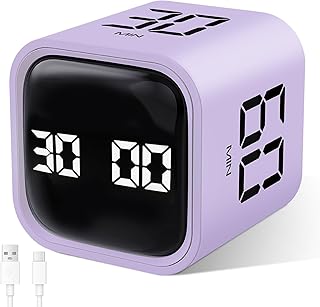
GuDoQi Multi-Function Cube Timer, 5/10/30/60 Min & Custom Count Down, Included Pause & Resume Feature, Silent, Vibrate & Adjustable Sound Alarm for Productivity in Tasks, Study & Kitchen, Purple
Best For:
People who need flexible timing, pause/resume capability, and adjustable alarms; parents, freelancers, and multitaskers who require adaptable timers.
This GuDoQi cube emphasizes customization and control. In addition to standard presets like 5, 10, 30, and 60 minutes, the unit offers custom countdown programming, an adjustable alarm volume, and a pause/resume feature that is handy when interruptions are inevitable. The color option and modern styling make it visible on a busy desk without being intrusive.
For users who frequently need to interrupt and then resume a timer, the pause/resume function reduces friction compared with simpler cubes that reset when touched. The adjustable alarm volume is also a practical touch: crank it up in noisy environments or set a low volume or vibration for shared spaces. The purple finish stands out and can help ensure the device is not lost among papers.
Real-life scenarios that benefit from these features include parents balancing focused work with child care, freelance professionals who switch between tasks, and study groups where different members require different durations. The custom-countdown and adjustable alarm make the cube versatile for non-standard tasks like short meditation sessions, quick household chores, or iterative coding rounds.
Compared to very basic preset-only timers, GuDoQi gives more control without leaning on smartphone apps. The main trade-offs are the slightly larger learning curve to use the custom modes and the need to watch battery consumption if you favor vibration and louder alarms frequently.
When deciding if this is for you, consider whether the pause/resume and adjustable sound will matter more than having a very minimal device. If flexibility is a priority, this cube delivers practical features that match varied real-world schedules.
Pros
- Pause and resume feature for interrupted sessions
- Adjustable alarm volume and vibration options
- Custom countdown programming for non-standard intervals
Cons
- Slightly more complex to program than preset-only cubes
- Larger feature set may use more battery if vibration and sound are used often
If flexibility and pause/resume control are priorities, check the product page and specifications on Amazon. Check the latest price on Amazon.
Final Verdict
Physical desk timers and focus cubes are a small investment that can yield consistent returns in daily attention and task completion. Each of the five devices reviewed here leans into a common design language—orientation-based presets, gravity sensing, and a balance between audible and haptic alerts—while offering variations that suit different needs: a wood grain aesthetic for home offices, a two-pack for shared spaces, a model with a 45-minute preset for longer sprints, and a highly configurable unit with pause/resume and adjustable alarm volume.
For students and people using traditional Pomodoro cycles, the VEWINGL and the standard rotating cubes are excellent straightforward choices. For those who want an attractive desk accessory that blends with decor, one of the wood grain options makes the timer feel less like a gadget and more like part of the workspace. If flexibility matters—pausing mid-countdown, adjusting alarm volume, or programming custom durations—the GuDoQi model provides meaningful extras. The two-pack proves practical for households and instructors who want multiple identical timers.
These timers are not substitutes for detailed productivity tracking software, but they are highly effective behavioral tools. The tactile action of rotating, flipping, or placing a cube triggers a mental cue that helps many people start and stick with a focus block. If your work suffers from frequent distractions and you want a low-tech solution to reintroduce ritual and accountability into your day, a desk timer is worth trying. Choose based on the presets you use most often, how you will interact with the device, and whether silence or vibration is essential in your environment.
Final note: check product specifications such as battery type, included batteries, warranty, and exact preset intervals before buying. These practical details matter for long-term satisfaction.
Check the latest price on Amazon.
Conclusion
These Desk gadgets people use during focused productivity workflows picks are trending now and offer great value and variety. Check the links above for latest prices and reviews.
As an Amazon Associate, I earn from qualifying purchases.
Tags:
desk timer, pomodoro timer, productivity cube, focus gadget, ADHD timer, study timer, flip timer, workspace tools
