Desk Gadgets Creators Use for Focused Writing Nights
As an Amazon Associate, I earn from qualifying purchases. This article may contain affiliate links, which means we may receive a commission at no extra cost to you.
Late-night writing sessions demand more than willpower; they need a compact, distraction-busting toolkit. Whether you’re drafting a novel chapter, polishing an essay, or pushing through a freelance deadline, the right desk gadgets can help keep your brain in the zone. This guide highlights a curated set of practical, affordable tools—fidget clickers, a paper-based to-do notepad, a programmable Pomodoro timer, a multi-function desk lamp, and a small desktop calculator—that many creators reach for when they want focused, efficient work blocks. As an Amazon Associate, I earn from qualifying purchases. This article may contain affiliate links, which means we may receive a commission at no extra cost to you.
Buying Guide
What to look for when choosing desk gadgets for focused writing nights
When shopping for desk gadgets aimed at improving focus, consider how each item will interact with your workflow rather than buy purely for novelty. Prioritize tactile or visual tools that reduce friction: compact size so items don’t crowd your workspace, simple interfaces that don’t demand app setup, and durable materials if you’ll be using them nightly. For fidget tools, look for satisfying tactile feedback that’s audible or silent depending on your environment. For timers, preset modes (like 25/5 Pomodoro) and quiet or vibration alerts are helpful—loud chimes can be jarring during deep work. Notepads should have clear, undated layouts to avoid pressure; consider paper weight and binding that stays open flat. Desk lamps should balance color temperature and brightness controls, ideally with built-in charging ports to cut down on cables. And for quick mental math, a small hybrid (battery plus solar) calculator with a readable display and optional stand is more ergonomic than reaching for your phone.
Practical buying considerations:
– Desk footprint: keep items compact so they don’t interrupt your view of notes or screens.
– Noise level: choose fidgeters and timers with adjustable sound or silent modes for shared spaces.
– Power and connectivity: prefer USB charging, wireless charging surfaces, or battery/solar hybrids for low maintenance.
– Durability and materials: tactile gadgets should feel solid; paper products should use quality stock to reduce ghosting.
– Multi-functionality: items that combine lighting, charging, and clock functions can replace multiple devices and simplify the desk.
Who should invest? Creators who often work in non-ideal environments—shared apartments, late-night households, or cafés—will benefit most. If you already have a full, ergonomic desk setup and rarely get distracted, these items might be less transformative. The following product breakdowns explain realistic use cases, pros and cons, and who each gadget is best suited for.
4-Key Keyboard Clicker Fidget Gadget with LED Lights, Stress Relief Tool for Office Desk & Focus, Satisfying Tactile Feedback Keychain for Adults (Black & White 2-Pack)

Best For:
Writers and editors who benefit from tactile micro-routines and want a compact desk fidget to reduce restlessness without checking their phone.
Small, tactile fidget gadgets have become a quiet staple on many writers’ desks because they provide a micro-ritual that helps the mind settle without a full-blown break. This 4-key keyboard clicker set—sold as a two-pack in contrasting black and white—mimics the feedback and cadence of mechanical keys but in a compact, desk-friendly format. Each unit offers distinct click travel and a satisfying snap, paired with subtle LED accents that add a little visual interest during dimly lit sessions. These are designed as stress-relief tools and keychain-sized fidgets: light enough to tuck into a pocket, heavy-duty enough to stay on your desk while you type.
What it does for focused writing
The gadget’s primary benefit is tactile anchoring. When your attention drifts, a few deliberate clicks can act like a reset button—engaging your hands without pulling you completely away from the screen. Compared with larger fidget spinners or phone-based distractions, this clicker stays low-profile and purpose-built for desk use. The LEDs aren’t blinding and are more decorative than functional, so they provide a tiny ambient cue rather than a bright distraction.
Real-life scenarios
Writers who battle mid-session restlessness can use the clicker during revision passes or while plotting scenes. If you’re on a research call or a quiet co-working space, the clicker’s sound profile is comparable to gentle keyboard typing—less obtrusive than tapping your phone. Because it’s a two-pack, you can keep one at your desk and carry the other when you travel, or share with a writing partner during paired sessions.
Why this gadget is valuable
Many creators underappreciate micro-habits. The consistent, repeatable action of the clicker helps form a small ritual that signals your brain to focus. It’s inexpensive, space-efficient, and low-tech—no batteries or apps required. Compared with common alternatives like silicone stress balls (which are bulkier) or clicky pens (which can leak or wear down), this product holds up to repeated use and stays out of your way.
Buying considerations and limitations
Noise sensitivity is the main caveat. If you work in a very quiet office or library, the clicks may still be noticeable. Also, if you prefer purely silent stimulation, a textured silicone fidget may be a better option. The LEDs are decorative; they won’t substitute for a desk lamp or indicator light. Finally, while the gadget is small, it’s not a replacement for more structured focus tools like timers.
Who should buy it
Best for writers who like tactile stimulation and want a low-cost, portable way to break mental loops without leaving the desk. Not ideal for those who need absolute silence or who find small gadgets visually distracting.
Pros: "Satisfying tactile feedback that mimics mechanical keys", "Compact and portable—two-pack for desk and travel", "Low-tech and durable; no apps or batteries required"
Cons: "Click sound may bother very quiet workspaces", "LEDs are decorative and provide no practical function"
Check the latest price on Amazon.
Pros
- Satisfying tactile feedback that mimics mechanical keys
- Compact and portable—two-pack for desk and travel
- Low-tech and durable; no apps or batteries required
Cons
- Click sound may bother very quiet workspaces
- LEDs are decorative and provide no practical function
Check the latest price on Amazon.
Taja To Do List Notepad – To Do List Notebook for Work with 52 Sheets, 9.8" x 6.5", Undated Daily Planner Perfect for Daily Tasks and Goal Setting, Notepad Suitable for Office, Home & School – Greenery Sway

Best For:
Writers, students, and freelancers who prefer quick, paper-based daily planning to reduce decision fatigue during focused sessions.
A simple, well-designed notepad is often underrated by creators who rely heavily on digital tools. The Taja To Do List Notepad offers 52 undated sheets in a practical 9.8" x 6.5" format—large enough to capture a day’s priorities but compact enough to sit under a laptop or beside a keyboard. The layout is focused on daily tasks and goal setting, helping writers break ambiguous goals into actionable steps. Because the pads are undated, they remove the pressure of perfection and encourage iterative productivity: if a day goes sideways, you simply start a fresh sheet the next day.
Main benefits for focused writing nights
The tactile act of writing a short, prioritized list is one of the most effective ways to transition into a concentrated work session. The Taja notepad’s clear sections make it easy to distill today’s top three tasks, schedule focused time blocks, and note quick ideas so they don’t derail your flow. Compared to a blank notebook, the structured template saves time and keeps decisions minimal—exactly what you want when your cognitive load is high during late-night writing.
Use-case examples
If you’re drafting a short story, use the notepad to list three narrative beats to get done in a session, plus one research task. Freelancers can outline deliverables and attach estimated work blocks to each item. Academics or students can jot down paragraph targets and reference links, then tear off the page at day’s end for archiving. Because the sheets are undated, you can experiment with different scheduling rhythms without wasting pages.
Why the notepad is valuable
Anecdotal patterns from frequent users suggest that switching from a sprawling digital task manager to a single-sheet daily plan reduces context switching and keeps attention narrow and actionable. The Taja notepad offers a pleasing paper feel and binding that lays flat—small ergonomic wins that matter over long sessions. It’s also inexpensive compared to dedicated planners, making it a low-risk adoption for writers testing analog workflows.
Buying considerations
Check the paper weight if you prefer fountain pens—thin stock may show some ghosting. If you want a long-term archive of your work patterns, consider transferring key pages to a bound notebook periodically. The pad’s format is ideal for single-session planning, not long-term project outlines.
Who should buy it
Best for writers who need a quick, low-friction way to plan nightly work sessions and keep priorities visible. Less useful for creators who already maintain a robust, dated planner system.
Pros: "Undated layout reduces pressure and supports flexible scheduling", "Compact size fits easily on any desk", "Structured template helps reduce decision fatigue"
Cons: "Paper may ghost with very wet inks", "Not meant for long-form project notes"
Check the latest price on Amazon.
Pros
- Undated layout reduces pressure and supports flexible scheduling
- Compact size fits easily on any desk
- Structured template helps reduce decision fatigue
Cons
- Paper may ghost with very wet inks
- Not meant for long-form project notes
Check the latest price on Amazon.
Rotating Pomodoro Timer 5, 25, 10 50 Minutes Preset, Desk Productivity Flip Timer, ADHD Tool Cube Countdown Stopwatch, Vibration/High/Low Volume/Custom Modes, for Work, Study, Back to School, Kitchen

Best For:
Writers, students, and neurodivergent creators who benefit from tactile start/stop cues and want to keep phone distractions out of their timing routine.
Timers are the backbone of many productive routines. This rotating Pomodoro timer combines preset focus intervals (5, 25, 10, 50 minutes) with tactile rotation controls, multiple alert modes (vibration, high/low volume), and a compact cube form factor that sits neatly on a desk. It’s designed to be intuitive: rotate to the desired face to start the countdown, and the device begins timing without fiddling with apps or Bluetooth settings. The timer’s multiple modes make it suitable for shared spaces—select vibration or low volume when you don’t want to disturb roommates.
Why creators value a hardware timer
While smartphone timers are convenient, they also invite distractions—notifications, tempting apps, and the inertia of checking other content. A physical timer divorces timing from your phone and becomes a visible commitment to a block of work. The preset options match common Pomodoro rhythms but also give flexibility for longer sprints. The tactile action of rotating the cube signals a clear start to your focus session, which many users find ritualistic and grounding.
Real-life use cases
Use a 25-minute cycle for focused drafting, then switch to 5 minutes for a break stretch. When editing or research requires longer immersion, the 50-minute preset keeps you on track without frequently stopping. The vibration mode is particularly useful for writers in shared apartments or quiet coffee shops where sound would be intrusive. Students with ADHD often find physical timers helpful because they provide a clear, external structure to working sessions.
Comparisons and practical observations
Compared with simple digital timers, this cube emphasizes ease and ritual. It’s less flexible than app-based systems for analytics (no automatic session logging), but that’s part of its appeal: no tracking, just doing. Battery life, depending on the model, can vary—check the product page for power type (rechargeable vs. replaceable batteries). If you want analytics or calendar integration, pair this hardware timer with a manual log or a separate app.
Buying considerations
Look for adjustable volume levels and a reliable start/stop mechanism—cheap variants may drift or fail to hold time precisely. Consider whether you need vibration (for quiet spaces) or louder alerts (for home environments). Also note the cube size so it doesn’t dominate a small workstation.
Who should buy it
Best for creators who struggle with phone distractions and want a simple, tactile timing device to anchor sessions. Less helpful for people who need integrated session logging or synchronized team timers.
Pros: "Physical Pomodoro cube with preset intervals and tactile start", "Multiple alert modes including vibration for quiet spaces", "Simple, distraction-free operation—no apps required"
Cons: "No automatic session logging or analytics", "Battery type and life vary by version; check specs"
Check the latest price on Amazon.
Pros
- Physical Pomodoro cube with preset intervals and tactile start
- Multiple alert modes including vibration for quiet spaces
- Simple, distraction-free operation—no apps required
Cons
- No automatic session logging or analytics
- Battery type and life vary by version; check specs
Check the latest price on Amazon.
Desk Lamp, LED Desk Lamp with Wireless Charger, USB Charging Port, Table Lamp with Clock, Alarm, Date, Temperature, Office Lamp, Desk Lamps for Home Office, Pink

Best For:
Night writers and hybrid workers who want an all-in-one desk lamp with charging and timekeeping functions to keep desks tidy and sessions focused.
Lighting makes a disproportionate difference to how productive a writing session feels. This multi-function LED desk lamp blends task lighting with practical extras: a wireless charging pad, a USB charging port, and an integrated display for clock, alarm, date, and temperature. The lamp offers adjustable brightness and color temperature, which is useful for preserving circadian rhythm during late-night work (warmer tones) and for accurate color work during daytime (cooler tones). The pink finish adds a cheerful touch to a desk but the lamp’s utility is where it shines.
How a combined lamp and charger helps focus
One of the small but persistent distractions during writing nights is cable juggling and device battery anxiety. Having a wireless charger built into the lamp’s base means your phone can rest on the desk and top up without extra cords—a subtle reduction in cognitive load. The integrated clock and alarm keep time visible without relying on your phone, which helps you stick to planned sessions. The lamp’s adjustable head and multiple brightness levels let you avoid glare while keeping pages and screens well-lit.
Use-case scenarios
If you’re drafting into the early hours, switching to a warmer color temperature while retaining enough brightness reduces eye strain. Freelancers using multiple devices will appreciate the USB pass-through to keep a tablet or external drive charged. The lamp doubles as a bedside or office lamp for hybrid workers who move between writing and other tasks. The compact footprint is suitable for small desks or bedside tables.
Why this lamp is valuable
It consolidates devices: light, clock, charger, and charging port all in one footprint, which simplifies the workspace and reduces the number of things that can go wrong mid-session. Compared with a standard desk lamp plus separate charger, this one frees up outlets and cable space. The display adds unobtrusive context (date and temperature) that some users find comforting without being distracting.
Buying considerations
If you use a phone case thicker than average, confirm wireless charging compatibility. The lamp’s color and finish may be a style choice—choose a neutral color if you prefer minimalism. While the lamp includes many functions, if you need studio-grade color accuracy or ultra-bright task lighting for detailed art, a dedicated, higher-output lamp might still be necessary.
Who should buy it
Best for late-night writers who want consolidated desk accessories—lighting plus charging and timekeeping—without extra clutter. Not ideal for users needing high-precision lighting or those who already have built-in wireless chargers at their workspace.
Pros: "Integrated wireless charger and USB port reduce cable clutter", "Adjustable brightness and color temperature for day/night use", "Clock, alarm, and temperature display give quick context without a phone"
Cons: "Wireless charging may be affected by thick phone cases", "Not a substitute for professional-grade studio lighting"
Check the latest price on Amazon.
Pros
- Integrated wireless charger and USB port reduce cable clutter
- Adjustable brightness and color temperature for day/night use
- Clock, alarm, and temperature display give quick context without a phone
Cons
- Wireless charging may be affected by thick phone cases
- Not a substitute for professional-grade studio lighting
Check the latest price on Amazon.
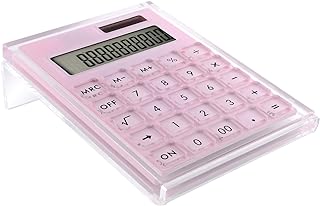
Acrylic Calculator with Stand, Battery and Solar Hybrid Powered Basic Calculator 12-Digit LCD Display,Home Office Desktop Accessories(Pink)
Best For:
Writers, freelance creatives, and small-business owners who want a distraction-free, reliable calculator for day-to-day arithmetic.
A small, well-designed calculator remains one of those low-friction tools many creators forget they need—until they do. This acrylic calculator in pink combines a readable 12-digit LCD display with a hybrid power approach (battery plus solar) and a built-in stand that tilts the screen for easy viewing. It’s compact enough to live on a crowded desk or to slide into a small organizer, but large enough that quick calculations during budgeting, referencing word counts, or checking invoice totals are simple and fast.
Why a standalone calculator is useful for writers
Reaching for your phone to do arithmetic invites distraction. A dedicated calculator keeps the task simple and contained: check a character count tally, convert time estimates into rates, or reconcile small expenses without opening an app that tempts you with news or notifications. The hybrid power means you aren’t left scrambling for batteries in the middle of a billing session.
Practical examples
During tax prep or invoicing, the calculator makes repeated computations quick and easy without switching windows. If you monitor hourly rates or calculate session time versus output (words per hour), the large display and responsive keys speed up the mental math. Creators who keep physical notebooks will also appreciate the tilt stand because it keeps the display legible while you jot numbers down.
Comparisons and considerations
Compared with phone calculators, this device reduces distraction and provides a tactile, reliable experience. Compared with full scientific calculators, it’s intentionally simple—great for everyday needs but not meant for advanced math. The acrylic housing looks modern but may show fingerprints; a small desk cloth can help maintain its appearance.
Buying considerations
Check the angle of the stand to ensure it suits your desk height. If you do a lot of heavy numeric work, a full keyboard calculator with large keys and memory functions might be better. Also verify the hybrid power setup—some models use button cells that are available but not rechargeable.
Who should buy it
Best for creators who perform frequent, small calculations and prefer minimal interruptions from their phone. Not necessary for writers who already use a desktop calculator widget integrated into their primary workstation and never pick up the phone for calculations.
Pros: "Hybrid battery and solar power for reliable use", "Readable 12-digit display with tilted stand for ergonomics", "Compact, tactile alternative to phone calculators"
Cons: "Acrylic surface can attract fingerprints", "Not intended for advanced scientific calculations"
Check the latest price on Amazon.
Pros
- Hybrid battery and solar power for reliable use
- Readable 12-digit display with tilted stand for ergonomics
- Compact, tactile alternative to phone calculators
Cons
- Acrylic surface can attract fingerprints
- Not intended for advanced scientific calculations
Check the latest price on Amazon.
Final Verdict
When late-night writing calls for sustained focus, the right desk gadgets function like small rituals that minimize friction and help channel creative energy. The tactile 4-key clickers provide a portable reset for restless hands, the Taja notepad brings a simple, analog planning surface to keep tasks actionable, and the rotating Pomodoro timer enforces structured work blocks without dragging your phone into the equation. Pair those with a multi-function LED lamp that consolidates lighting, charging, and timekeeping, and a compact hybrid calculator for quick arithmetic, and you’ve covered the micro-needs that often derail sessions. These tools won’t replace discipline, but they lower the activation energy required to start and maintain deep work. If you prefer integrated digital ecosystems with analytics, you may want app-based alternatives; if you want minimal distraction and tangible cues, this selection is built for you. Try one or two items first—most creators find that a single change (a physical timer or a dedicated notepad) produces outsized gains in focus. As an Amazon Associate, I earn from qualifying purchases.
Conclusion
These Desk gadgets creators use during focused writing nights picks are trending now and offer great value and variety. Check the links above for latest prices and reviews.
As an Amazon Associate, I earn from qualifying purchases.
Tags:
desk gadgets, writing tools, productivity for writers, Pomodoro timer, desk lamp with charger, fidget gadget, writing focus
