Morning Desk Gadgets for Focused Productivity
As an Amazon Associate, I earn from qualifying purchases. This article may contain affiliate links, which means we may receive a commission at no extra cost to you.
There’s a difference between an ambitious to-do list and a realistic, productive morning. The right desk gadgets help you cross that line: they reduce friction, keep attention on the task at hand, and make focused work feel achievable, not punishing. Whether you’re protecting two hours of deep work, juggling a busy family schedule, or managing ADHD-related distractions, the tools below are chosen for repeatable, morning-friendly routines. As an Amazon Associate, I earn from qualifying purchases. This article may contain affiliate links, which means we may receive a commission at no extra cost to you.
In the sections that follow you’ll find five practical picks—timers, notepads, and a desk whiteboard with wireless charging—each described with who it’s best for, realistic use cases, and pros and cons gathered from product specs and common user feedback. Think of this guide as a buyer’s companion to help you choose what will actually change your mornings, not just decorate your desk.
Buying Guide
Before you pick a gadget, set a clear goal for your morning routine: focused deep work, quick wins, or family coordination. That goal dictates the features you’ll value most.
– Noise and feedback: Do you need silence, a gentle vibration, or a visible cue? Timers that are silent or have visual cues are better for shared spaces.
– Size and placement: If your desk is tight, choose slim notepads or a compact cube timer. A desktop whiteboard with storage can replace multiple items and declutter your surface.
– Compatibility: For organizers with wireless charging, make sure your phone supports Qi charging and fits the pad size. If you use bulky cases, consider removing them for reliable charging.
– Paper format: Daily vs. weekly, hourly vs. checklist—pick the layout that matches your planning style. Those who time-block need hourly columns; checklist lovers want a tear-off notepad.
– Reusability vs. disposability: Dry-erase boards and whiteboards are reusable and eco-friendly; undated notepads are disposable but keep archives.
– Integration with digital: If you rely on calendars and apps, choose analog tools that complement rather than duplicate your workflow—use a whiteboard for one-week priorities, a timer for focus blocks, and a notepad for a running task queue.
Finally, consider durability, edge finish, and how quickly a tool can be adopted into habit. The simpler the interaction, the more likely it will survive the messy, sleepy moments of your morning routine.
KADAMS Pomodoro Timer Visual – Productivity Pomodoro Cube, 5/10/25/50 Min Countdown & Countup, Silent – Ideal for Work Study Cook Workout Kitchen School Classroom Office ADHD Gift Kids (1, Black)

Best For:
Remote workers, students, parents, anyone who benefits from discrete, tactile time-blocking—especially useful for ADHD and distraction-prone mornings.
A compact visual timer is one of the fastest wins you can add to an underperforming morning. The KADAMS Pomodoro Timer Visual cube brings a tactile, distraction-resistant approach to time management: set a 5, 10, 25 or 50 minute block with a single flip of the cube and let the silent countdown keep you honest. The silent design matters—no startling alarms that break concentration or annoy a partner working nearby. It also supports count-up for flexibility if you prefer tracking elapsed focus rather than a strict deadline.
This cube is designed for people who benefit from structure but dislike fiddly controls: the physical flip action and crisp time presets reduce setup friction and make it easy to commit to a single block. Students, remote workers, parents carving out a work window while kids are home, and people with ADHD who respond well to short, clearly bounded sessions report this style of timer helps with starting and stopping tasks. The portability means you can move it from a home desk to the kitchen or a co-working table without dealing with apps or notifications.
Compared with smartphone timers or desktop apps, a Pomodoro cube eliminates digital temptation—no notifications, social media pings, or accidental scope creep. It’s also less obtrusive than a loud beep alarm and more immediately visible than an app buried in a stack of windows. On the practical side, check the display angle on your desk and whether the times align with your preferred block lengths—this cube’s presets are helpful for many, but if you need very custom durations you’ll want a supplementary app.
Who should buy this: people who struggle to start tasks, prefer tactile controls, or need a silent visible timer in shared spaces. Who may not need it: users who rely on integrated digital calendars and prefer automated syncing across devices, or those who need more granular custom times.
Pros: Quiet operation, quick one-flip setup, portable and tactile.
Cons: Fixed preset intervals may not suit everyone; lacks digital syncing.
Check the latest price on Amazon.
Pros
- Silent and non-disruptive visual timing
- Fast, one-flip preset intervals (5/10/25/50 min)
- Portable and easy to use without apps
Cons
- Fixed time presets limit customization
- No digital syncing or notifications
Check the latest price on Amazon.
Taja To Do List Notepad – To Do List Notebook for Work with 52 Sheets, 9.8" x 6.5", Undated Daily Planner Perfect for Daily Tasks and Goal Setting, Notepad Suitable for Office, Home & School – Greenery Sway

Best For:
Minimalists, checklist lovers, students, and professionals who want a quick morning ritual without screens.
A slim, undated to-do notepad is a low-friction way to make mornings tangible: write down the three most important tasks, tear off the page, and treat the rest as optional. The Taja To Do List Notepad offers 52 sheets in a compact 9.8" x 6.5" format that fits a corner of your desk or slips into a bag for work on the go. Because it’s undated, you won’t waste pages when your routine changes, and you can keep a running archive if you like to review progress at the end of the week.
What sets a dedicated to-do notepad apart from a blank notebook or a notes app is its intent-driven layout. Most pages are formatted to emphasize priorities and small wins, which nudges you to trim your list to realistic morning objectives. For people who battle decision paralysis in the morning—tossing between email, deep work, and errands—this notepad encourages a habit of committing to 2–4 focused items and then moving forward.
Real-life use cases: place it beside your keyboard during a focused two-hour work window, use it at the start of a homeschooling morning to coordinate tasks, or keep it on a landing zone near the door for “must-do” errands. It’s also a simple onboarding tool for families: assign essential morning chores to kids and check them off as they finish. Compared with digital lists, the tactile satisfaction of checking boxes and the visible page on your desk can be surprisingly motivating.
Who should buy this: people who prefer analog checklists, those who need a portable, undated planner, and anyone building a habit of morning prioritization. Who may not need it: heavy digital task managers who rely on synced reminders and integrations.
Pros: Compact, undated pages for flexible use, clear priority layout.
Cons: Single-use paper means recurring lists aren’t automatically tracked; may need frequent replacement.
Check the latest price on Amazon.
Pros
- Undated, flexible layout
- Portable size fits most desks and bags
- Helps prioritize realistic morning tasks
Cons
- Paper is single-use and requires replenishing
- No digital backup or syncing
Check the latest price on Amazon.
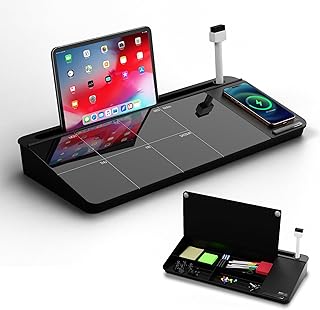
NEXTLUXE Glass Desk Whiteboard with Wireless Charger – Desktop Whiteboard with Storage, Weekly Planner, Dry Erase Pad, Organizer Drawer for Home, School, Office Gadgets – Black (Black)
Best For:
Home office workers, students, people who like visual planning and want a tidy desk with wireless charging capability.
If your morning routine needs more than a list—a visible planning surface, a place to stash pens, and a convenient phone charger—the NEXTLUXE Glass Desk Whiteboard aims to consolidate those functions into a single footprint. This desktop organizer pairs a glass dry-erase surface with storage compartments and a built-in wireless charging pad, giving you a clean place to sketch priorities, map your weekly goals, or write a short daily schedule without hunting for multiple accessories.
The glass surface is easy to wipe and tends to resist ghosting compared with some plastic boards, which makes it better for frequent morning updates. The organizer drawer is handy for storing markers, sticky notes, or a small external battery—so you keep your workspace tidy while building visual focus. The wireless charger brings practical convenience: place a compatible phone on the pad and it will charge while you plan. That’s especially useful when you’re using your phone for music, an audible timer, or a call and don’t want battery worries to interrupt a focused block.
Realistic use cases include: a weekly sprint session where you map top priorities and subtasks, a homeschooling command center for tracking the day’s lessons, or a hot-desk solution for people who move between offices. Compared to sticky notes and a stand-alone charger, this unit reduces clutter and centralizes routine actions. Compared with full-size whiteboards, it’s more desk-friendly and portable.
Who should buy this: people who need a multi-function desktop hub, small-office owners, students, and anyone who wants an elegant visual planner plus cable-free phone charging. Who may not need it: users who prefer fully digital boards synced across devices or those whose phones aren’t Qi-compatible.
Pros: Multi-function design (whiteboard + storage + wireless charger), durable glass surface, consolidates desk clutter.
Cons: Wireless charging depends on phone compatibility and case thickness; takes up more desk space than a single notepad.
Check the latest price on Amazon.
Pros
- Glass dry-erase surface resists ghosting
- Built-in wireless charging for compatible phones
- Integrated storage keeps desk clutter down
Cons
- Requires Qi-compatible phone and may not charge through thick cases
- Larger footprint than a notepad
Check the latest price on Amazon.
Daily Planner Notepad with Hourly Schedule – ADHD Planner, Time Block Planning Pad, Desktop To Do List, College Supplies – 6 x 9” – 50 Undated Sheets

Best For:
People who time-block, students, ADHD users, and professionals needing a visible hourly plan for the day.
For time-blocking fans—especially those juggling attention or academic schedules—an hourly daily planner pad can change a scattered morning into a sequence of intentional actions. This Daily Planner Notepad includes a clear hourly layout on each undated sheet, making it easy to map focused blocks for work, study, appointments, and breaks. The 6 x 9" size is small enough to keep visible next to your laptop and large enough to write quick notes and time estimates.
The strength of an hourly pad is the discipline it builds. Rather than writing a long list and hoping for the best, you assign arrival and departure times to tasks—an approach that reduces context switching and keeps momentum through short, realistic sprints. For people with ADHD, the visual structure of hourly blocks and built-in space for priorities can be especially helpful: it externalizes time and reduces the cognitive load of deciding what comes next.
Use this pad for morning routines like mapping a two-hour focused window, scheduling a workout, or coordinating meetings with time buffers to avoid running late. College students can block study sessions, parents can plan breakfast and drop-off windows, and freelancers can split client work into billed segments.
Compared with a blank notebook or a digital calendar, the hourly pad sits between tactile simplicity and time specificity—you lose automatic reminders but gain an unmissable visual timeline on your desk. If you already use a digital calendar heavily, consider using the pad as a desk-specific complement for single-day execution rather than a replacement.
Who should buy this: people who use time blocking, ADHD planners, students with hourly classes, or anyone who benefits from an at-a-glance daily timeline. Who may not need it: those who prefer all-day digital scheduling with automated alerts.
Pros: Clear hourly layout for precise time blocking, compact and desk-friendly, undated for flexible use.
Cons: No notifications or syncing; single-use sheets need repurchasing.
Check the latest price on Amazon.
Pros
- Hourly layout encourages disciplined time-blocking
- Compact size fits next to a laptop
- Undated pages allow flexible, one-off use
Cons
- No digital reminders or syncing
- Requires replacing pads over time
Check the latest price on Amazon.
Weekly To Do List Notepad, Undated Planner with 52 Sheets (8.5”x11”), Desk Weekly Planner for Women & Man, Home School & Work

Best For:
Families, project managers, freelancers, and anyone who plans at a weekly cadence to protect focused mornings.
If your mornings require context beyond a single day—family schedules, project milestones, and recurring commitments—a weekly to-do notepad helps you hold a short-term horizon without the heaviness of a full planner. This undated 8.5" x 11" weekly notepad gives you a clear spread for each week, which is perfect for mapping priorities and blocking focused mornings by day. Keep the current page under a paperweight or on a desktop stand so the week’s objectives stay visually prominent.
A weekly layout is useful for people who want to distribute tasks across multiple mornings. For example, reserve Monday and Wednesday mornings for deep work blocks, use Tuesday morning for meetings and quick tasks, and keep Friday mornings for planning and review. Parents can block extracurricular pickups and meal prep; freelancers can assign client work and admin time in advance. The undated format avoids wasted pages when your weeks look different, and 52 sheets align well with a year of weekly planning if you prefer a single-sheet-per-week approach.
Compared with daily notepads, weekly planners force you to think in terms of priorities and delegation across several days, reducing the impulse to overload any single morning. Compared with digital weekly planners, the tactile spread is easier to glance at while working and can be paired with a daily pad or timer for execution.
Who should buy this: people managing family schedules, project timelines, or anyone who wants a visible weekly roadmap that supports focused mornings. Who may not need it: those who already use a synced digital weekly planner and prefer automation.
Pros: Large weekly view supports short-term planning, undated format for flexibility, standard letter-adjacent size for desk visibility.
Cons: Paper format requires physical storage or recycling over time; not automatically backed up.
Check the latest price on Amazon.
Pros
- Full-week spread improves short-term planning
- Undated layout avoids wasted pages
- Large size is easy to read from across a desk
Cons
- Requires physical storage or recycling
- No digital backup or sync
Check the latest price on Amazon.
Final Verdict
Picking one or two of these desk gadgets can transform a chaotic morning into a predictable, productive routine. If you struggle to start, the KADAMS Pomodoro cube gives you tactile, silent timing that removes app distractions. If you need a tiny, flexible checklist that fits anywhere, the Taja To Do List Notepad is a low-friction habit builder. The NEXTLUXE glass whiteboard is the best consolidator if you want a visual planning surface plus a wireless charger and storage to reduce desktop clutter. For precise time-blocking, the Daily Planner Notepad with hourly schedules encourages disciplined execution, and the Weekly To Do List Notepad helps you protect recurring morning blocks by mapping them across the week.
Choose based on the behavior you want to reinforce: timers to start, hourly pads to structure, and weekly spreads to prioritize. Combine a paper notepad with a visual timer for many mornings—the analog pairing keeps your phone out of the loop while still giving you accountability. These picks are selected from product specs and common user feedback to suit realistic morning routines rather than idealized ones.
Check the latest price on Amazon.
Conclusion
These Desk gadgets people use during focused realistic productivity mornings picks are trending now and offer great value and variety. Check the links above for latest prices and reviews.
As an Amazon Associate, I earn from qualifying purchases.
Tags:
desk gadgets, pomodoro timer, daily planner, time blocking, desktop organizer, productivity morning, ADHD planner, wireless charger whiteboard
