Top Desk Timers for Realistic Productivity Resets
As an Amazon Associate, I earn from qualifying purchases. This article may contain affiliate links, which means we may receive a commission at no extra cost to you.
If you regularly reset your focus during work or study sessions, a tactile desk timer can make those resets feel intentional instead of chaotic. Whether you’re using short bursts for email triage, classic Pomodoro cycles for deep work, or custom intervals to manage household tasks, a small, visible timer removes friction and keeps momentum. Below you’ll find a practical, research-informed buyer’s guide and five top-rated rotating and cube-style timers that are simple to use, non-distracting, and well-suited for different workstyles.
Quick note on links: As an Amazon Associate, I earn from qualifying purchases. This article may contain affiliate links — I’ll flag products and use cases so you can choose what fits your routine without hunting through dozens of listings.
Buying Guide
Why choose a physical desk timer over an app? A physical timer serves as a persistent visual cue that lives on your desk: it reduces the temptation to switch tabs, it’s quick to set without unlocking phones, and for many people—especially those with ADHD or attention challenges—the tactile act of flipping or rotating a cube is itself a focus trigger. When shopping, consider these practical factors:
– Preset lengths and custom modes: If you follow the Pomodoro method, presets like 25/5 are convenient. Look for devices with extra presets (10, 50, 30 minutes) and the ability to set custom countdowns for irregular tasks.
– Activation method and ergonomics: Gravity-sensor rotating cubes and auto-rotating timers are satisfying to use and reduce fumbling. Make sure the device’s size and weight fit your desk — a tiny timer is easy to lose, while a chunky one can be intrusive.
– Alerts: Mute, vibration, and adjustable sound are key. In shared spaces or during calls, vibration or a soft chime is preferable; louder alarms work for noisy kitchens or workshops.
– Power: Battery vs rechargeable. Rechargeable timers avoid swapping cells, but replaceable batteries are handy if you travel and can’t charge.
– Materials and finish: A wood grain or matte finish blends into a more stylish desk setup; bright colors are easier to spot but more playful.
– Extras: Pause/resume, count-up mode, and silent modes are practical — pause/resume helps with interruptions, and count-up is perfect when you want to log how long a task actually took.
Compared to apps, these gadgets are single-purpose and low-friction. They won’t replace project management tools but they will help you maintain cadence and guard your attention. Below are five realistic options across aesthetics, feature sets, and budgets to consider.
Rotating Pomodoro Timer 5, 25, 10 50 Minutes Preset, Desk Productivity Timer w/Gra vity Sensor, ADHD Tool Cube Countdown, Custom Modes, for Work, Study, Back to School, Kitchen, Black, 2 Pack

Best For:
People who want dual timers for multiple workspaces—parents, students, and remote workers who move between locations.
This 2-pack rotating Pomodoro timer is designed for people who want no-app, no-setup timing across multiple work areas. Each cube offers preset intervals—5, 10, 25, and 50 minutes—plus custom modes you can program for specific routines. The gravity sensor makes starting a session as simple as flipping the cube to the desired side; it auto-rotates into countdown mode and uses a clear visual face to show remaining time.
Why it stands out: the two-timer bundle lets you place one at a primary desk and another in a meeting room or on a kitchen counter. That dual placement is practical for people who switch contexts frequently (remote parents, part-time students, or people splitting time between creative work and administrative tasks). Compared to smartphone timers, this cube reduces the temptation to check notifications because the action is physical and the device remains on your desk.
Real-life use cases: Use a 25-minute side for deep work blocks, a 5-minute face for micro-breaks to stretch or make tea, and the 50-minute preset for longer focused tasks like drafting a report. In a parent’s day, use one cube for kid-focused homework sessions and the other for household tasks — consistent rhythms help kids settle into a schedule and signal transitions without verbal reminders.
Practical observations: Buyers report that the gravity sensor is reliable and that the black finish hides desk wear. The custom modes allow tailoring to nonstandard schedules (e.g., 18-minute sprints). If you share a workspace, the cube’s audible alert can be turned down or set to vibrate if available; otherwise, expect a clear chime. The 2-pack is also handy if you lose or misplace small devices — having a spare is less stressful than running to a charger.
Who should buy it: This set is ideal for people who want low-friction, visible timing across two locations—students balancing study and group sessions, households managing kid routines, or remote workers who move between home office and kitchen. If you prefer a single elegant timer or need rechargeable power, consider other options in this list.
Pros:
– Two timers included for multi-location routines
– Gravity-sensor rotation is fast and intuitive
– Multiple presets and custom modes for flexibility
Cons:
– Audible alerts may be loud for shared quiet spaces
– Uses replaceable batteries (check battery life expectations)
Check the latest price on Amazon.
Pros
- Includes two timers for different rooms or routines
- Intuitive gravity-sensor activation
- Multiple presets plus custom modes
Cons
- Alarm can be too loud in shared quiet environments
- Uses replaceable batteries instead of built-in rechargeable battery
Check the latest price on Amazon.
Rotating Productivity Timer 5, 25, 10, 50 Minutes Preset, Desk Cube w/Gravity Sensor for ADHD, Mute Functions, Ideal for Work, Study, Kitchen, Back to School (1, Wood Grain Finish)

Best For:
Users who want a stylish, discreet desk timer with mute functionality—ideal for professionals and students who care about aesthetics.
This single rotating productivity cube takes the tactile benefits of the Pomodoro method and packages it in a wood-grain finish that’s less toy-like and more at home on a well-appointed desk. The gravity sensor triggers the preset countdowns—5, 10, 25, and 50 minutes—so you don’t need to fumble with tiny buttons. A mute function and low-volume mode are included for office environments, and the cube supports custom timing for nonstandard workflows.
Why it stands out: the aesthetic finish makes it a good choice for people who want a discreet but functional desk accessory. Compared to plastic, brightly colored counterparts, this wood-grain cube blends into living rooms and executive desks while still offering the same ease of use. The mute option is particularly useful if you’re in a shared office or in a household with sleeping children.
Real-life use cases: In a study routine, set the 25-minute face for focused reading and the 5-minute face for quick breaks. Use the 50-minute preset for longer creative sessions like sketching or editing. If you work in open-plan offices and use meeting rooms, the cube’s muted mode lets you run a timing session without disrupting colleagues. Students studying in coffee shops will appreciate the single-unit simplicity and quiet modes.
Practical observations: Customers who value desk aesthetics praise the finish, noting that it looks intentional rather than gimmicky. The gravity sensor responds quickly, but because it’s single-unit you’ll need to decide where it lives. Battery life is good for intermittent use, but heavy daily use may require more frequent battery changes. Compared to rechargeable models, this one is lower maintenance until batteries run out.
Who should buy it: Buy this if you want a tasteful desk timer that won’t clash with decor and prefer physical, tactile reminders over phone apps. If you frequently travel or want built-in rechargeability, consider the rechargeable option below.
Pros:
– Attractive wood-grain finish suits home or professional offices
– Gravity-sensor and mute functions for quiet environments
– Simple presets for Pomodoro-style timing
Cons:
– Single unit—no spare for other rooms
– Uses replaceable batteries
Check the latest price on Amazon.
Pros
- Stylish wood-grain finish
- Mute and low-volume modes for shared spaces
- Easy gravity-sensor presets
Cons
- Only one timer included
- Requires replaceable batteries
Check the latest price on Amazon.
Small Rechargeable Pomodoro Timer, Gravity Sensor Auto-Rotating 7 Preset Times (1/3/5/15/30/60/90 min) & Count Up Mode, Digital Kitchen Timers for Cooking, Work and Study (Space Gray)

Best For:
People who need a rechargeable, portable timer with many preset options—commuters, students, and multi-location workers.
If you want a compact, rechargeable option with broader timing flexibility, this small auto-rotating Pomodoro timer is built for versatility. It offers seven preset lengths—1, 3, 5, 15, 30, 60, and 90 minutes—plus a count-up mode for open-ended tasks. The gravity sensor auto-rotates when placed on a side, starting the countdown without button presses. The rechargeable battery makes it travel-friendly and reduces the ongoing cost of disposables.
Why it stands out: Rechargeability and a range of presets make it one of the most adaptable timers here. The inclusion of a 1- and 3-minute quick set is helpful for micro-tasks like checking a boiling pot or doing a short stretch session. The count-up mode is useful for tracking how long ad-hoc tasks actually take, which informs schedule planning.
Real-life use cases: Use 15- or 30-minute presets for focused review sessions, switch to 5 minutes for quick resets, and use the 90-minute preset for long study or work blocks when you want fewer interruptions. The count-up mode is great when you need to measure a meeting or brainstorming session without predefining its length. Its small size makes it easy to toss in a laptop bag for a café work date or a study group.
Practical observations: People who prioritize low-maintenance features praise the rechargeable battery and compact footprint. The space gray finish is neutral and fits most desk setups. Compared to larger cubes, this unit trades presence for portability, so if you prefer a large visible countdown you might find it less conspicuous. The auto-rotation sensor is responsive, though the small size requires a careful place on a stable surface to prevent accidental flips.
Who should buy it: Choose this if you want rechargeable convenience, more timing options, and portability. It’s especially useful for commuters, students who study in multiple locations, or anyone who logs time for varied tasks.
Pros:
– Rechargeable battery avoids frequent battery swaps
– Seven presets plus count-up mode for flexibility
– Compact, travel-friendly design
Cons:
– Small size can be easy to misplace or overlook on a desk
– Less visible from across a room compared to larger cubes
Check the latest price on Amazon.
Pros
- Built-in rechargeable battery
- Seven presets and count-up mode
- Compact and portable
Cons
- Small footprint may be less visible
- Can be easier to knock over on an unstable surface
Check the latest price on Amazon.
Printers Jack, Productivity Cube Timer, Visual Pomodoro Timer, Mute & Vibration & Adjustable Sound Alert, for Office, ADHD, Study, Work, 3/5/10/25/30/60min & Custom Countdown – Orange

Best For:
Users who need vibration or discreet alerts—neurodiverse individuals, shared-office workers, and educators.
The Printers Jack productivity cube is a colorful, feature-packed option that focuses on accessibility and customization. With presets covering 3, 5, 10, 25, 30, and 60 minutes plus custom countdown ability, it gives flexibility for short chores through to full-focus sessions. Importantly, it supports mute, vibration, and adjustable sound alert levels—making it a strong option for shared workspaces and for people who are sensitive to loud timers.
Why it stands out: Vibration mode is a thoughtful inclusion for neurodiverse users and for those working in quiet environments who still need a discreet tactile cue. The visible countdown face is easy to read, and the bright orange color makes the cube easy to spot on cluttered desks or in busy shared spaces. Compared to basic single-tone timers, this one’s alert options help tailor signaling to the setting.
Real-life use cases: Therapists, tutors, and educators can use the 30- or 60-minute faces for lesson structures while keeping vibration for gentle transitions. In co-working spaces, mute plus vibration does the job without disturbing others. If you’re timing quick household chores, the 3- and 5-minute presets are convenient for microtasks like a 5-minute tidy or a short hand-washing countdown.
Practical observations: Users value the adjustable sound levels and the tactile vibrate option. The orange finish is intentionally visible, which helps in shared refrigerator-like common areas where a timer might otherwise vanish. It’s bulkier than some minimalist models, so if desk space is at a premium, measure before buying. The device uses replaceable batteries, so keep spares handy if you use vibration often.
Who should buy it: This is a good fit for neurodiverse users who rely on tactile alerts, anyone in quiet shared offices, and people who like a visible, easy-to-spot timer.
Pros:
– Vibration and adjustable sound levels for discreet alerts
– Wide range of presets plus custom countdown
– Bright color for easy visibility
Cons:
– Larger footprint on small desks
– Replaceable batteries required
Check the latest price on Amazon.
Pros
- Vibration mode and adjustable sound
- Multiple presets and custom countdown
- High visibility color
Cons
- Takes up more desk space
- Requires replaceable batteries
Check the latest price on Amazon.
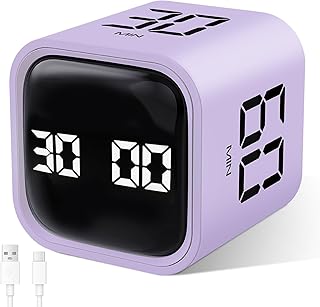
GuDoQi Multi-Function Cube Timer, 5/10/30/60 Min & Custom Count Down, Included Pause & Resume Feature, Silent, Vibrate & Adjustable Sound Alarm for Productivity in Tasks, Study & Kitchen, Purple
Best For:
People who want pause/resume plus flexible alerts—students, office workers, and home cooks who face intermittent interruptions.
The GuDoQi multi-function cube timer balances simplicity and control with common presets—5, 10, 30, and 60 minutes—plus a custom countdown option and a valuable pause/resume feature. Silent, vibrate, and adjustable sound modes let you pick the notification type that fits your environment. The purple finish is playful but unobtrusive, and the cube’s tactile sides make it quick to activate.
Why it stands out: Pause and resume is an underrated but powerful feature for real-world focus: if an urgent message or quick chat interrupts your session, you don’t lose the half-completed interval. That keeps your overall time-block structure intact and supports accurate time logging. The silent mode is useful for late-night work and shared spaces.
Real-life use cases: Use the 30-minute face for concentrated project work, pause when a coworker stops by, then resume immediately without resetting the session. For cooking, the 10- and 5-minute presets are handy for short tasks like steeping tea or simmering sauces. Students working on group assignments can use the cube to structure discussion and pair programming sessions.
Practical observations: Buyers appreciate the pause/resume and adjustable alerts; these features make the cube flexible for real environments where interruptions are normal. The cube is mid-sized—large enough to be visible but not so bulky it dominates a small desk. Battery life is reasonable, and users say the controls are intuitive after a short learning curve.
Who should buy it: This cube is best for people who need pause/resume, adjustable alerts, and a straightforward set of presets—good for students, home cooks, and office workers who expect intermittent interruptions.
Pros:
– Pause and resume preserves partial sessions
– Silent, vibrate, and adjustable sound modes
– Clear, easy-to-use presets and custom countdown
Cons:
– Purple finish may not suit professional decor
– Replaceable batteries rather than rechargeable
Check the latest price on Amazon.
Pros
- Pause and resume feature
- Multiple alert modes including silent and vibrate
- Simple presets and custom countdown
Cons
- Color may not suit all desk aesthetics
- Uses replaceable batteries
Check the latest price on Amazon.
Final Verdict
Choosing the right desk timer comes down to two practical questions: where will you use it, and how do you prefer to be alerted? For multi-room needs, the 2-pack Rotating Pomodoro Timer (B0DDL3VWDY) gives you presence in more than one place. If a tasteful desk accessory matters, the wood-grain rotating cube (B0F5WJGJ5V) blends form with function. For portability and rechargeability, the small space-gray rechargeable Pomodoro timer (B0DRSMT3L1) is the most versatile. If vibration and adjustable sound are essential—especially in shared or quiet spaces—the Printers Jack cube (B0GHMW3GCH) delivers, and the GuDoQi cube (B0DN9F45CZ) is excellent when pause/resume matters.
All five picks reduce friction compared to phone timers and help establish a repeatable rhythm for work, study, or household tasks. If you’re unsure where to start: pick the form factor that best fits your desk and lighting (visible vs discreet), then choose the alert mode you’re most likely to respond to (sound, vibrate, or silent visual). Each product above is designed to make those realistic productivity resets both reliable and gentle, so you can focus more on work and less on managing the clock.
Check the latest price on Amazon.
Conclusion
These Desk gadgets people use during realistic productivity resets picks are trending now and offer great value and variety. Check the links above for latest prices and reviews.
As an Amazon Associate, I earn from qualifying purchases.
Tags:
Pomodoro timer, desk timer, productivity gadgets, ADHD tools, study timers, rechargeable timer, cube timer
